
Work on a board together in real time
Edit a MockFlow board with your team at the same time, follow each other's cursors, chat at your cursor and see who is online.

Every MockFlow board is multiplayer. When teammates open the same board, each change appears for everyone straight away, and each person's cursor moves across the canvas with their name on it. A design review, a sprint plan or a client walkthrough happens on one board, with no saving, sending or merging.
Edit together
Open a board that has been shared with you, as described in Share a board with people. Anyone with the Editor or Admin role can add and change items while others do the same. Moves, edits, new items and deletions show up for everyone at once.
Each person's cursor carries their first name, so you can see who is working where. A cursor fades after a few seconds without movement.
Say something at your cursor

Cursor chat puts a short message right next to your cursor, so you can point at a card, a screen or a step and say something about it without opening team chat. It works whenever someone else is on the board with you.
Point to the spot you want to talk about and press M.
Type your message, up to 120 characters, and press Enter. Press Esc to close the box without sending.
Everyone on the board sees the message beside your named cursor for a few seconds, longer for longer messages. Press M again to send another one. In a meeting, Cursor chat (M) is also in the meeting's … menu. Cursor chat is not available while you follow someone else's presentation, or when you have hidden other people's cursors.
See who is online
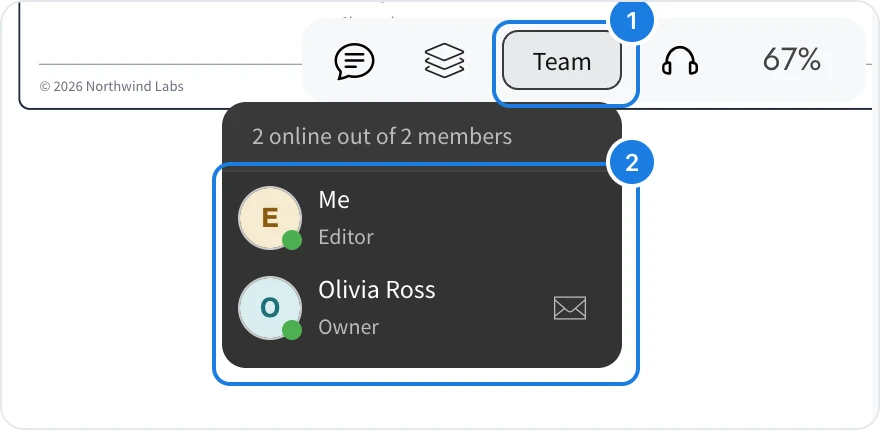
Point to Team at the top right (1). The board owner sees Share instead. The list shows how many members are online and marks each person as online or offline (2). Members in a meeting on the board show a headphone badge.
Hide other people's cursors
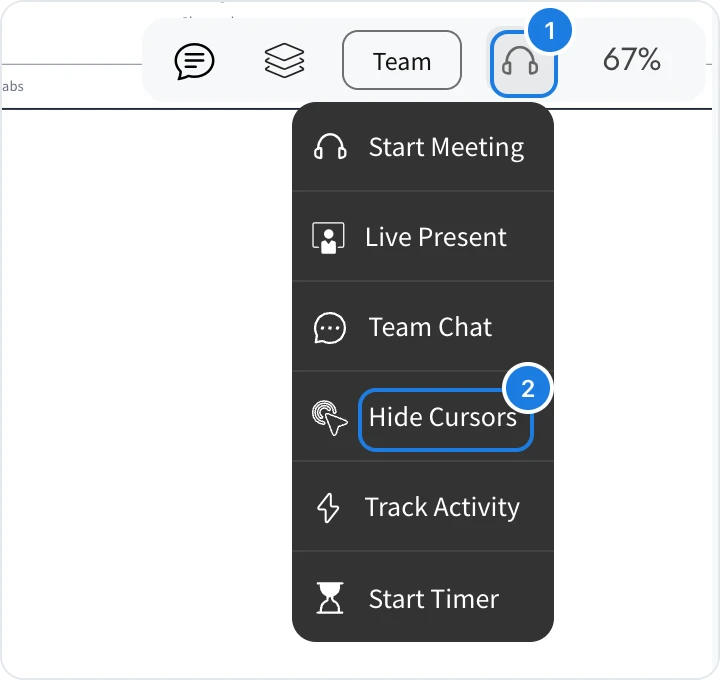
Point to the headset icon at the top right to open the collaboration menu (1).
Click Hide Cursors (2).
Other people's cursors disappear from your view only, which helps when you need to focus. Choose Show Cursors to see them again. The same menu starts a meeting, opens team chat, starts a shared timer and shows the board's activity.
What is not available on the Basic plan
On the Basic plan, people can join your boards as Reviewers but cannot edit with you. Editing together as a team, meetings and many other features, such as team chat and board activity, are available on Plus and Max. See MockFlow pricing for details.