
What you can do with MockFlow Bridge
Use cases for MockFlow Bridge: map a codebase, turn documents into boards, generate without counting credits, plan whole boards and visualize your team's data with your own AI.
MockFlow Bridge puts your own AI agent, such as Claude Code or Codex, behind Mida on the board. Everything Mida can make, from flowcharts and mind maps to wireframes, kanban boards and complete board plans, it makes with your agent. Because the agent runs on your computer and on your own AI plan, Bridge also opens up work that is hard to do with a hosted AI. Here are the most common ways teams use it.
Map a codebase before you build
Share a code repository with Bridge and ask for the picture you need: the architecture of a service, the folder structure as a mind map, a flowchart of a request through the code or the data model as a diagram. Your agent reads the code on your computer and draws what it finds, so the board reflects the code as it is, not as someone remembers it.
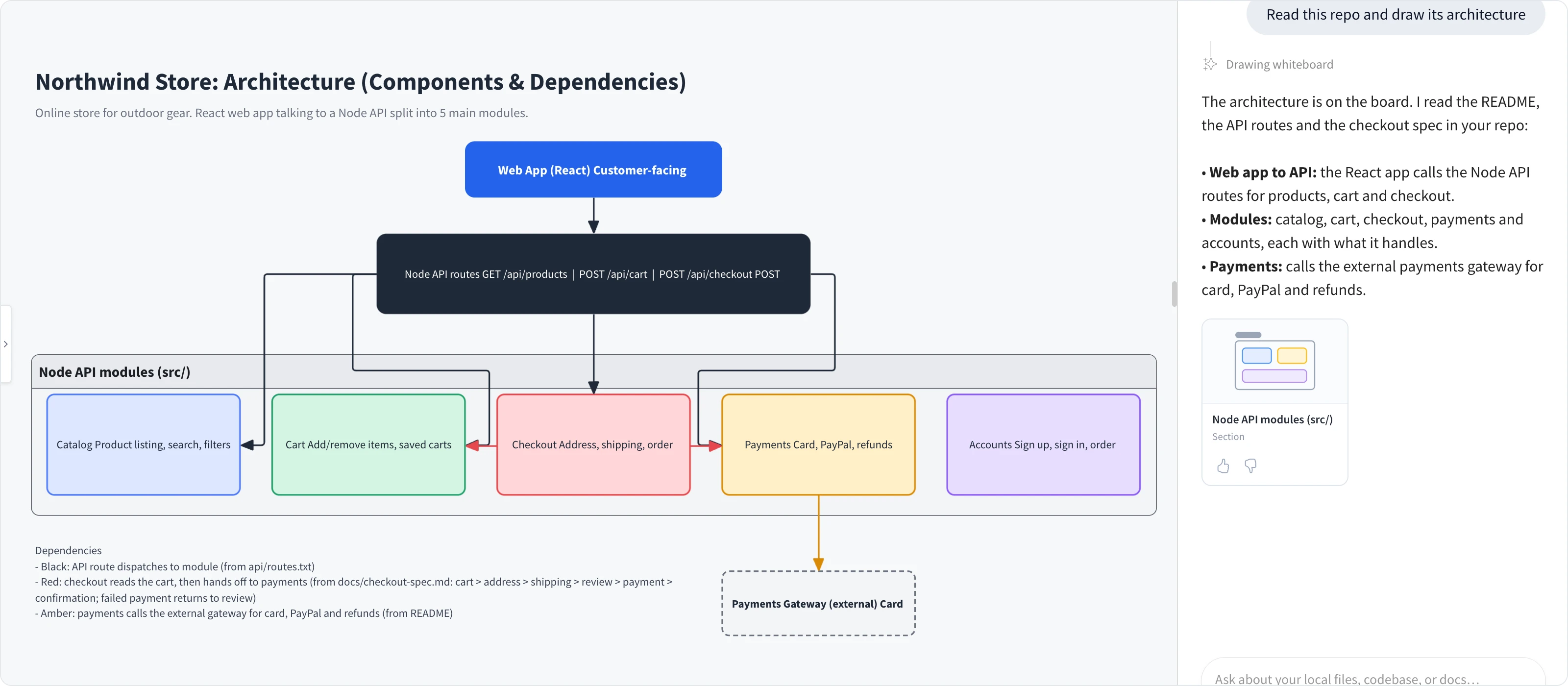
Engineers use this to explain a system to new teammates, review a design before a change, or plan a refactor next to the brainstorm that started it. The code never leaves your computer; only the drawing is saved to the board. See Let MockFlow Bridge read your local files.
Turn documents and notes into boards
The same works for any folder of documents: product specs, research notes, interview transcripts, lesson plans or a book outline. Ask Mida to turn them into the board that fits, for example a flowchart of the process a spec describes, a mind map of themes from interviews, or a timeline from a project plan. You can also attach a single file, such as a PDF, to a message in Mida.
Generate as much as you need
Generations through Bridge use your own AI plan, not MockFlow AI credits. On Plus and Max, Bridge Pro has no daily limit, so you can explore freely:
Try several versions of a wireframe, a flowchart or a plan and keep the best one
Run a workshop where everyone asks Mida for visuals without anyone watching a credit balance
Rework a large board many times as the idea changes
Plan a complete board at once
Ask Mida for a whole board, such as a product launch, a course outline or a sprint review, and it proposes a plan of the items to include. Choose the ones you want and generate the board. With Bridge, your agent creates the items several at a time and Mida arranges them on the board in the order you chose.
Keep refining what is on the board
Your agent can read the board as well as draw on it. Ask for a change in plain words, such as "Add a Blocked column to the kanban board" or "Split the payment step into card and PayPal", and the agent changes the item in place instead of drawing a new copy. It also works from what is now on the board, so if you rearrange or delete items, the next request builds on your version.
Visualize your team's data
On Max, your agent can also read the tools you connect in Mida, such as Jira, Notion, Slack or GitHub. Ask for "Show my current Jira sprint as a kanban board" or "Turn this Slack thread into a mind map", and your agent pulls the data and draws it. Connected tools are read only through Bridge: your agent cannot post messages, create issues or delete anything.
Work with your team on the same board
Bridge runs on your computer, but the result is an ordinary MockFlow board. Teammates open, edit, comment on and present it as usual, without installing anything or seeing a terminal. On Plus and Max, you can also connect several boards to Bridge at the same time.