
What you can make with MockFlow MCP
Diagrams, mind maps, plans, data, maps, wireframes and team activities you can create from Claude, ChatGPT, Cursor or VS Code through MockFlow MCP, with example prompts.
Through MockFlow MCP, your AI app can create most of what you can put on a MockFlow board. You describe what you need, and the AI picks the right kind of item and fills it with real content. Each result is an editable MockFlow board, not a picture, so you can change it, add to it with Mida and share it.
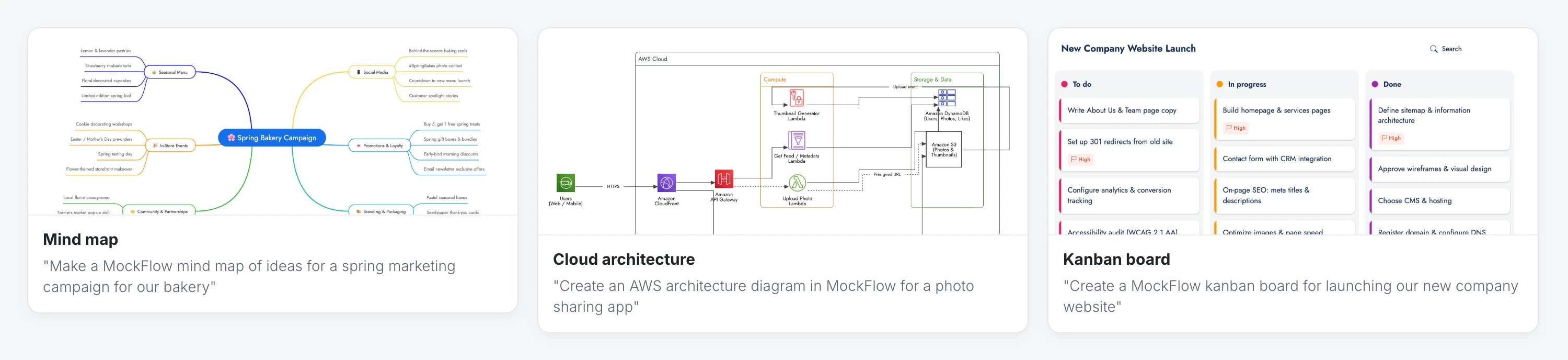
The kinds of items below are examples. New ones are added to MockFlow regularly, and your AI app sees them as soon as they are available.
Diagrams
Flowcharts and process diagrams, including UML, sequence, circuit and medical diagrams, swimlane diagrams, org charts and other tree diagrams, cloud architecture diagrams for AWS, Azure and Google Cloud, database diagrams and knowledge graphs.
"Draw our refund process as a flowchart in MockFlow, with the decision points"
"Create a MockFlow swimlane diagram of how a support ticket moves between support, engineering and billing"
"Make an org chart in MockFlow for a 40 person design agency"
Ideas and planning
Mind maps, kanban boards, Gantt charts, timelines, calendars, checklists, strategy maps, customer journey maps and storyboards.
"Make a MockFlow mind map of themes for our school's science week"
"Create a Gantt chart in MockFlow for a three month office move"
"Map the customer journey for booking a hotel room in MockFlow, with pain points at each stage"
Data and documents
Charts, tables, spreadsheets, documents and code blocks.
"Create a MockFlow chart of monthly website visitors for this year"
"Turn this pricing comparison into a MockFlow table"
Maps and spaces
Maps with places or regions marked, and floor plans.
"Create a MockFlow map of our five store locations in Texas"
"Draw a floor plan in MockFlow for a small cafe with a counter, kitchen and twelve tables"
Wireframes and prototypes
Wireframes of app and web screens, clickable prototypes and mood boards. In coding tools, the MockFlow MCP server for wireframes turns a screen into editable wireframe components in WireframePro, the wireframing tool built into MockFlow.
"Wireframe a dashboard with sidebar navigation, stats cards and a data table in MockFlow"
"Create a clickable MockFlow prototype of a three step sign up flow for a mobile app"
Designs
Posters, flyers, banners, social media posts, ads, invitations, menus and other finished graphics, as editable designs with text, shapes and pictures. A landing page or an app screen is made as a wireframe, even when you call it a design.
"Design an Instagram post in MockFlow announcing our bakery's spring menu"
"Make a MockFlow poster for a community garden open day on 14 June"
Team activities
Polls, upvoting boards and spinning wheels that your team uses together on the board.
"Create a MockFlow poll for choosing our team offsite location"
Images of your boards
Your AI app can also export a board as a PNG image: the whole board, one frame with everything inside it, or a single item. Give it the board's link, or ask about a board it just made. You need to be signed in to MockFlow and able to open the board. Use it to drop a board into a document, a slide or a reply.
"Export the timeline you just made in MockFlow as an image"
"Send me a PNG of our MockFlow launch board for the status update: (board link)"
Get better results
Mention MockFlow. AI apps have many tools. Saying "in MockFlow" or "Using MockFlow" makes sure the result is a board.
Give the content. Paste notes, a list or a summary, or in a coding tool point to the files, so the board reflects your real situation.
Ask for one thing at a time. A focused request, such as one diagram, gives a clearer result. You can ask for several in one message, and each one counts toward your limits.
Keep going in MockFlow. For AI images or complex designs that need several steps, open the board and continue with Mida in the editor.
Each item counts toward your plan's MCP limits. See MockFlow MCP limits on each plan.