
How team licenses work
How a MockFlow team license works: the owner, License Admins and Members, who needs a license, and how license roles differ from space roles.
When a team works in MockFlow on the Plus or Max plan, one person buys the subscription and shares its licenses with teammates. Each license lets one person create and edit on the paid plan: boards, wireframes, diagrams, prototypes and everything else on the visual canvas. You decide who holds each license in User licenses.
Open User licenses
Click your name at the bottom of the workspace sidebar.
Choose User licenses.
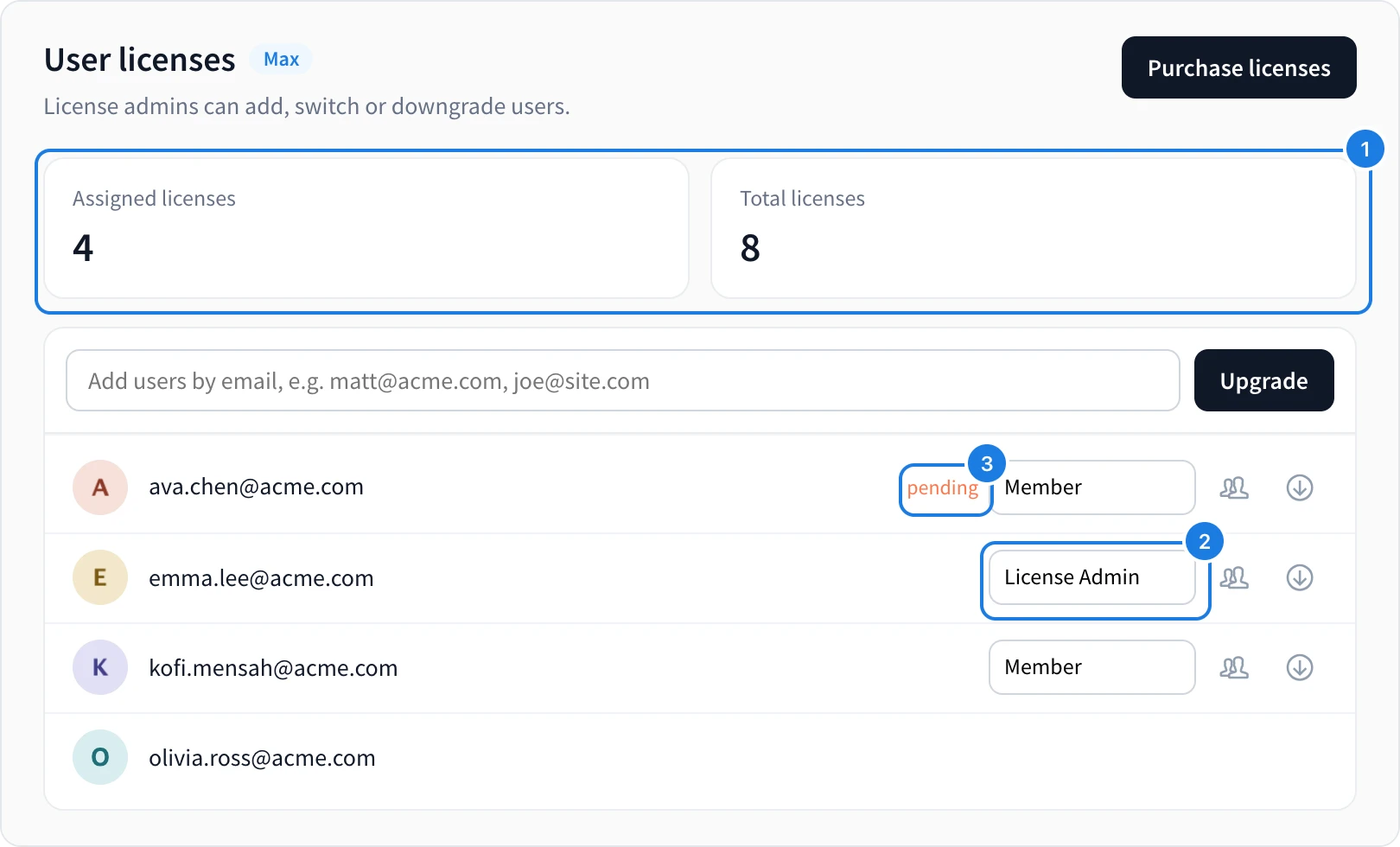
The page shows how many licenses are in use and how many you have (1), and everyone on the license with their role (2). A person who has not yet accepted their invite is marked pending (3).
License roles: Owner, License Admin and Member
Role | What it can do |
|---|---|
Owner | The person who bought the subscription. Adds and removes people, changes roles, manages billing and, on Max, sets up two-factor authentication and single sign-on. The owner always keeps their license. |
License Admin | Adds people to the license and removes them. |
Member | Uses a license. Sees who manages it and can leave the license. |
To make someone a License Admin, see Make someone a License Admin.
Who needs a license
Pricing is per editor. Anyone who creates or edits boards on your team needs a license. Viewers and commenters always join free, so clients and stakeholders can review your work without one.
People on the same license are added to each other's team, so they show up as suggestions when you share a space or a board.
License roles and space roles
A license role decides who manages the license. It does not open every board to everyone on it. Access to boards is set per space, where each person is a Reviewer, Editor or Admin. A License Admin, for example, still needs to be invited to a space to see its boards. See Invite people to a space.
Team features on Plus and Max
Plus includes the license management console and transferable licenses and spaces.
Max adds two-factor authentication, single sign-on with SAML, automated license management with SCIM and secure data migration between people, on yearly plans.
To change how many licenses you have, see Manage your subscription. For full plan details, see MockFlow pricing.