
Remove someone from your license
Free a license when a teammate leaves, see what happens to their account and boards, and give the license to someone else.
When someone leaves your team or no longer needs to edit, the license owner or a License Admin can remove them from the license. Their license becomes free at once, ready for the next person.

Remove a teammate
Click your name at the bottom of the workspace sidebar and choose User licenses.
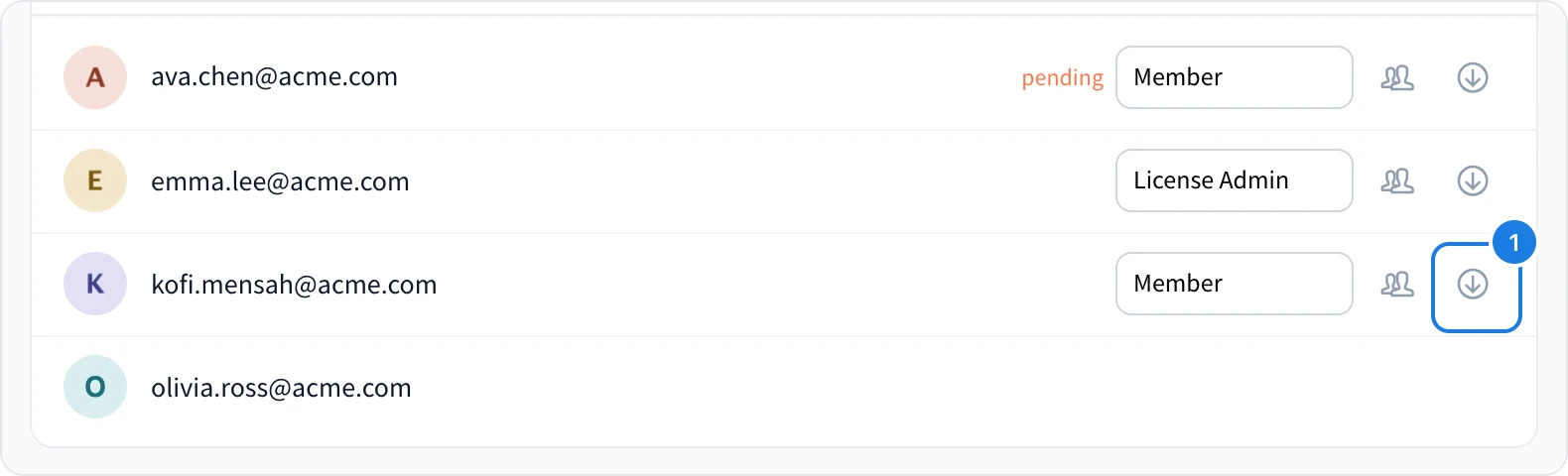
In the person's row, click Downgrade (1).
Confirm with OK.
The person leaves the list and Assigned licenses goes down by one. This works for pending invites too, so you can take back a license nobody has accepted yet.
What happens to their account
Their account moves to the free Basic plan, and they get an email saying so. If they have MockFlow open, it asks them to reload on their new plan.
Their boards and spaces are not deleted. They stay in their own account, with the limits of the Basic plan.
Spaces they own stay with them. To keep a space with the team, ask them to hand it over before you remove them, as described in Transfer a space to another person.
To move everything they own into a teammate's account, see Move a departing member's data to a teammate.
Give the license to someone else
A license is not tied to one person. Remove the person who no longer needs it, then add the new person, as described in Add people to your license.