
Track activity in a space
See who did what in a space: boards created, changed and moved, comments, people added, links shared and more, with search and filters.
Space activity is a running history of everything that happens in a space. It shows who created, changed, moved or deleted a board, who commented, who was added to the space and when a public link was turned on, so admins can keep track of a team or client project without opening every board.

Open Space activity
In the workspace sidebar, point to the space and click its settings button.
Choose Space activity. The newest activity is shown first.
Only the owner and admins of a space can see its activity.
Read the activity list
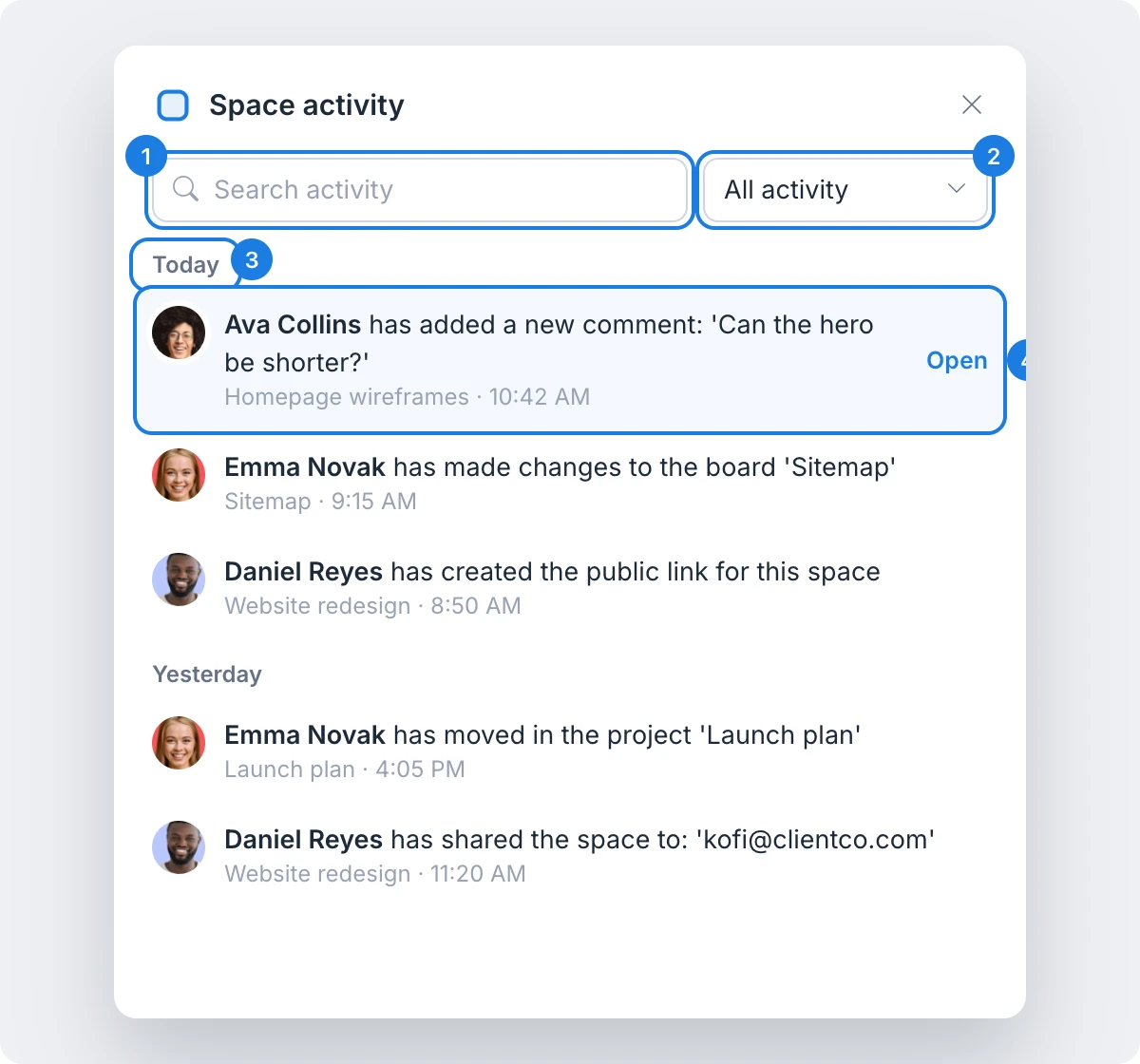
Entries are grouped by day under headings such as Today and Yesterday (3). Each entry (4) shows the person, what they did, the board it concerns and the time. Point to an entry and click Open to go straight to that board. Older activity loads as you scroll down.
Space activity records changes such as:
Boards: created, changed, renamed, duplicated, moved in or out, locked, unlocked, deleted and restored from Trash.
Comments: added, edited, replied to, resolved and deleted, as well as design suggestions.
Revisions: new revisions checked in, restored or deleted.
People and links: people added to or removed from the space, public links created or removed, and the space renamed or transferred to a new owner.
Search and filter activity
Search activity (1): type a word to find entries that mention it, such as a board name or a person.
Category list (2): show one kind of activity at a time. The categories are All activity, Projects, Design files, Design embeds, Comments, Revision history, Symbols, Project workflow, Doc changes and Page operations.
Search and the category list work together, so you can, for example, find every comment that mentions a feature.
What is not available on the Basic plan
Space activity is available on the Plus and Max plans. On the Basic plan, the panel shows Space activity is available on the Plus and Max plans. Plus and Max also include many other features for teams, such as space analytics, sharing by role across spaces and unlimited spaces. See MockFlow pricing for details.