
Run automations with your own AI and save AI credits
Let your own AI agent make an automation's boards through MockFlow Bridge, using no AI credits, and other ways to keep automations from using up your credits.
By default, MockFlow AI makes each automation's board and the run uses your AI credits. You can instead let your own AI agent, such as Claude Code or Codex on your computer, make the boards through MockFlow Bridge. Those runs use no AI credits. This article explains how to set that up and the other ways to keep automations light on credits.
Use your local agent through MockFlow Bridge
MockFlow Bridge connects an AI agent on your own computer to MockFlow. When an automation uses the Local Agent, each run is sent to your Bridge, your agent makes the board's content, and MockFlow draws it on the board.
Before you start: set up MockFlow Bridge and connect it from a MockFlow board. See Set up MockFlow Bridge.
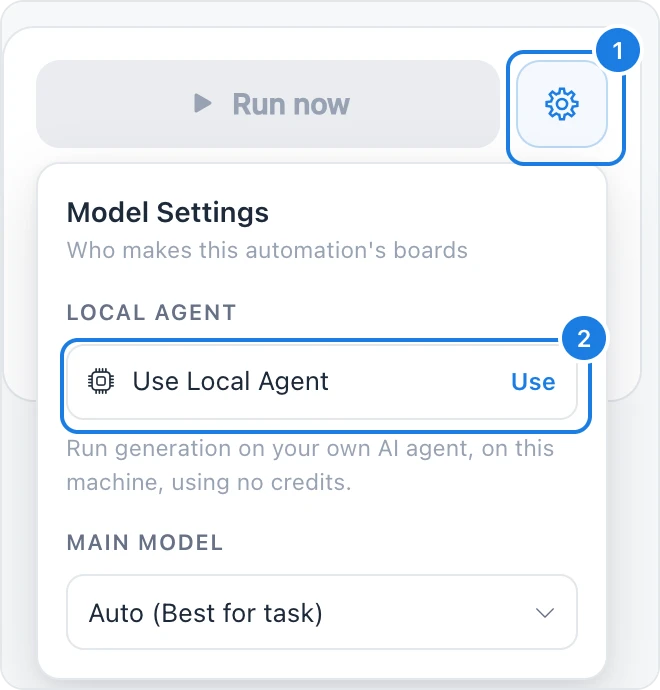
Open the automation and pick what it makes. The local agent can make many types, but not all (see below).
Click the gear next to Run now or Turn on (1) to open Model Settings.
Under Local Agent, click Use Local Agent (2). If your Bridge is not connected yet, the row reads Connect Local Agent; click it and MockFlow waits for the Bridge.
Save the automation. The settings now say Runs on your machine, and the summary says each run uses no AI credits.
To go back to MockFlow AI, open Model Settings and click Disable next to Runs on your machine.
What the local agent can make
Your local agent can make most planning, structure, document and design types, including kanbans, Gantt charts, timelines, calendars, to-do lists, mind maps, journey maps, sitemaps, org charts, tables, spreadsheets, documents, wireframes, designs, storyboards and Multiboards.
Some types are made by MockFlow AI only, such as flowcharts, swimlanes, architecture diagrams, whiteboards, moodboards, charts, prototypes and images. For those, Model Settings says Your local agent cannot make that type, so MockFlow AI makes it.
Keeping a component up to date (Into a {type} I already have) always runs on MockFlow AI.
Keep your Bridge running
The Bridge runs on your computer, so a local agent run works only while your computer is on and the Bridge is running:
A run waits up to 10 minutes for your Bridge to pick it up, then gives up with Your local agent did not pick it up within 10 minutes.
Your agent has up to 15 minutes to finish a run.
If the Bridge is not connected, the run fails with Your local agent is not connected. Open a MockFlow board with the MockFlow Bridge running, then run it again.
For automations that must run at night or while you are away, use MockFlow AI instead.
What still counts
Local agent runs use no AI credits, and they keep running even when your AI credits are used up. Each run that makes a board still counts toward your plan's monthly runs and the automation's own Runs per month, at most.
Other ways to save AI credits
Choice | How it saves credits |
|---|---|
Add each {item} as it is under How | Each record is placed as the app sends it, with no AI. Good for a kanban card per Jira issue or a row per deal. No credits. |
AI fills in the details under How | Records are placed as they are and AI only picks out details such as an amount or a due date. Uses 1 AI message instead of a full generation. |
Filter data under More options | Only items about your topic go on the board. If nothing matches, the run makes no board and does not count as a run. |
Runs per month, at most under More options | Caps how often a busy automation can run, for example one that starts on every new Slack message or Typeform response. |
At a set time instead of a busy event | A daily or weekly schedule collects everything new since the last run into one board, instead of one run per event. |
Only when I press Run | The automation never runs on its own, so it uses credits only when you need the board. |
Each run in History shows how many AI credits it used, or No AI credits, so you can see which automations cost the most. See Automation plans and limits for the monthly allowance.