
Add reactions
React to work on a MockFlow board with an emoji, see who reacted and add your own reaction to someone else's.

Reactions are the quickest way to respond to work on a board. Drop a 👍 on the chart that shows a launch result, a ❤️ on the wireframe the team likes best or a 🔥 on an idea worth pursuing. Teammates add their own reaction to the same pin, so the count shows at a glance how many people agree.
Add a reaction to a board
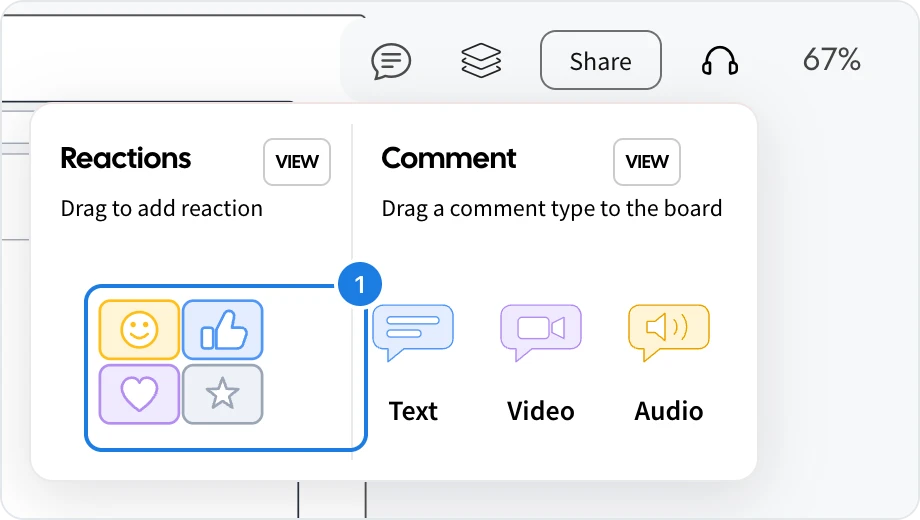
Click the comment icon at the top right.
Drag a reaction (1) onto the item you are reacting to.
Choose an emoji in Select Reaction, or click Select from library for more.
The reaction appears as a pin with a count, and everyone on the board sees it straight away.
React to someone else's reaction
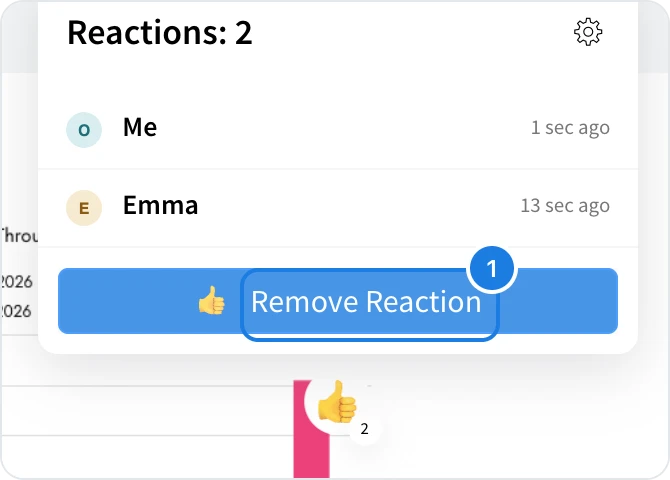
Click a reaction pin to see who has reacted. Click Add Reaction to add yours, and the count goes up for everyone. Once you have reacted, the button reads Remove Reaction (1), so you can take it back.
See every reaction on a board
Click the comment icon at the top right, then View next to Reactions. The list shows every reaction on the board.