
Leave a video or audio comment
Record a short video or audio comment and pin it to the exact spot on a board, so feedback comes with your voice and face.
Some feedback is quicker to say than to type: walking through a wireframe, explaining a design choice or giving a client a short update. Video and audio comments let you record up to 2 minutes and pin the recording to the exact spot on the board it is about. Teammates play it when they get to it, with no meeting needed.

Record a video or audio comment
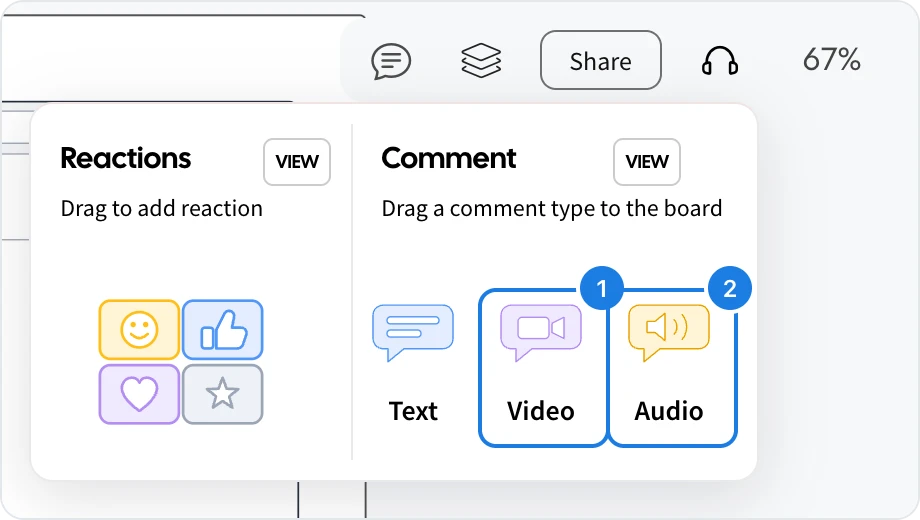
Click the comment icon at the top right.
Drag Video (1) or Audio (2) onto the spot you want to comment on.
Click Start Recording. Your browser asks to use your camera or microphone the first time.
Talk through your feedback, then click Stop.
Check the preview. Click Record Again to retake it, or Upload Video or Upload Audio to post it.
The comment appears as a pin on the board. Anyone with access to the board clicks the pin to play it, and sees who recorded it.
Tips for clear recordings
Pin the comment right next to what you are talking about, so viewers see both at once.
Keep each recording to one topic. Several short comments are easier to follow than one long one.
Recordings can be up to 2 minutes long.
What is not available on the Basic and Plus plans
Audio comments are not available on the Basic plan, and video comments are available only on the Max plan. On other plans, the Video comment shows a sample and an upgrade note instead of recording. Text comments work on every plan, as described in Comment on a board. See MockFlow pricing for details.