
Make someone a License Admin
Let a teammate help manage your MockFlow license by changing their role from Member to License Admin.
On a large team, one person adding and removing everyone can slow things down. The license owner can make teammates License Admins, so they can add new people to the license and remove people who leave.

Change a teammate's role
Click your name at the bottom of the workspace sidebar and choose User licenses.
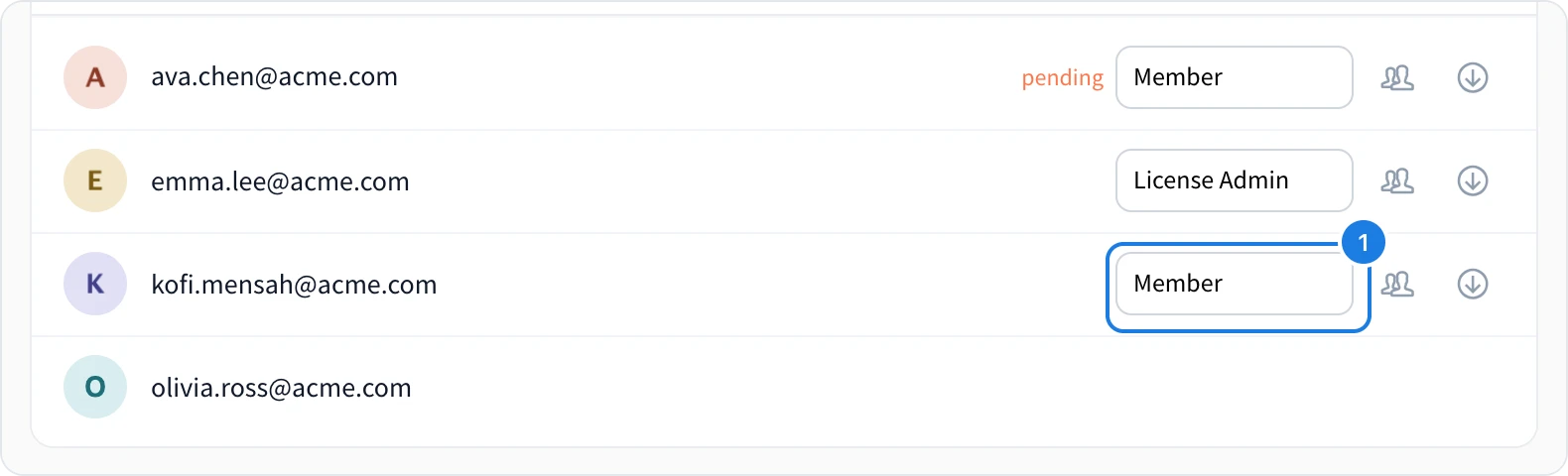
Find the person in the list and open the role list in their row (1).
Choose License Admin. To take the role away, choose Member.
The change is saved at once. The person gets an email and a notification about their new role.
What a License Admin can do
Add people to the license by email, as described in Add people to your license.
Remove people from the license, as described in Remove someone from your license.
Only the license owner can change roles, buy more licenses and set up security settings such as single sign-on. The owner's own role cannot be changed.
A License Admin manages the license, not the boards. To work on a space, a License Admin still needs to be invited to it like anyone else. See Invite people to a space.