
What is the MockFlow MCP server
The MockFlow MCP server lets Claude, ChatGPT, Cursor, VS Code and other AI apps create MockFlow boards, from flowcharts and mind maps to timelines and wireframes.
MCP (Model Context Protocol) is the open standard AI apps use to connect to other tools. The MockFlow MCP server connects MockFlow to the AI app you already use, such as Claude, ChatGPT, Claude Code, Cursor or VS Code. Ask for a visual in the conversation, and the AI creates it as a MockFlow board: a real, editable board with a link that you open, change and share with your team, instead of a picture or a text diagram that stays in the chat.
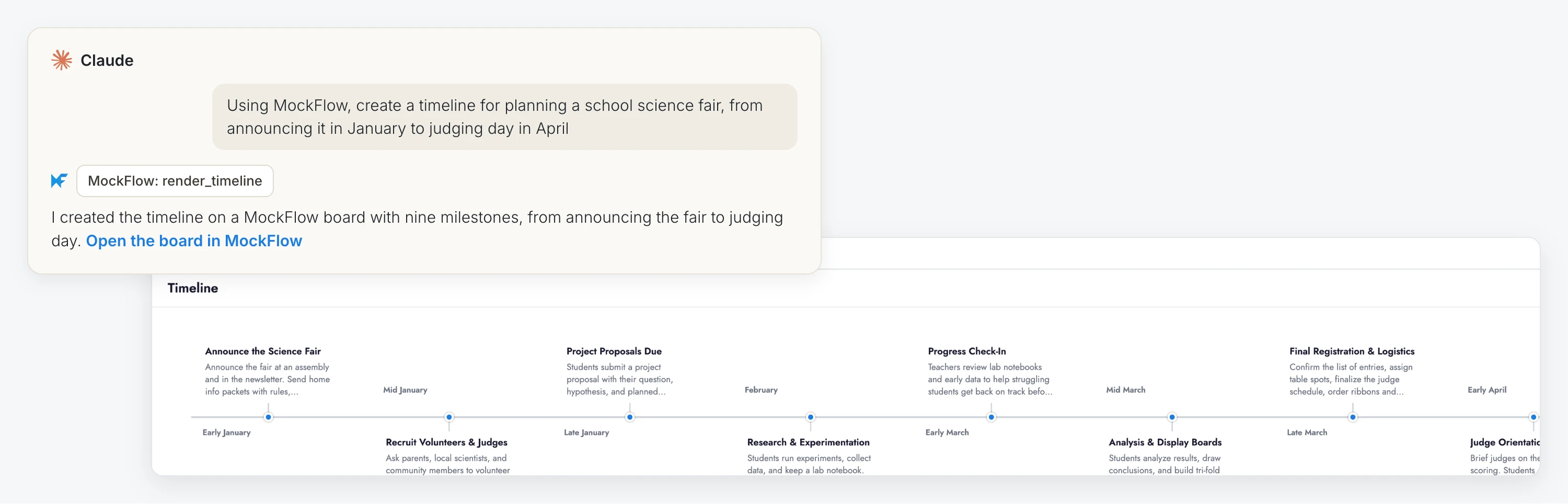
Generations through MockFlow MCP run on the AI in your app, so they use no MockFlow AI credits.
Ways to connect
Server | Use it with | How it connects |
|---|---|---|
MockFlow hosted server | Claude and ChatGPT | Add MockFlow as a connector in the app, with the address |
MockFlow MCP for boards | Claude Code, Cursor, VS Code, Codex and other MCP clients | Run |
MockFlow MCP for wireframes | Claude Code, Cursor, VS Code, Codex and other MCP clients | Run |
The hosted server needs no installation: you add it once in your AI app's settings and sign in to MockFlow. The two local servers run on your computer for coding tools: one creates boards, and one creates wireframes and diagrams in WireframePro, the wireframing tool built into MockFlow.
What happens when you ask for a visual
You ask your AI app for something visual, such as "Create a flowchart of our refund process" or "Make a mind map for our product launch".
The AI chooses the right kind of item and sends its content to MockFlow.
MockFlow creates a board with the item and returns a link, and the AI shows it to you. In some apps, such as ChatGPT, a preview of the board also appears in the chat.
You open the board in MockFlow to edit it, add to it and share it like any other board.
When you are signed in, the board is saved to your MockFlow account. See Connect MockFlow to Claude or ChatGPT.
What you can create
MockFlow MCP covers most of what you can put on a board, for example flowcharts, mind maps, org charts and tree diagrams, cloud architecture diagrams, kanban boards, Gantt charts, timelines, customer journey maps, charts, tables and spreadsheets, maps, wireframes and clickable prototypes, and designs such as posters and social media posts. New kinds of items are added regularly.
Your AI app can also bring a board back into the conversation as a picture. Ask for an image of a board, of one frame with everything inside it, or of a single item, and MockFlow returns it as a PNG. This works when you are signed in to MockFlow and can open the board.
MockFlow MCP or MockFlow Bridge
MCP and MockFlow Bridge both use your own AI, but they work in opposite directions:
MCP keeps you in your AI app. The board is where the result lands.
Bridge keeps you on the board. Mida, Concept Builders and the AI on each item run on an AI agent on your computer, and the agent draws live on the board you have open.
Use MCP when the conversation or the code is where you work and you want a visual as the output. Use Bridge when the board is where you think and work with your team.
For the fullest results, such as AI images or complex designs that need several steps, use Mida inside the MockFlow editor.
MockFlow MCP is available on every plan, including Basic, with a limit on how many items you can create in a period of time. Plus and Max have higher limits. See MockFlow MCP limits on each plan.