
Provision users with SCIM
Connect your identity provider to MockFlow with SCIM, so people get a license when they are assigned to MockFlow and lose it when they are removed.
SCIM keeps your MockFlow license in step with your identity provider. When you assign someone to MockFlow in Okta, Microsoft Entra ID (Azure AD) or another SCIM-capable identity provider, they get a MockFlow license. When you unassign or deactivate them, their license is freed. Nobody has to add or remove people by hand in User licenses.

Before you start
The SCIM settings are part of single sign-on, so set up SSO first, as described in Set up single sign-on (SAML).
Get the SCIM base URL and token
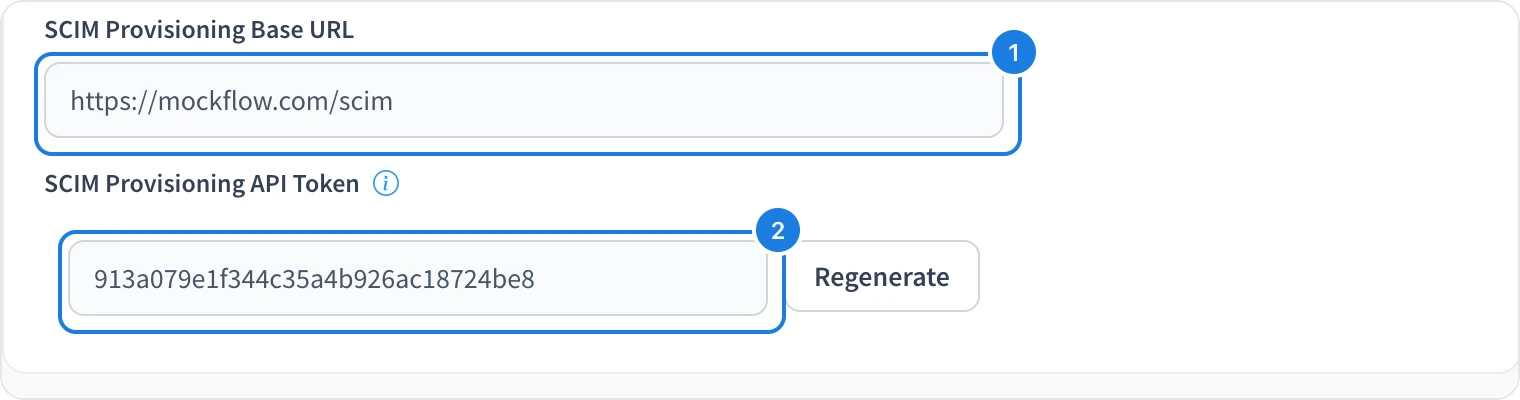
Click your name at the bottom of the workspace sidebar, choose My Account, then choose Security & SSO.
Below the single sign-on fields, find SCIM Provisioning Base URL (1). Click it to copy it.
Under SCIM Provisioning API Token, click Generate. Click the token (2) to copy it.
Connect your identity provider
In your identity provider, open the MockFlow app and turn on SCIM provisioning.
Enter the base URL as the SCIM connector base URL or tenant URL.
Choose bearer token (HTTP header) authentication and paste the API token.
Turn on creating users and deactivating users, then save.
What happens when people are provisioned
Assigning someone to MockFlow gives them a license. Like an invite from User licenses, they get an email and appear as pending until they accept, as described in Join a team license.
Unassigning or deactivating someone removes their license and moves their account to the free Basic plan. Their boards are not deleted.
MockFlow provisions individual users. Groups are not synced, so turn off group push for the MockFlow app in your identity provider.
Each person needs a free license on your plan. If every license is in use, add more as described in Manage your subscription.
Regenerate the token
Click Regenerate and confirm to replace the token, for example if it may have been exposed. Provisioning that uses the old token stops working, so paste the new token into your identity provider straight away.
Who can set up SCIM
Automated license management with SCIM is part of the Max plan with yearly billing and five or more licenses. Only the license owner sees Security & SSO.