
What is MockFlow Bridge
MockFlow Bridge connects an AI agent on your computer, such as Claude Code or Codex, to your board, so Mida generates with your own AI and uses no AI credits.
MockFlow Bridge is a small program you run on your own computer. It connects an AI agent on that computer, such as Claude Code or Codex, to the MockFlow board open in your browser. While the board is connected, Mida and the other AI features on the board send their work to your agent instead of to MockFlow AI. You keep working on the board exactly as before, and the generation runs on the AI plan you already pay for, so it uses no MockFlow AI credits.
In the picture, Mida is connected to Claude Code. Claude Code read a project folder on the computer and drew its checkout flow on the board.
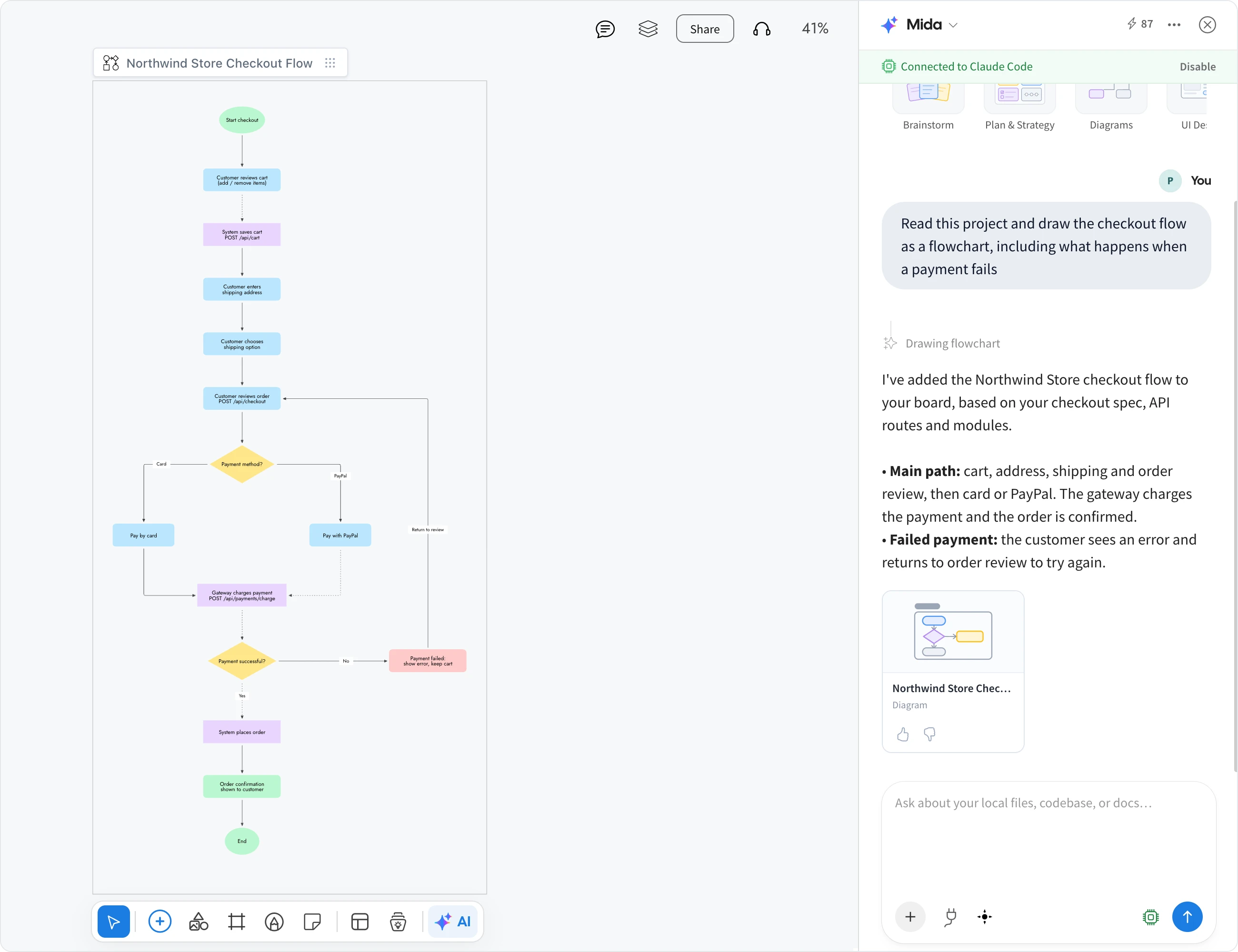
What Bridge does on the board
When a board is connected to Bridge, these AI features run on your own agent:
Ask Mida. Describe what you need and Mida asks its quick questions, plans the items and adds them to the board, from flowcharts and mind maps to wireframes, kanban boards and complete board plans.
Concept Builders. These AI agents help your team build a concept for a game, product, book or software on the board over time. Their replies and drawings come from your agent.
AI on an item. Generating or changing an item from its toolbar, such as rewriting a mind map or adding a column to a kanban board, also runs on your agent.
Everything else stays the same. Every board format and AI skill works as usual, the result is saved to the board through your MockFlow account, and teammates on the board see a normal board session, not a terminal.
How MockFlow Bridge works
Bridge sits between your board and your AI agent, and all three run on your computer:
You start Bridge in a terminal window. It finds the AI agent installed on your computer and shows a pairing code.
You enter the pairing code on your board, once per computer. The board is now connected to Bridge.
When you ask Mida for something, the board passes the request to Bridge, Bridge runs your agent, and the agent's drawing appears on the board you are looking at.
Bridge works with the MockFlow board in your browser and in the MockFlow desktop app. It runs only while its terminal window is open; close the window and the board goes back to MockFlow AI.
Which AI agents work with Bridge
Claude Code, using your Claude subscription
Codex, using your ChatGPT subscription
opencode, with the model you choose, including models that run on your computer
BridgeAI, an agent built into Bridge that needs no separate app, only an API key from OpenRouter, Azure OpenAI or Amazon Bedrock
Gemini CLI and Cursor CLI can also be connected, with basic and experimental support.
What stays on your computer
Your agent does its reading and thinking on your computer:
Your files. If you start Bridge with a folder, such as a code repository or a set of meeting notes, the agent reads it to build boards. The files are never uploaded; only the finished drawing is saved to your board.
Attachments. A file you attach in Mida is passed to your agent on your computer, not uploaded to MockFlow.
Two things still go through MockFlow by design. Concept Builder chat is stored in your MockFlow account, so builders remember the conversation and your team sees it too. Connected sources, such as Jira, Notion or Slack, are fetched by MockFlow, where their sign-in is stored, and your agent can only read them.
AI credits with Bridge
Anything your agent generates uses no MockFlow AI credits. Media items, such as AI images, video clips, sound and 3D models, can only be generated by MockFlow AI. When you ask for one while connected, Mida tells you, and MockFlow AI creates it using credits as usual.
Bridge is available on every plan. On Basic, it runs with Claude Code on one board at a time, with a daily number of free generations. Bridge Pro, included in Plus and Max, removes the daily limit and adds every agent, several boards at once and reading files on your computer. On Max, your agent can also read your connected sources.
To get started, see Set up MockFlow Bridge.