
Start a meeting on a board
Hold an audio or video meeting right on a MockFlow board, share your screen, bring everyone to your view and raise your hand while everyone works on the same canvas.
Meetings in MockFlow happen on the board itself. Start a call from the board you are working on, and teammates join with one click and keep editing while you talk: a sprint review on a kanban, a design critique on a wireframe or a workshop on a mind map. There is no separate meeting link and no switching between apps.
Start a meeting
Point to the headset icon at the top right and click Start Meeting.
The first time, read the note and click Start. MockFlow notifies the members who are online.
The meeting bar appears at the top of the board with the meeting time and the number of people in the call.
Join a meeting
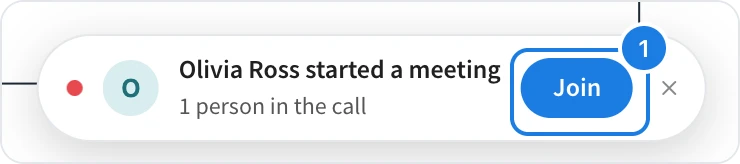
When someone starts a meeting, everyone on the board sees a banner with their name and the number of people in the call. Click Join (1). If the board is open in a background tab, the browser notifies you and the tab title shows that a meeting is in progress.
Talk, turn your camera on and share your screen

Click the microphone (1) to mute or unmute.
Click the camera (2) to turn your video on. The meeting moves to a strip at the bottom of the board, with everyone's video next to the canvas.
Click Share your screen (3) to show your screen to everyone in a panel on the board. From the panel you can place a screenshot or a short recorded clip on the board.
Meeting controls
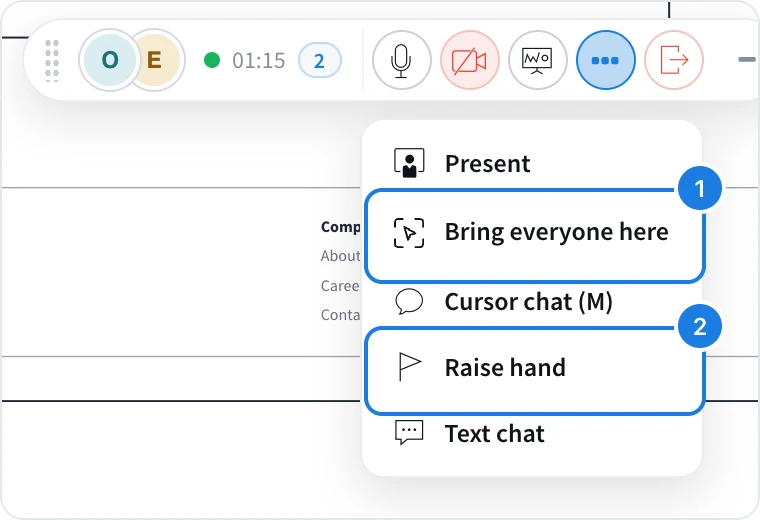
Click … (More) on the meeting bar for the rest of the meeting controls:
Present walks everyone through the board, with their view following yours. See Present a board live.
Bring everyone here (1) moves everyone in the meeting to the part of the board you are looking at, once, without starting a presentation.
Cursor chat (M) shows a short message next to your cursor. See Work on a board together in real time.
Raise hand (2) lets the others know you want to speak. Its tool tip reads Ask to speak. Click it again to lower your hand.
Text chat opens team chat for links and notes during the call. See Chat with your team on a board.
Presenting and sharing your screen do not run at the same time: while a screen is shared, Present is turned off, and while someone presents, Share your screen is turned off.
Bring everyone to your view

Use Bring everyone here when you want the whole call to look at one spot, such as a kanban column during a stand-up or a screen in a wireframe review. Everyone in the meeting moves to your view, and a bar at the bottom of the board says that you brought everyone here. Each person can click Go back to return to where they were.
Someone who is in the middle of editing is not moved. They see that you want everyone here and click Go when they are ready.
Go to a teammate's view
Each person in the call has a picture on the meeting bar. Click a teammate's picture to go to the part of the board they are looking at, for example to see the section they are talking about.
To leave, click the red leave button. To keep the board clear while you work, click Minimize at the end of the meeting bar.
What is not available on the Basic and Plus plans
Meetings are not available on the Basic plan. On Plus, meetings are audio only, and turning the camera on is part of the Max plan. Many other features for teams, such as audio comments and board activity, are also part of Plus and Max. See MockFlow pricing for details.