
MockFlow for Google Meet
Open a MockFlow board on the Google Meet stage so everyone in the call can brainstorm, plan and run workshops on it together.
MockFlow for Google Meet brings a board into your video call. Open a retro, a workshop agenda or a planning board on the meeting stage, and everyone in the call works on it together while you talk.
Install the add-on
Install MockFlow from the Google Workspace Marketplace. Workspace admins can also allow it, or install it for the whole organization.
Open a board in a call
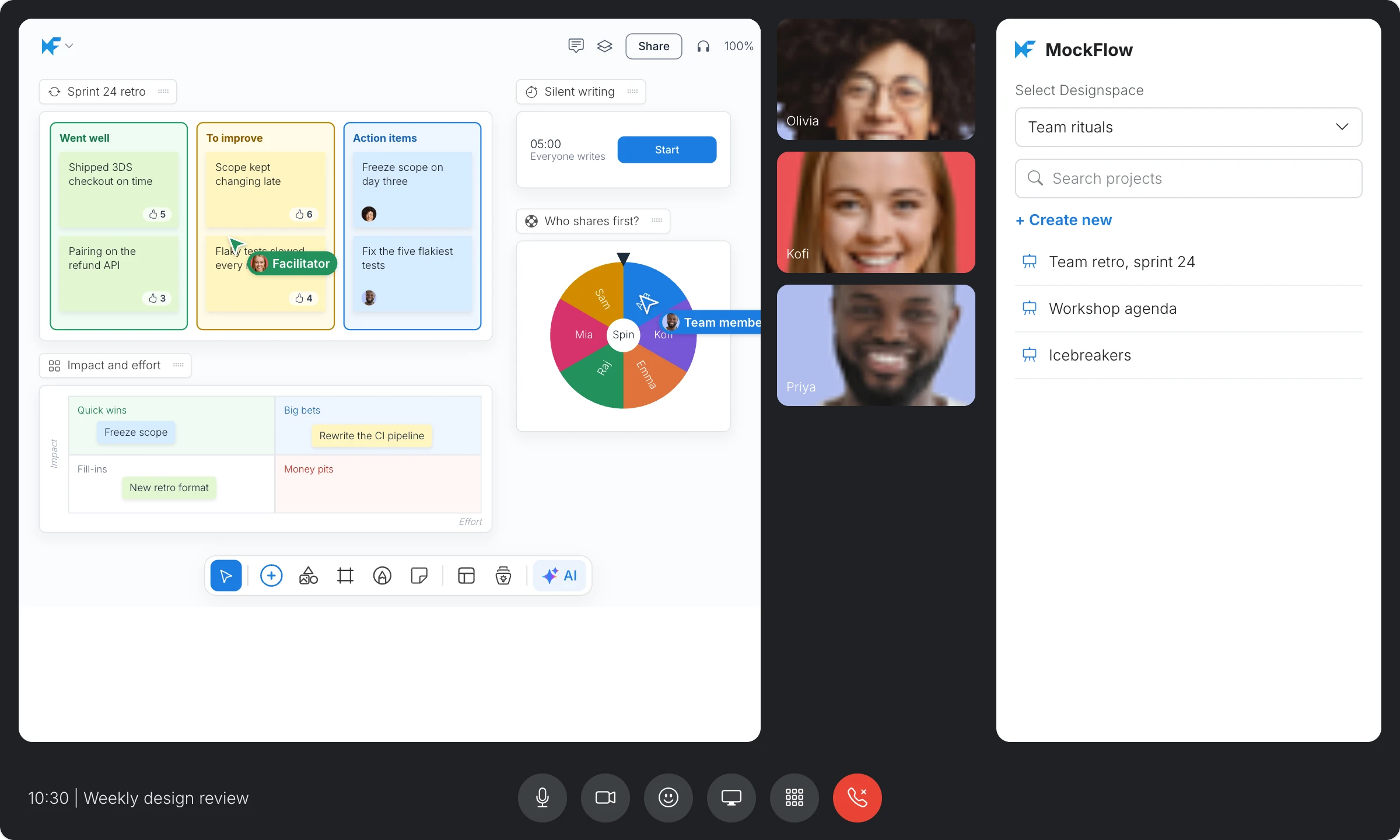
In a Google Meet call, click Activities and choose MockFlow. The MockFlow panel opens on the side.
Sign in with Google, Microsoft or Apple, or with your MockFlow email.
Choose a space under Select Designspace, then click a board, or click Create new.
The board opens on the main stage for everyone in the call.
Work on the board together
Each participant signs in to MockFlow to edit. Anyone who does not have access to the board yet is added to it automatically, so the whole call can add notes, vote and move items in real time. For example, run a sprint retro with silent writing, vote on the ideas and spin the wheel to pick who shares first.
What is not available on the Basic plan
The add-on works on every plan, including Basic. On Basic, a space can have up to 10 collaborators, and creating or editing boards in another person's space needs a paid plan. Plus and Max remove these limits and include many other features, such as audio meetings and timers on boards. See MockFlow pricing for details.