
Reviewer, Editor and Admin roles
What reviewers, editors, admins and the owner can do on a shared board or space, and which roles use a paid seat.
Every person you share a board or space with in MockFlow gets a role. The role sets what they can do, from following the work and leaving feedback to editing alongside you and managing who has access. You pick the role when you invite someone, and you can change it at any time.
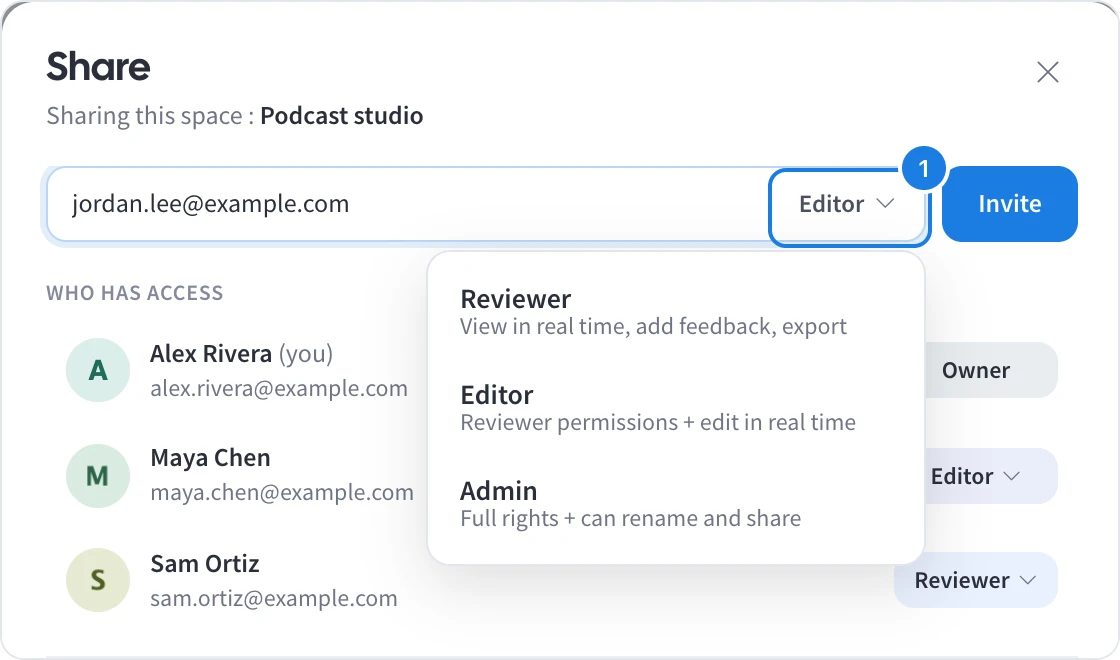
Choose a role when you invite someone
In the Share panel, open the role menu (1) beside the email field and pick Reviewer, Editor or Admin before you click Invite. Each option shows a one-line summary of what it allows. For the full steps, see Share a board with people.
What each role can do
Reviewer | Editor | Admin | Owner | |
|---|---|---|---|---|
View the board live as others work | Yes | Yes | Yes | Yes |
Comment, react and give feedback | Yes | Yes | Yes | Yes |
Export | Yes | Yes | Yes | Yes |
Edit the board in real time | No | Yes | Yes | Yes |
Rename boards and the space | No | No | Yes | Yes |
Invite people and change their roles | No | No | Yes | Yes |
Transfer the space to someone else | No | No | No | Yes |
Reviewer suits clients, stakeholders and anyone who needs to follow the work and give feedback, such as a teacher reviewing a class project or a client approving a campaign moodboard. Reviewers see the board without the editing tools.
Editor suits the people who build the work with you. Editors see a Team button in place of Share, listing who else is on the board.
Admin suits team leads who manage a space. Admins have full rights and can share the space and rename it and its boards.
Owner is the person who created the space. The owner always has full rights and is the only one who can transfer the space to another person.
In a team space, a role applies to every board in the space.
Which roles use a paid seat
Pricing is per editor. Editors and admins use a paid seat, while reviewers are free and unlimited on paid plans, so you can bring in as many clients and stakeholders as you need. If you manage your team's licenses and invite an editor or admin who has no license yet, MockFlow offers to assign one of your vacant licenses to them.
People who open a public link are not members and have no role. They can view the board, but they cannot edit it.
Change someone's role
In Who has access, click the person's current role and pick a new one under Change role. The change applies straight away.
What is not available on the Basic plan
On the Basic plan, the Editor and Admin roles are not available. You can invite people only as reviewers, and a space can have up to 5 reviewers. Editor and admin roles, unlimited reviewers and many other features, such as sharing by role across spaces and live presentation mode, are available on Plus and Max. See MockFlow pricing for details.