
Export a WireframePro project
Export WireframePro pages as images, PDF, Interactive PDF, Word or PowerPoint, send them to Figma, export a selection or save a .wire file.
When a design is ready to share outside MockFlow, export it in the format your audience uses: a PDF for a client review, PowerPoint slides for a stakeholder meeting, PNG images for a ticket, or Figma layers for visual design.
Export pages
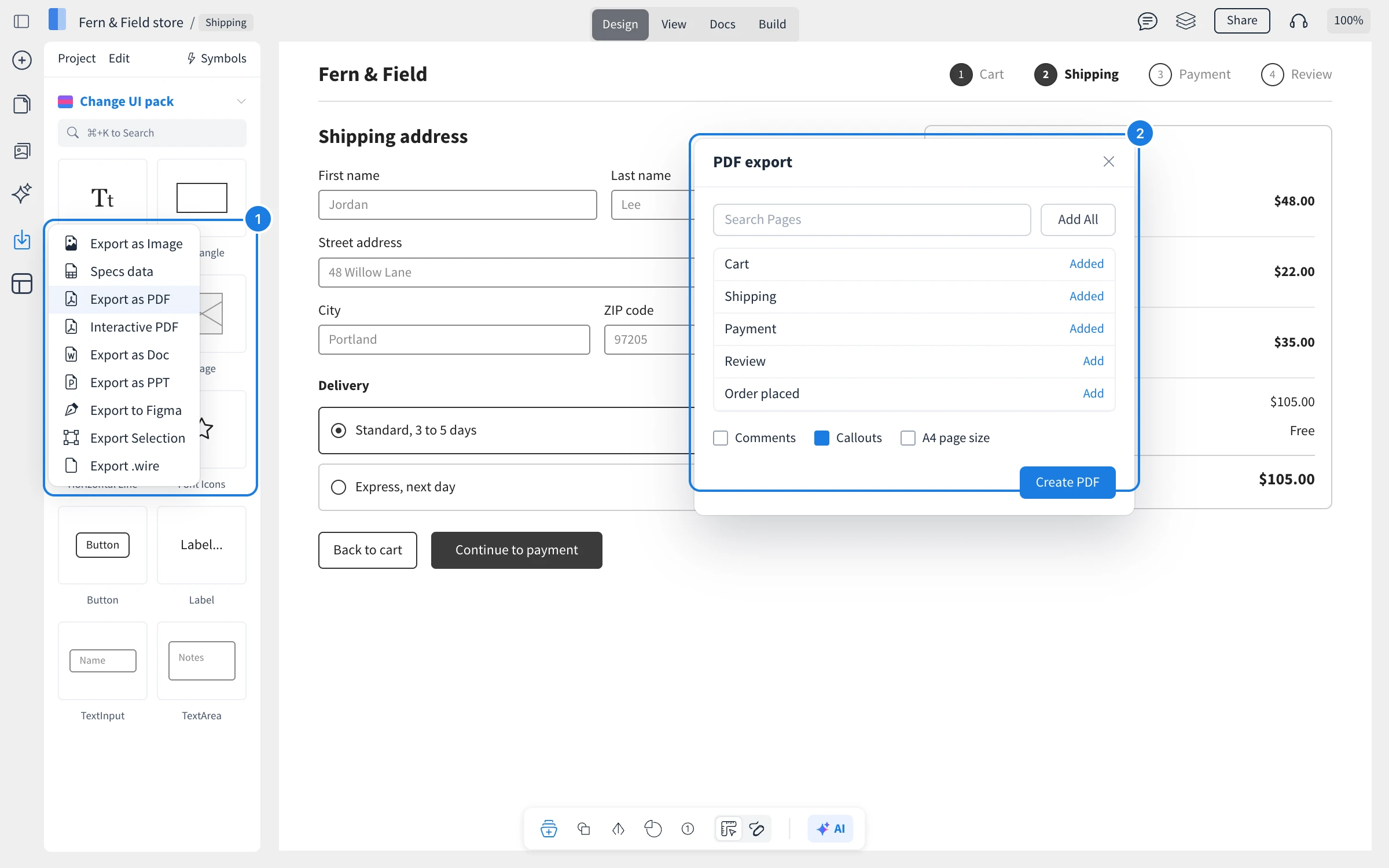
Click Export on the left rail (1) and choose a format.
In the export window (2), search for pages and click Add, or Add All.
Choose the options and click the create button, for example Create PDF.
Up to 80 pages can be exported at a time.
Export formats
Export as Image: PNG images of each page. Tick 2x Size for a sharper image of one screen at a time.
Export as PDF: a PDF with optional Comments, Callouts and A4 page size.
Interactive PDF: a PDF whose links work, so readers can click through the prototype.
Export as Doc: a Word document of the pages, with optional comments and callouts.
Export as PPT: a PowerPoint deck with one slide per page.
Export to Figma: click Start Export, then open Figma and run the MockFlow Figma plugin to import the design as editable layers.
Export Selection: only the selected items, as an image.
Export .wire: the project as a .wire file that opens in the MockFlow desktop app. See Wireframe files in the desktop app.
Specs data: the design's specifications for developers. See Document a design with UX docs and specs.
To turn a design into code instead, see Turn wireframes into code with Build mode.
What is not available on the Basic and Plus plans
Interactive PDF and Figma export are part of the Max plan, and PDF export with selectable text is not available on Basic. Exporting a .wire file from the web app is available with yearly Max licenses. Max also includes many other features, such as Build mode and team UI packs. See MockFlow pricing for details.