
Build a concept with a Concept Builder
Chat with a Concept Builder: it asks focused questions, offers quick replies, checks its plan with you and then draws the concept on your board.
A Concept Builder works like a session with a specialist. You describe your idea, it asks one focused question at a time, and when it has enough it proposes what to put on the board. Once you agree, it draws the concept, such as an MVP scope, a game design or a course outline, and you keep refining it together.

Start a session
Open a Concept Builder, as described in What are Concept Builders.
Click one of its starting points, or describe your idea in the message field, for example Northwind is a project planning app for small teams. Help me cut it down to a shippable MVP for a 6 week build.
Press Enter.
Answer its questions
The builder asks one question at a time, such as who the first users are or what problem matters most to them. Click one of the quick replies under the question, or type your own answer.
Agree on what goes on the board
When the builder knows enough, it describes what it plans to draw and asks whether to go ahead, with a button such as Draft it or Go ahead. Click it to let the builder work, or Not yet to keep talking. You can also turn on Generate images first, which uses extra AI credits.
The builder then places the concept on the board and tells you what it added.
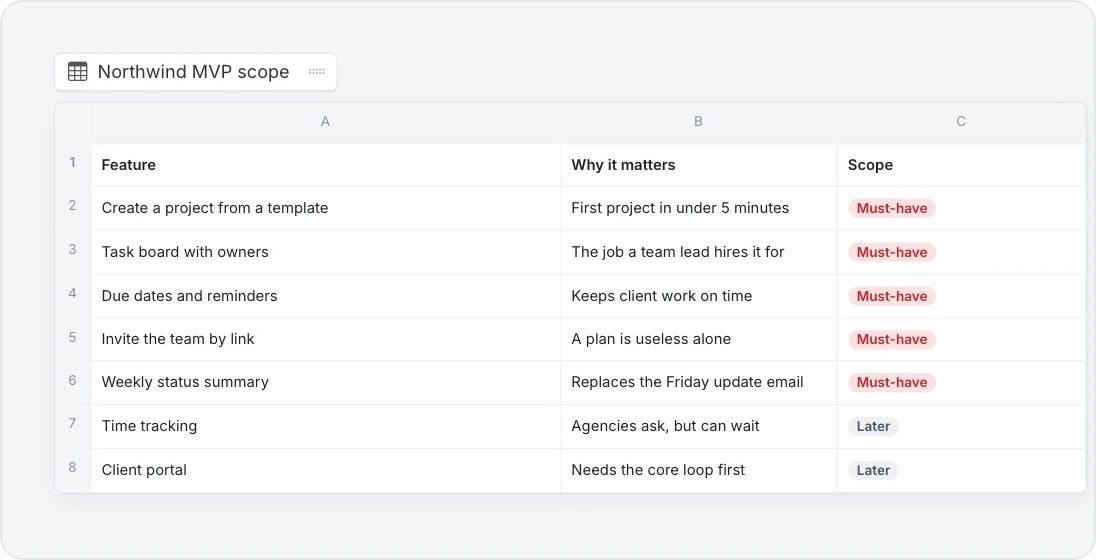
Keep building
A Concept Builder keeps going after the first draft. It suggests what to pressure-test next, and you can ask it to add to the concept, for example a release plan or a list of risks. Its memory keeps the session going across visits, and your team sees the same chat.
To stop a builder remembering earlier sessions, click … at the top of the panel and choose Reset memory.