
Meet Mida, your AI on the board
What Mida, the AI agent built into MockFlow, can make for you, how to open it and how to start from a ready-made prompt.
Mida is the AI agent built into every MockFlow board. Describe what you need and Mida plans it, asks what matters and builds it on the board, ready to edit: a flowchart of a hiring process, a product roadmap, a pricing page wireframe, a floor plan or a data table. Mida also reads your board, so it can change what you select, answer questions about the board and turn meeting notes into a plan.

Open Mida

Click the AI chip at the right of the bottom toolbar (1), or press Ctrl (⌘ on Mac) + J. Mida opens as a panel on the right of the board. You can also:
Press / on the board to open Mida with an empty prompt.
Right-click an empty spot on the board and choose Create with AI.
Start from a ready-made prompt
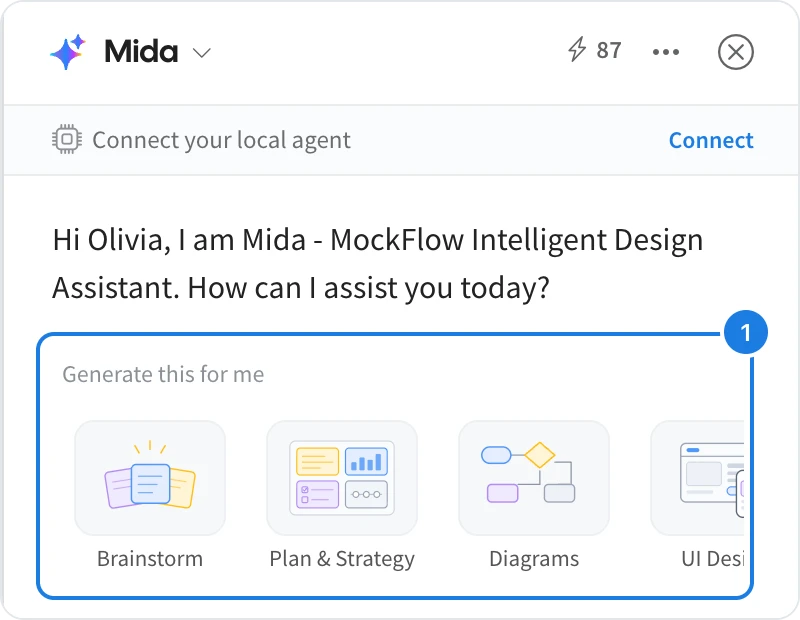
Under Generate this for me (1), pick a category such as Brainstorm, Plan & Strategy, Diagrams, UI Design, Floor Plans or Data, then a type, for example Flowcharts or Org charts. Mida fills in the start of the prompt, and Try examples suggests finished prompts. Add your details and press Enter to send.
You can also type any request in your own words, for example Map our customer onboarding as a flowchart.
What Mida can do
Build from a prompt: diagrams, plans, wireframes, tables, charts and more. See Generate a board from a prompt.
Work from your documents and images: meeting notes, transcripts, screenshots and whiteboard photos. See Turn meeting notes or a document into a board.
Change what you select: sort, convert or rewrite items on the board. See Change selected items with Mida.
Bring in an expert: Concept Builders are AI collaborators with a defined role. See What are Concept Builders.
Each request uses AI credits from your plan's monthly allowance, shown at the top of the panel. See AI credits.