
Your account menu
Open your account menu from the workspace sidebar to see your plan and AI credits, and to reach account settings, licenses, subscriptions and support.
Everything about your account starts from one place: your name at the bottom of the workspace sidebar. It shows your plan and your AI credit balance, and opens the account menu.
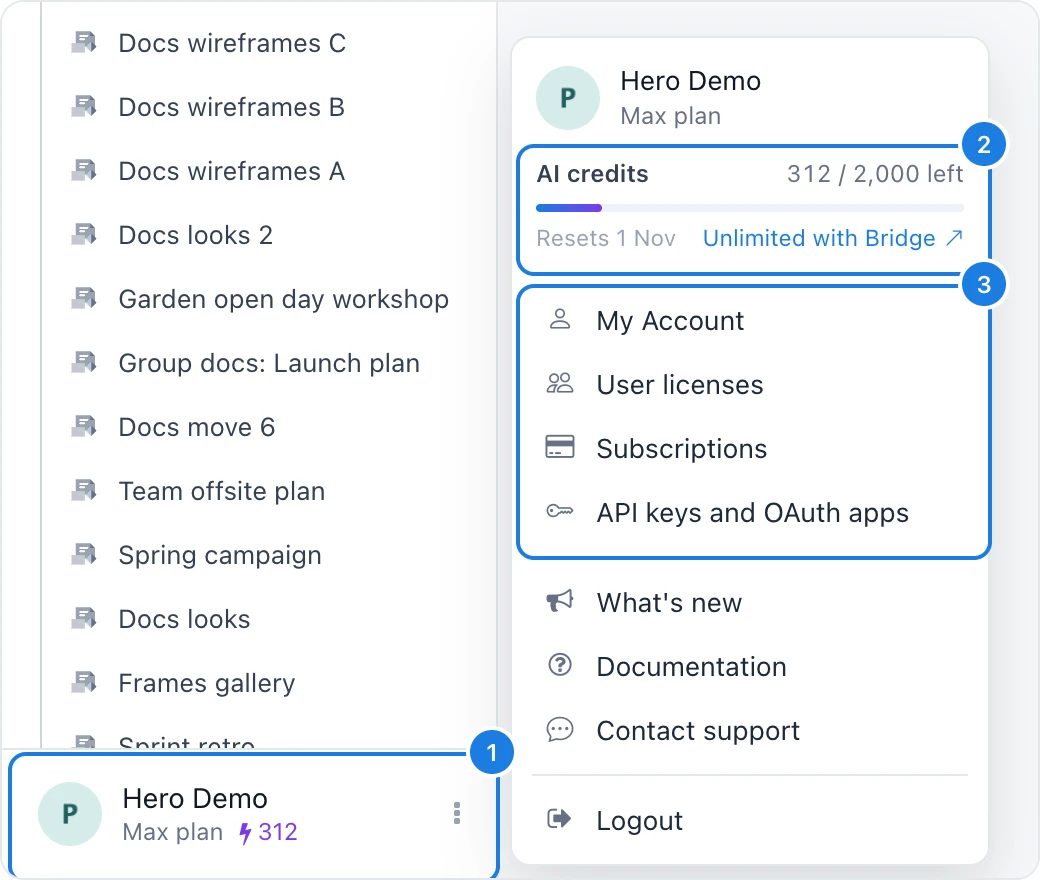
Open the workspace sidebar and click your name at the bottom (1). The footer shows your plan and, beside the lightning bolt, the AI credits you have left.
The AI credits card (2) shows how many credits are left this month and when they reset.
Choose an item (3) to open its settings.
Item | What it opens |
|---|---|
My Account | Account settings: profile, password, email notifications and authorized apps |
User licenses | The editors on your license, for license admins |
Subscriptions | Your paid plans, billing details and invoices |
API keys and OAuth apps | Keys for the MockFlow API, in the Developers console |
What's new | Recent product updates |
Documentation | MockFlow help and guides |
Contact support | A chat with the MockFlow team |
Switch to old layout | The previous dashboard, for accounts created before October 2026. A banner on that dashboard brings you back |
Logout | Signs you out on this device |