
Use WireframePro from AI assistants (WireframePro MCP)
Connect Claude Code, Cursor, VS Code or Codex to WireframePro with the WireframePro MCP server, and create wireframes, flowcharts and cloud diagrams from a prompt.
The WireframePro MCP server connects AI assistants to WireframePro. MCP (Model Context Protocol) is the open standard AI apps use to work with other tools. With it, you can ask Claude Code, Cursor or another assistant for screens in the conversation, and the AI creates them as editable wireframes in a WireframePro project.
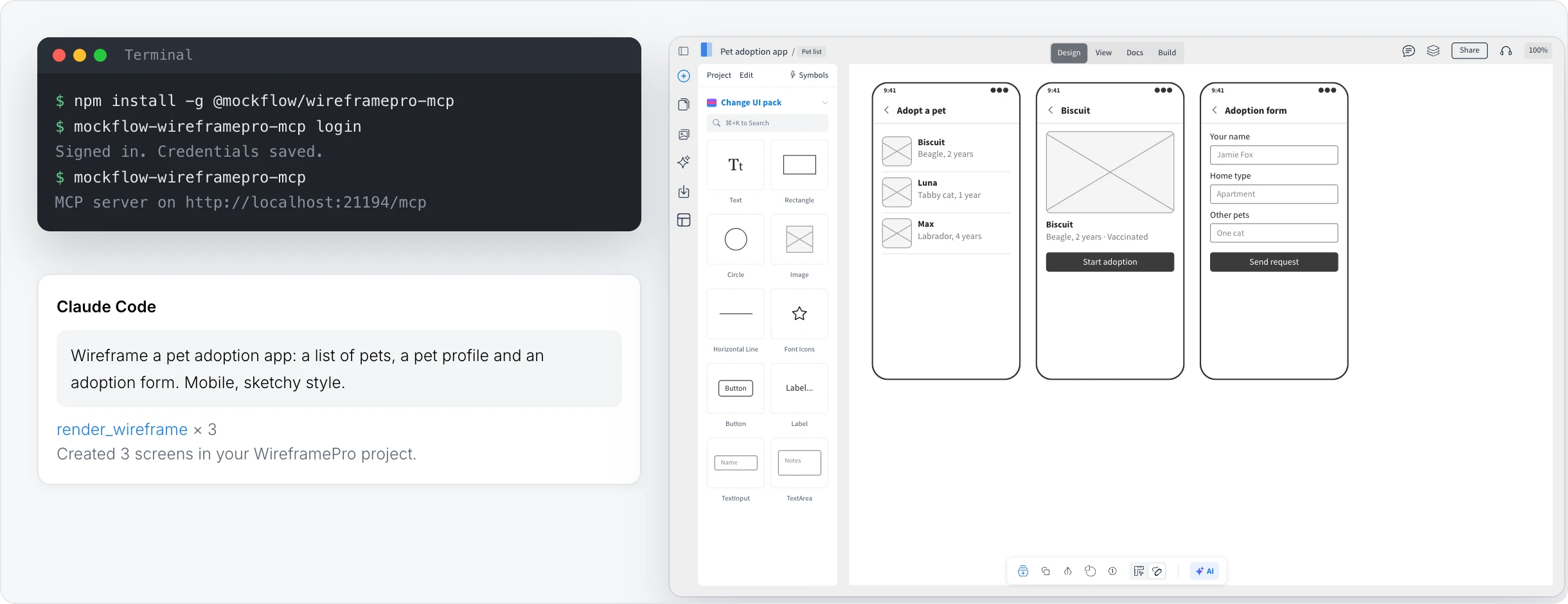
Set up the MCP server
You need Node.js on your computer.
npm install -g @mockflow/wireframepro-mcp
mockflow-wireframepro-mcp login
mockflow-wireframepro-mcp
The login command opens your browser to sign in to MockFlow. The last command starts the server at http://localhost:21194/mcp. Add that address as an MCP server in your AI assistant, such as Claude Code, Cursor, VS Code Copilot or Codex. You can also run it without installing, with npx @mockflow/wireframepro-mcp.
What you can ask for
Wireframes: web or mobile screens, in the default or sketchy style, for example Wireframe a pet adoption app: a list of pets, a pet profile and an adoption form.
Flowcharts: for example Draw the password reset flow.
Cloud architecture diagrams: for example Diagram our web app on AWS with a load balancer, two app servers and a database.
To add screens to an existing project, include the project's link in your request.
Use it from the desktop app
The MockFlow desktop app has the MCP server built in, so AI agents can create and read wireframes in the .wire files you have open. See Use AI agents on board files. In the editor, AI > Add MCP Server shows the setup for both.
Limits
On the Basic plan, the MCP server allows 10 requests every 30 minutes. Paid plans allow 30 requests a minute. See MockFlow pricing for details.