
Research the web with Mida
Ask Mida to search the web and bring what it finds onto your board, with links to its sources.
Good plans start with what others have already learned. Ask Mida to research a topic on the web and it brings the findings onto your board: competitor tactics as a new branch on a mind map, market facts in a table, or best practices as a checklist. Mida lists the sources it used, so you can check them.

Ask Mida to search the web
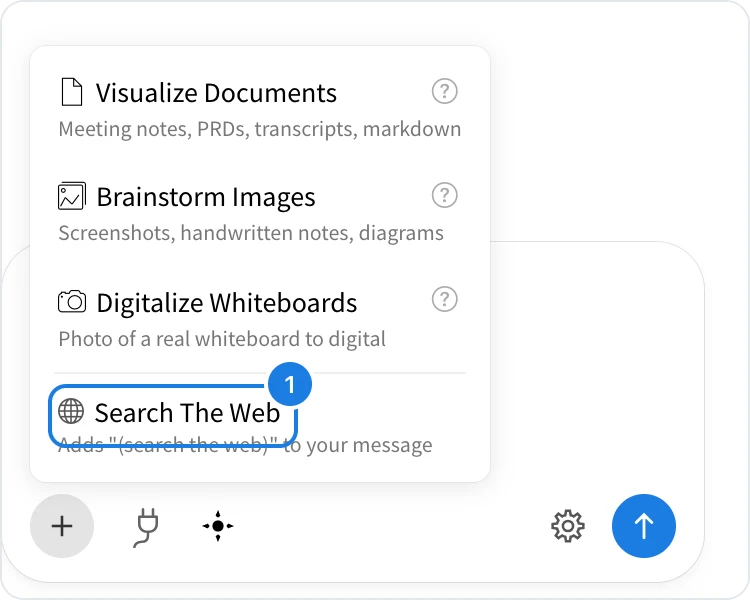
Open Mida and click + below the prompt field.
Choose Search The Web (1). Mida adds (search the web) to your message.
Say what to research and what to do with it, for example Research what helped project management apps succeed on Product Hunt and add the top tactics as a new branch on the launch ideas mind map, and press Enter.
Mida searches, reads what it finds and then works on the board. In the example above, it found the launch ideas mind map and added a Product Hunt tactics branch with four tactics, such as a teaser waitlist and replying to every comment.
Mida can also decide to search the web on its own when a question needs current information.
Ways to use web research
Add to what you have: Add the top competitors to the market map, Add current best practices to the onboarding checklist
Build something new: Compare the pricing of the top five project management tools in a table
Check facts: What are the current app store guidelines for login with Google?
When Mida answers in the chat, it links its sources. Check important facts, such as prices and dates, with the source before you rely on them.
What is not available on the Basic plan
Web search in Mida is not available on the Basic plan. Web research, turning documents and images into boards, and many other features, such as creating your own Concept Builders, are part of Plus and Max. See MockFlow pricing for details.