
Track activity on a board
See what teammates have done on a MockFlow board: new comments, replies, page updates and revisions, with a link to each one.
Track Activity shows what has happened on a board while you were away: who commented, who replied, which pages changed and which revisions were checked in. It is the quickest way to catch up before a review or to find the comment a teammate mentioned.

Open board activity
Point to the headset icon at the top right and click Track Activity.
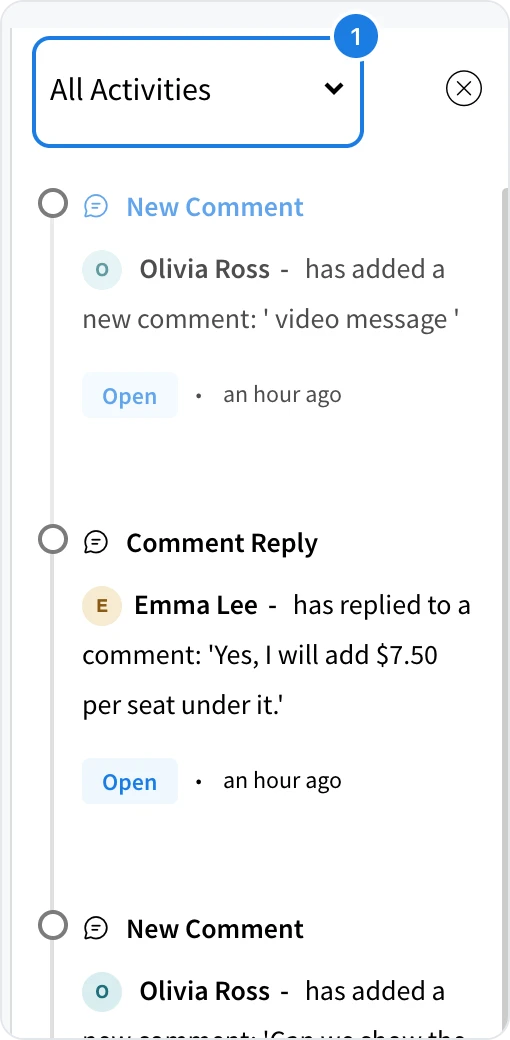
Read the list, newest first. Each entry shows who did what and when.
Click Open on an entry to go to that item on the board.
Filter the list
Use the filter at the top of the panel (1) to choose what you see:
All Activities shows everything on the board.
Comments shows new comments and replies, so feedback is easy to follow up.
Revision history shows revisions that were checked in, restored or deleted, and changes to revision notes.
Board activity covers one board. To see activity across all the boards in a space, see Track activity in a space.
What is not available on the Basic plan
Board activity is not available on the Basic plan. Choosing Track Activity there shows Upgrade to Plus instead. Board activity, space activity and many other features for teams, such as meetings and audio comments, are part of Plus and Max. See MockFlow pricing for details.