
Start your first board
Create a board and choose how to begin: generate it with AI, pick a template, shape an idea with a Concept Builder, or add a frame such as a wireframe, diagram or mind map.
A board is an infinite canvas where you brainstorm, diagram, wireframe and plan. When you sign up, MockFlow opens your first board for you. Every new board opens with a short panel, How do you want to start?, that helps you begin in the way that suits your work.
Create a new board
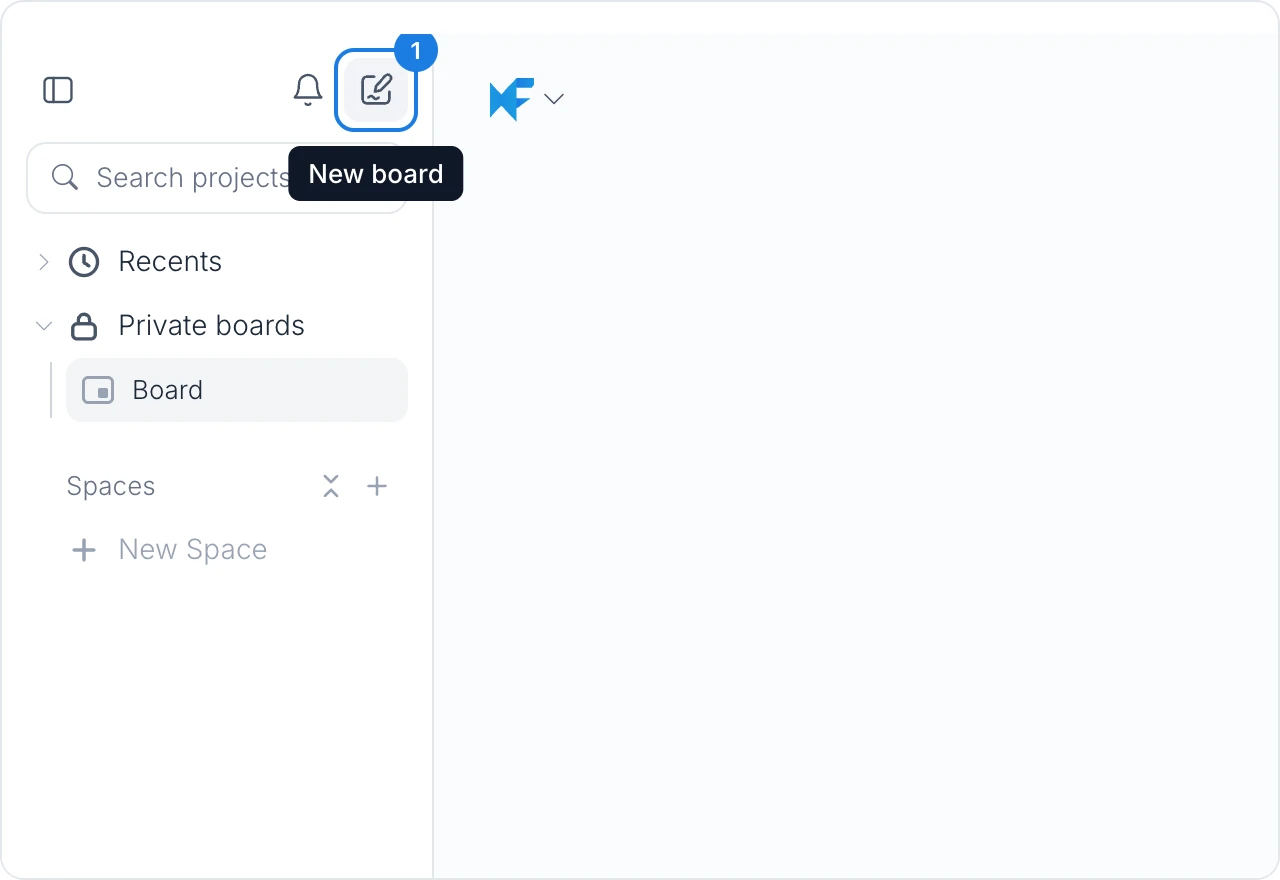
In the workspace sidebar on the left, click New board (1), the pencil button at the top. MockFlow creates a blank board and opens it with the How do you want to start? panel.
The free Basic plan includes a limited number of boards. Paid plans include unlimited boards. See MockFlow pricing for details.
Choose how to start
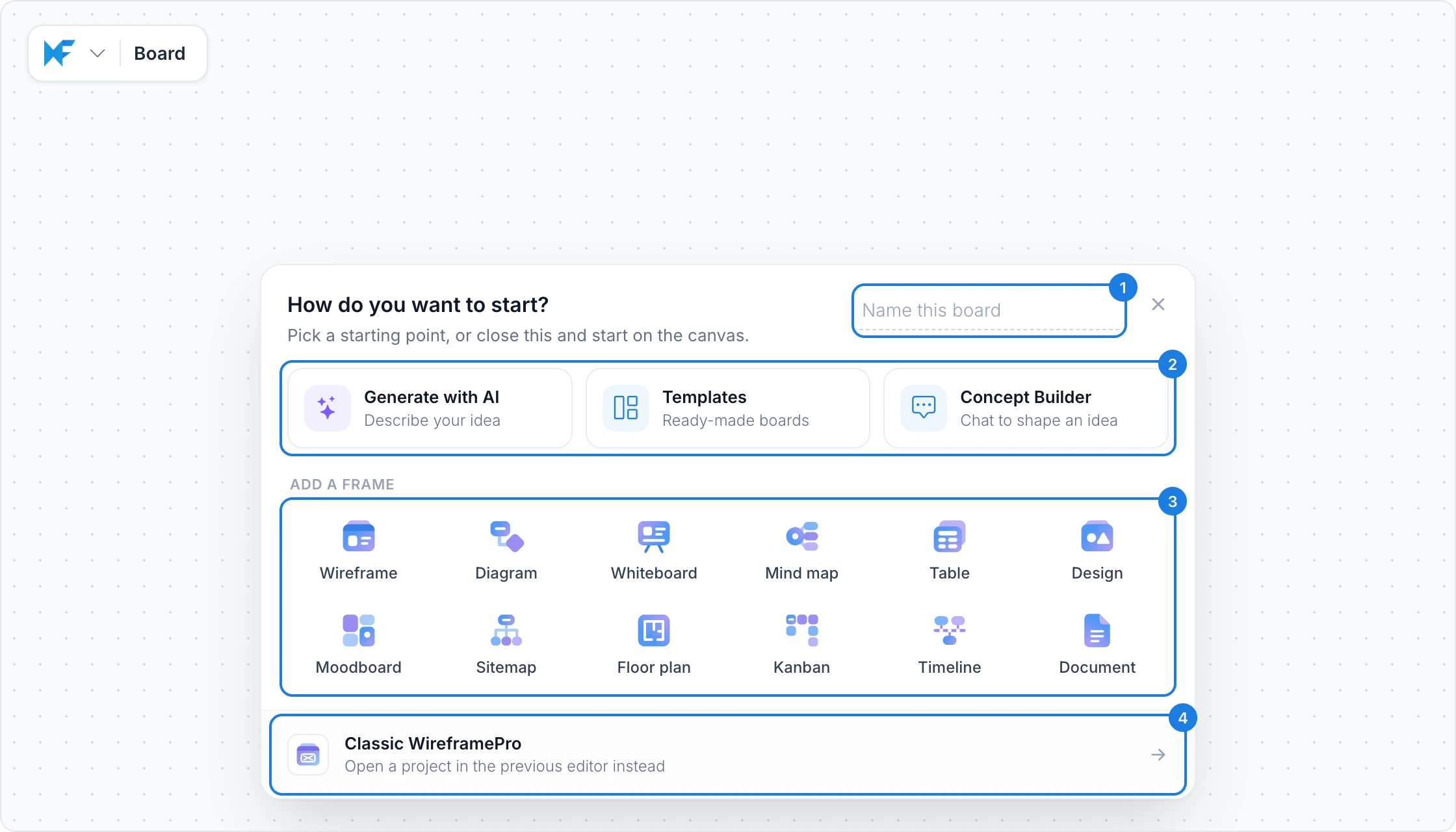
Type a name in Name this board (1). The name is saved as soon as you leave the field. If you skip this, the board takes the name of the first frame you add.
Choose a way to begin (2), add a frame (3), or open Classic WireframePro (4). Each option is described below.
To start on an empty canvas instead, press Enter in the name field or close the panel with the close button at the top right.
Begin with AI, a template or a Concept Builder
Each way to begin (2) opens its own panel on the board.
Opens Mida, the AI on your board. Describe what you need, and Mida plans the content, asks what matters, and adds it to the board as items you can edit.
Best for: starting from an idea, a brief, meeting notes or a document.
Example: Plan our coffee pop-up in Lisbon with an ad storyboard, a map of spots and a floor plan for the stand. Mida lists the items it will make, and Generate Board adds them.
Generating uses AI credits from your plan.
Opens the template library. Pick a ready-made board and adapt it to your work.
Best for: proven formats you want to start from instead of a blank canvas.
Examples: a brainstorming session, a mobile app wireframe, a sales process flowchart, a digital marketing plan, a pyramid diagram for a lesson or a storyboard. Browse them all in the template library.
Opens the Concept Builder library. A Concept Builder is an AI collaborator with a defined role. It joins your board, asks the questions an expert would ask, draws the concept as you talk, and remembers past sessions so the idea keeps building.
Best for: shaping an idea over time with expert guidance.
Examples: a Trip Planner, an iOS App Designer, a Service Blueprint Architect, a Database Schema Architect or a Go-to-Market Planner. Browse them all in the Concept Builders library.
Add a frame
A frame is a ready area on the board for one kind of work. Hover over a frame in the panel to see what you can create with it.
Frame | Use it for |
|---|---|
Wireframe | App and website screens, from phones to desktops, in sketchy, hi-fi or blueprint styles |
Diagram | Flowcharts, swimlanes, sequence, UML and ER diagrams, and AWS, Azure and GCP architecture |
Whiteboard | Brainstorms with sticky notes, SWOT analyses, retrospectives, roadmaps and workshop agendas |
Mind map | Ideas branching out from one topic, in several layouts and themes |
Table | Idea lists with owners and votes, impact and effort matrices, SWOT and retro tables, feature comparisons and tables from a CSV file |
Design | Social media posts, posters, banners, ads, logos and thumbnails |
Moodboard | Brand, color, typography and style references |
Sitemap | Website sitemaps, org charts and other hierarchies |
Floor plan | Layouts for homes, offices, shops, restaurants and events |
Kanban | Tasks in columns, with owners and dates |
Timeline | Milestones, roadmaps and sequences of events |
Document | Notes, specs and guides with headings, lists, tables and code |
You can add more frames and components to the same board at any time.
Open Classic WireframePro
WireframePro is MockFlow's dedicated UI design tool for wireframes and mockups of apps and websites. It works in projects of its own rather than on a board, and offers:
UI packs: ready component libraries for iOS, Android, web and other platforms
Symbols: reusable elements that update everywhere when you change them
Pages: many screens in one project, linked into a clickable prototype
Build mode: converts your wireframes into production code
Choose Classic WireframePro (4) to create a WireframePro project instead of a board. It is included with every plan. For quick screens next to your other work, add a Wireframe frame to a board instead.