
A tour of the WireframePro editor
Find your way around the Classic WireframePro editor: the Design, View, Docs and Build tabs, the left rail, the Project and Edit menus and the tool pill.
The WireframePro editor keeps the page you are designing in the middle and puts every tool one click away around it. This tour shows where each part is.
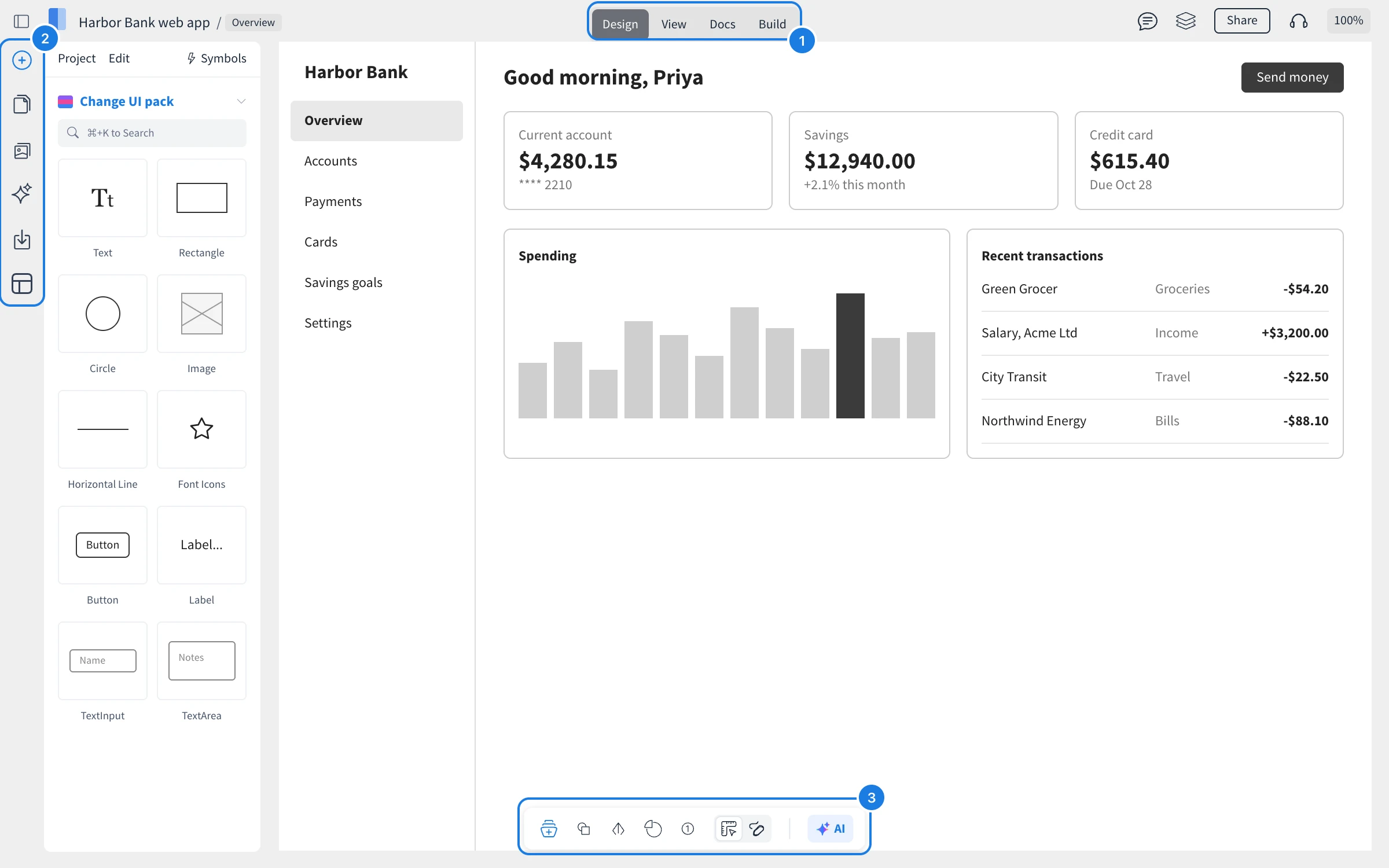
The four tabs
The tabs at the top (1) switch what you do with the project:
Design: build and edit pages.
View: click through the design as a prototype, the way reviewers see it. Press Shift to highlight the links on a page.
Docs: write UX docs and requirements beside the design. See Document a design with UX docs and specs.
Build: turn wireframes into code. See Turn wireframes into code with Build mode.
On the right of the top bar are Comments, Layers, Share, Start Meeting and the zoom level.
The left rail
The left rail (2) opens the panels and menus you use most:
Add components (Ctrl or ⌘ + 2): the components of the current UI pack, with search.
Pages (Ctrl or ⌘ + 3): the project's pages and folders, master pages and revisions.
Assets: uploaded images, icon libraries, diagram shapes, vector artwork, drawing and wireframe templates.
AI: generate layouts, images and diagrams, turn screenshots into wireframes, and add design skills and MCP servers.
Export: images, PDF, Word, PowerPoint, Figma, a selection or a .wire file.
Templates: ready-made page designs by category, such as Websites, Mobile apps and Enterprise.
The Project and Edit menus
At the top of the panel, Project holds project commands such as Save Project, Revision History, View Deleted Pages, Grid Settings, Page Settings and Export Wireframe. Edit holds undo and redo, copy and paste, copy and paste styles, lock, group and arrange. Symbols opens the project's reusable components.
The tool pill
The tool pill at the bottom (3) adds common items quickly: component libraries, layouts, arrows, charts and annotations. Its switch toggles between Wireframe comps and Sketchy comps, and AI opens Mida, the AI agent, which you can also open with Ctrl or ⌘ + J.