
Transfer a space to another person
Hand a space and all of its boards over to a teammate on your license, for example when you change roles or leave a project.
Every space has one owner. When you change roles, leave a project or hand a client over to a colleague, you can transfer the space to a teammate. The space moves with all of its boards, members and settings, and the new owner takes over from there.

Transfer a space
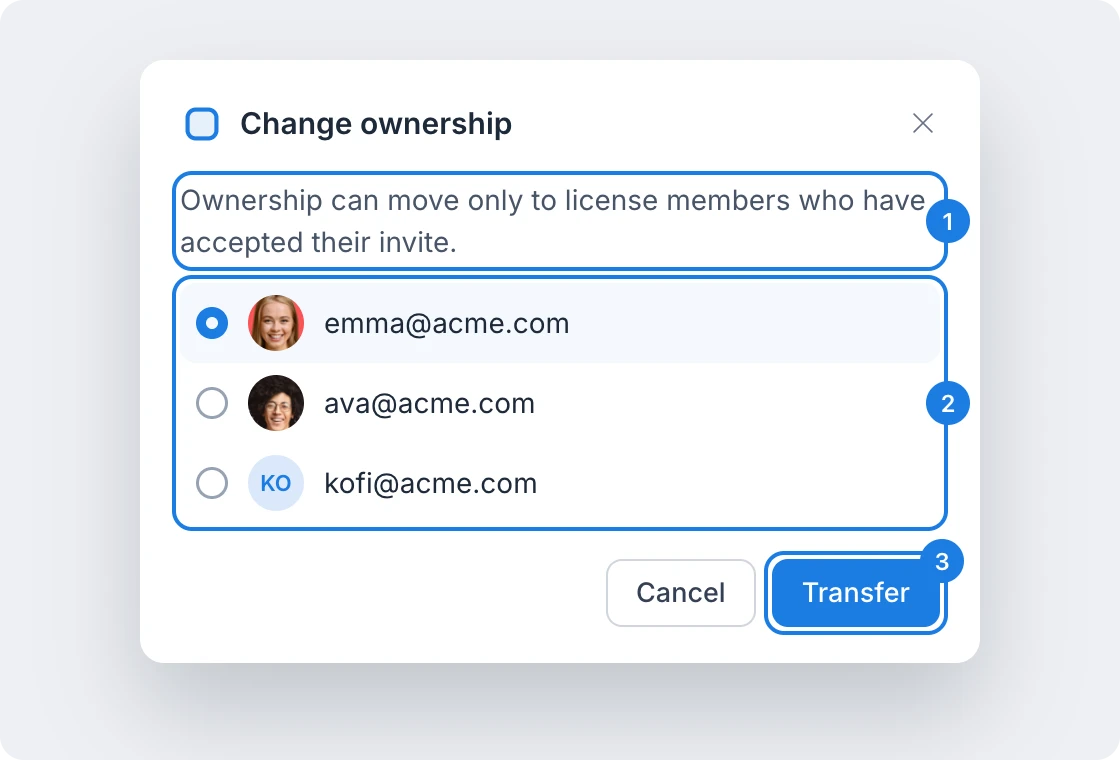
In the workspace sidebar, point to the space, click its settings button and choose Change ownership.
Read the note (1): ownership can move only to license members who have accepted their invite.
Choose the person who will own the space (2).
Click Transfer (3).
Check the confirmation, which names the space and the new owner, and click Transfer space.
The transfer takes effect at once and is recorded in the space's activity.
What happens after the transfer
The new owner owns the space and every board in it, and can share, rename or delete it.
You lose access to the space right away. If you still need it, ask the new owner to invite you, as described in Invite people to a space.
Other members keep their access and roles.
Who you can transfer a space to
Only the owner of a space sees Change ownership. You can transfer a space only to people on your license, the teammates listed under User licenses in your account, who have accepted their license invite. If nobody on your license has accepted yet, the dialog says so instead of showing a list.
If the transfer cannot go ahead, the dialog explains why, for example when the person has not accepted their license yet. They need to sign in and accept it first.
Private boards cannot be transferred, because they always belong to the person who created them. To hand over a private board, move it into a space first, as described in Move boards between spaces.
What is not available on the Basic plan
Transferring a space is not available on the Basic plan. Transferable licenses and spaces are included in Plus and Max, along with many other features for teams, such as space activity and unlimited spaces. See MockFlow pricing for details.