
Create your own Concept Builder
Describe the kind of concept your team builds and Mida drafts a Concept Builder for it, or define every field yourself.
When your team builds the same kind of concept again and again, such as app onboarding flows, workshop agendas or game levels, create a Concept Builder for it. Describe the concept in a sentence and Mida drafts the whole builder: its name, role, instructions, starting points, icon and cover. Review it, save it, and everyone on your team can use it.

Create a builder with AI
Open the Concept Builder Library from the Concept Builders icon in the bottom toolbar.
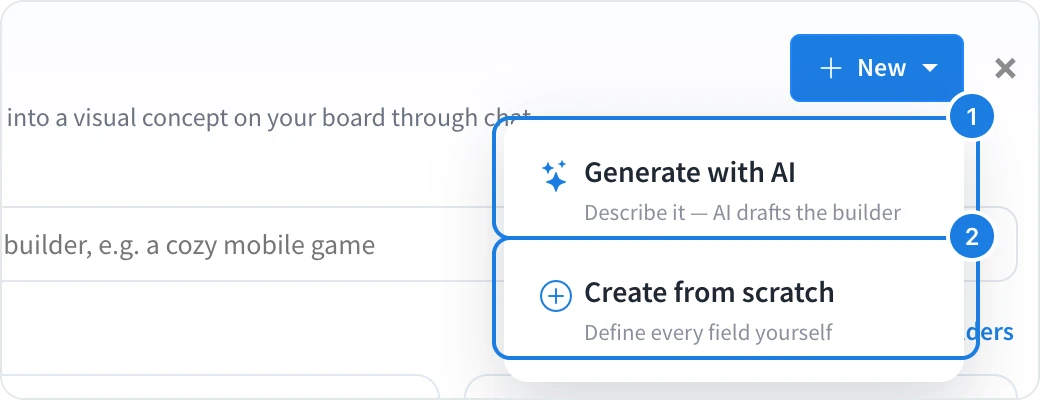
Click New, then Generate with AI (1).
Under What kind of concept do you want to build?, describe it, for example Mobile app onboarding flows, from the first launch to the moment a new user gets value.
Click Generate.
Mida drafts every field of the builder. Check them, change anything you like, and click Save Concept Builder. The new builder appears under Team in the library.
Create a builder from scratch
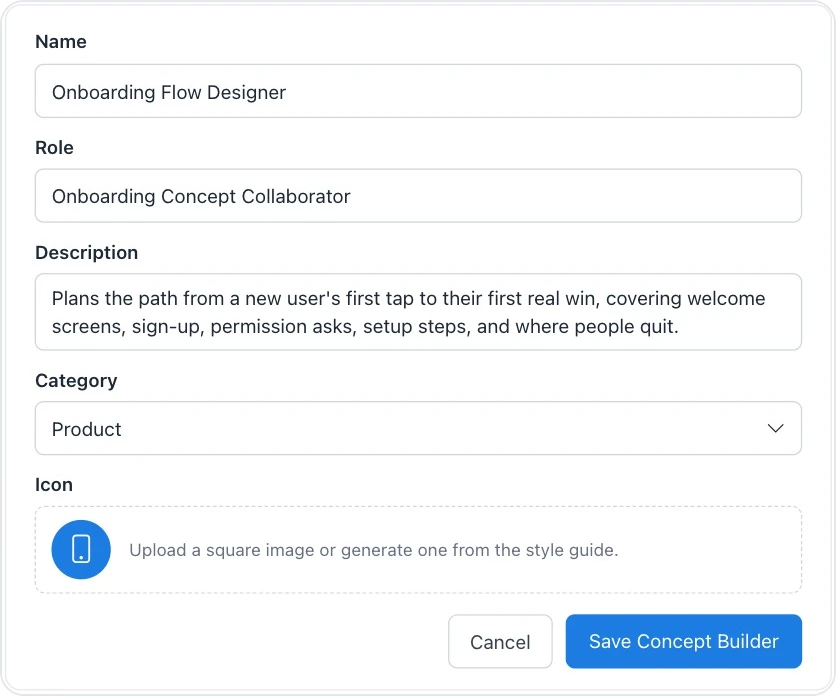
Click New, then Create from scratch (2), to define every field yourself:
Name, Role and Description: what the builder is called and what it helps your team create
Category: where it appears in the library
Icon and Cover Art: upload an image, or generate one from a short style guide
System Prompt: how the builder works with your team, the areas it covers and how it draws on the board
Starter Chips: the starting points shown when someone opens it, one per line
Enable Memory and Shared Memory: whether it remembers earlier sessions, and whether that memory is shared across your team
Show Model Picker: lets people choose an AI model for each message
Scope: Team (visible to your workspace only) or Public (visible to everyone)
Edit or delete a builder
On a builder you created, click … to edit or delete it.
What is not available on the Basic plan
Creating and editing Concept Builders is not available on the Basic plan. Your own builders, AI skills for your team and many other features, such as web search in Mida, are part of Plus and Max. See MockFlow pricing for details.