
Join a team license
Accept or reject a license your team has assigned to you, see what changes when you join, and leave a team license.
When your team's license owner or a License Admin adds you to their license, MockFlow asks you to join the next time you open it. Joining moves your account to your team's plan, so you can create boards, wireframes and diagrams with the same features as the rest of the team.

Accept a team license
Open the email that says a license was assigned to you. If you have no MockFlow account yet, sign up with the link in the email, using the same email address.
Sign in to MockFlow. A dialog asks you to join the team license of the person who added you, for example Join olivia.ross@acme.com's team license.
Click Accept.
Your account is upgraded right away, and MockFlow emails you a confirmation. The person who added you becomes your License Administrator.
What is shared when you join
After you join, your UI packs, fonts and Powerup data are shared with the other members of the license, so everyone works from the same assets. Your boards and spaces stay yours. Others see them only when you share a space or a board with them.
Reject a team license
Click Reject in the dialog, then Reject license to confirm. Your account stays on its current plan, and the person who added you can invite you again later. If you close the dialog instead, it opens again the next time you sign in.
Leave a team license
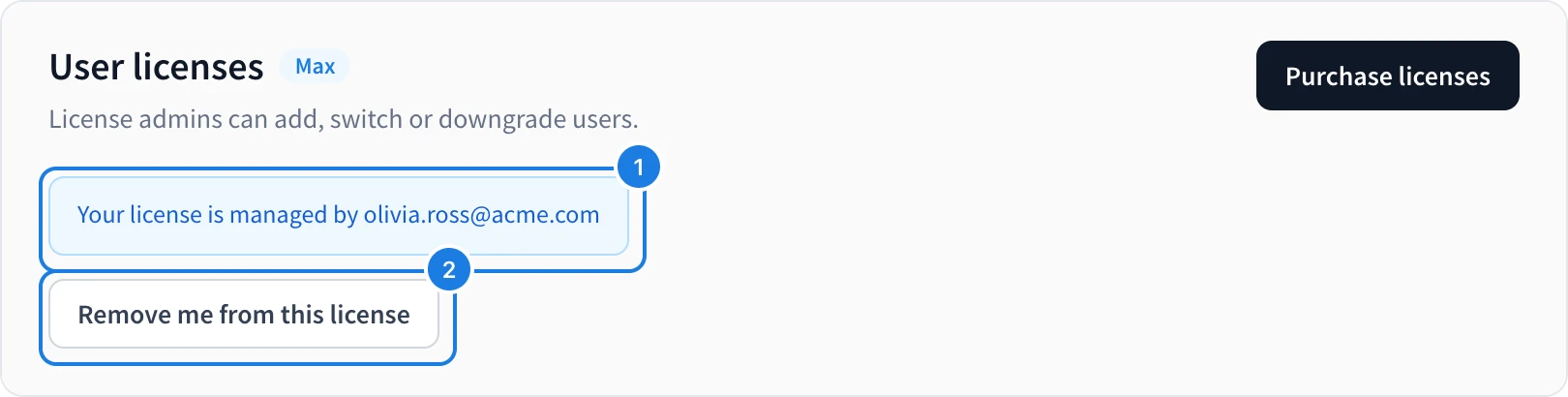
Click your name at the bottom of the workspace sidebar and choose User licenses. The page shows who manages your license (1).
Click Remove me from this license (2) and confirm with OK.
Your account moves to the free Basic plan. Your boards are not deleted, and the limits of the Basic plan apply from then on. To join again, ask your License Administrator to add you.