
Choose the AI behind MockFlow Bridge
Compare Claude Code, Codex, opencode and BridgeAI as the agent behind MockFlow Bridge, switch between them, and set up BridgeAI with an API key.
MockFlow Bridge works with several AI agents. Each one draws on your board, edits what is already there and uses no MockFlow AI credits, so the simplest choice is the agent you already pay for. This article compares them, shows how to switch, and explains how to use BridgeAI with an API key.
Supported AI agents
Agent | Runs on | Support |
|---|---|---|
Claude Code | Your Claude subscription | Full |
Codex | Your ChatGPT subscription | Full |
opencode | The model you choose, including models on your computer | Full |
BridgeAI | An API key from OpenRouter, Azure OpenAI or Amazon Bedrock | Built into Bridge |
Gemini CLI | Your Google account | Basic |
Cursor CLI | Your Cursor subscription | Experimental |
Gemini CLI and Cursor CLI need to be connected to Bridge once with a command that Bridge prints when it starts. The other agents work as soon as they are installed and signed in. For install commands, see Set up MockFlow Bridge.
On Basic, Bridge runs with Claude Code. Choosing another agent needs Bridge Pro, included in Plus and Max. See MockFlow pricing.
Which AI agent to use
If you want | Use |
|---|---|
The smoothest experience, with every feature supported | Claude Code |
To use the ChatGPT subscription you already have | Codex |
To choose your own model, or run one on your computer | opencode |
To start without installing an assistant app | BridgeAI |
How the agents differ
Every agent draws on the board, edits items already drawn, plans multi-part boards, remembers earlier messages in the chat, reads a folder you share with Bridge and reads files you attach in Mida. A few things differ:
Replies as they are written. Claude Code and BridgeAI show the reply word by word, and a Drawing step appears while the drawing is being made. Codex and opencode send the reply in one piece when they finish, together with the drawing.
Web search. Claude Code and Codex can search the web for current facts, such as recent events or real companies. opencode can open a web page you name but cannot search. With BridgeAI, it depends on the provider and model. Without search, the agent uses what it already knows and leaves unknown details as placeholders.
Choosing a model. opencode and BridgeAI let you choose the model. Claude Code and Codex use the model of your subscription.
See and change the agent Bridge uses
To see which agents Bridge found on your computer and which one is in use, run:
mockflow-bridge agent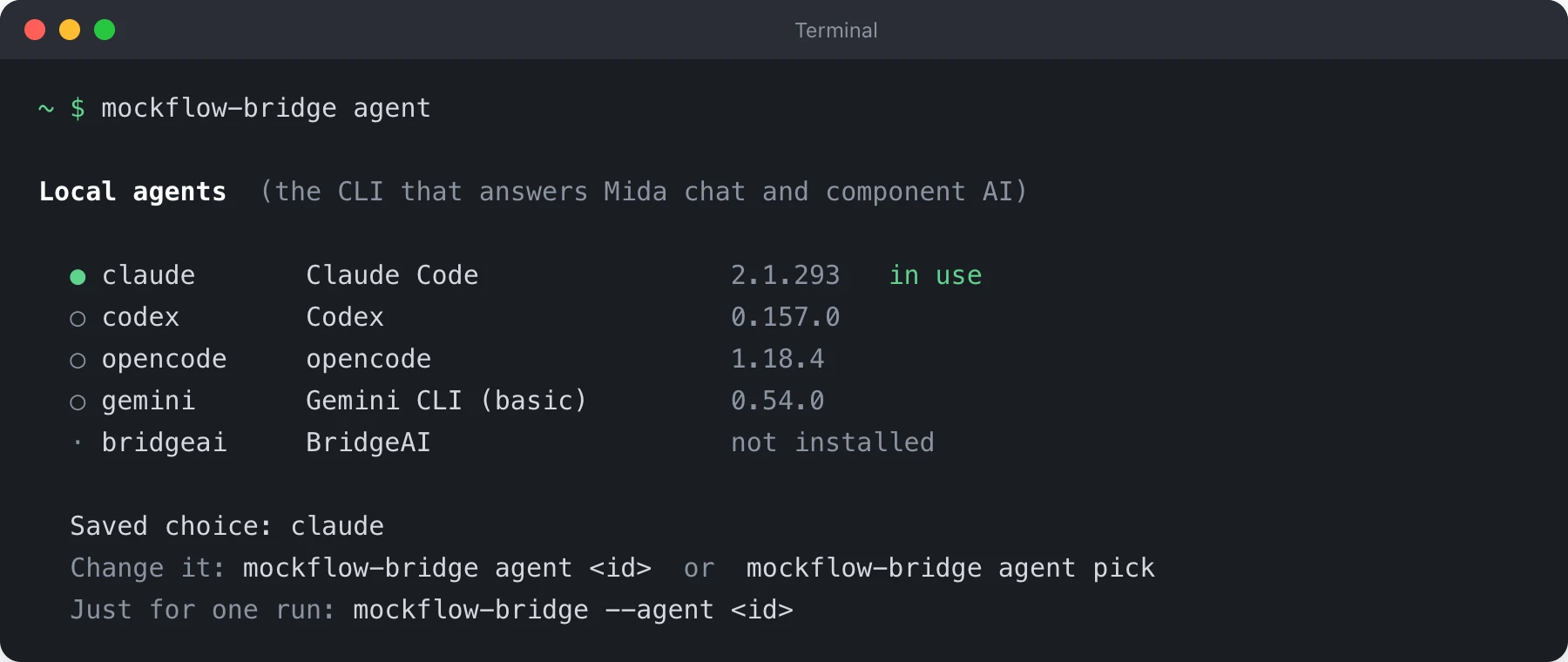
To switch, run the command with the agent's id from that list, for example codex. If Bridge is running, it switches straight away; the board stays connected and open chats start a fresh conversation with the new agent.
mockflow-bridge agent codexYou can also run mockflow-bridge agent pick to choose from a list, or press a in the Bridge window. To use another agent for one run only, without changing your saved choice, start Bridge with mockflow-bridge --agent codex.
Use BridgeAI with an API key
BridgeAI is an agent built into Bridge, so there is no assistant app to install. It connects to an AI provider with an API key you create there. OpenRouter is the easiest: one key gives access to many models, and a good default model is chosen for you.
Provider | Set |
|---|---|
OpenRouter |
|
Azure OpenAI |
|
Amazon Bedrock |
|
On macOS or Linux, set the key and start Bridge in the same terminal window:
export OPENROUTER_API_KEY="your-key"
mockflow-bridge
On Windows, set the key once, then open a new Command Prompt window and run mockflow-bridge:
setx OPENROUTER_API_KEY "your-key"On macOS and Linux, export lasts until you close the terminal window. To keep the key, add the same export line to your ~/.zshrc or ~/.bashrc file.
To see the provider and model in use, or choose another model, run:
mockflow-bridge bridgeai
mockflow-bridge bridgeai model
With Azure OpenAI, the model is your deployment name. Set it with mockflow-bridge bridgeai model followed by the name.
Your API key stays on your computer and is used only to call your provider. Usage is billed by the provider on your own account, not by MockFlow.