
Draw on your board from Codex
Install the MockFlow plugin for Codex, so Codex draws mind maps, flowcharts, kanban boards and wireframes on your open MockFlow board from the Codex app or CLI.
The MockFlow plugin for Codex lets you stay in Codex and have it draw on the MockFlow board open in your browser. Ask for a mind map of a repo, an architecture, a kanban board of work from your notes or a wireframe of a screen, and Codex draws it on the board while you watch. Like the plugin for Claude Code, it reaches your board through MockFlow Bridge, and it uses your ChatGPT plan, not MockFlow AI credits.
Where the plugin can draw
MockFlow Bridge runs on your computer and draws in the board open in your browser on that same computer, so Codex has to run there too:
Where you use it | Draws on your board |
|---|---|
Codex selected in the ChatGPT desktop app | Yes |
Codex CLI | Yes |
A ChatGPT conversation, in the desktop app or on the web | No |
Codex cloud tasks | No |
A ChatGPT conversation and a Codex cloud task run on OpenAI's servers, which cannot reach Bridge on your computer. In those, the plugin explains that it cannot draw instead of returning a text diagram. To create a MockFlow board from a ChatGPT conversation, add MockFlow as a connector in ChatGPT instead.
Install the MockFlow plugin
You need Node.js 18 or newer, Codex and a MockFlow account.
In a terminal, add the plugin to Codex:
codex plugin marketplace add mockflow/mockflow-codex-plugin
codex plugin add mockflow@mockflow
To check that it worked, run codex plugin list, which should show mockflow@mockflow as installed and enabled.
Then install and start MockFlow Bridge, if you have not already, and leave its window open:
npm i -g @mockflow/mockflow-bridge
mockflow-bridge
Open your board in MockFlow and pair it with Bridge: open Mida, click Connect on the Connect your local agent strip and enter the pairing code from the Bridge window. You pair once per computer. For pictures of each step, see Set up MockFlow Bridge.
The MockFlow plugin is also listed in the Codex plugin directory. That copy includes the MockFlow skills but cannot connect to Bridge, so it cannot draw. Install the plugin with the commands above to draw on your board.
Ask Codex to draw
Ask in your own words; Codex picks the right kind of item. For example:
"Draw a mind map of how this repo is structured"
"Draw the cloud architecture from our Terraform files in infra/"
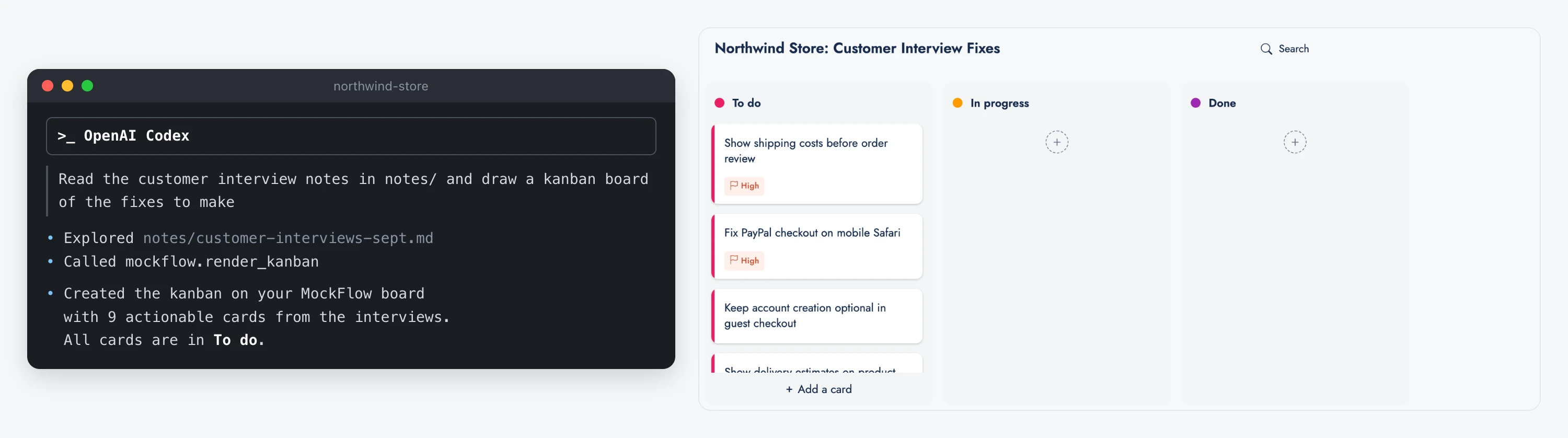
"Read the notes in this folder and make a kanban board of the fixes to make"
"Here is the transcript from this morning's planning call, turn it into a board of decisions, owners and open questions"
Follow-up requests, such as "Add a Blocked column to that kanban board", change the item already on the board instead of drawing a second one. To make sure a result goes on the board and not into the terminal as text, type /mockflow-draw followed by your request.
Codex reads your files on your computer. They are never uploaded; only the finished drawing is saved to your board, where teammates can open, edit and share it as usual.
The plugin works on every plan. On Basic, Bridge runs on one board at a time with a daily number of free generations. Plus and Max include Bridge Pro, with no daily limit and several boards at once. See MockFlow Bridge on each plan.