




 Air Hockey
 is an online air hockey game for two people on an upright table. Steer your mallet with the mouse or a finger, swing through the puck and bank it off the rails into the goal at the top.
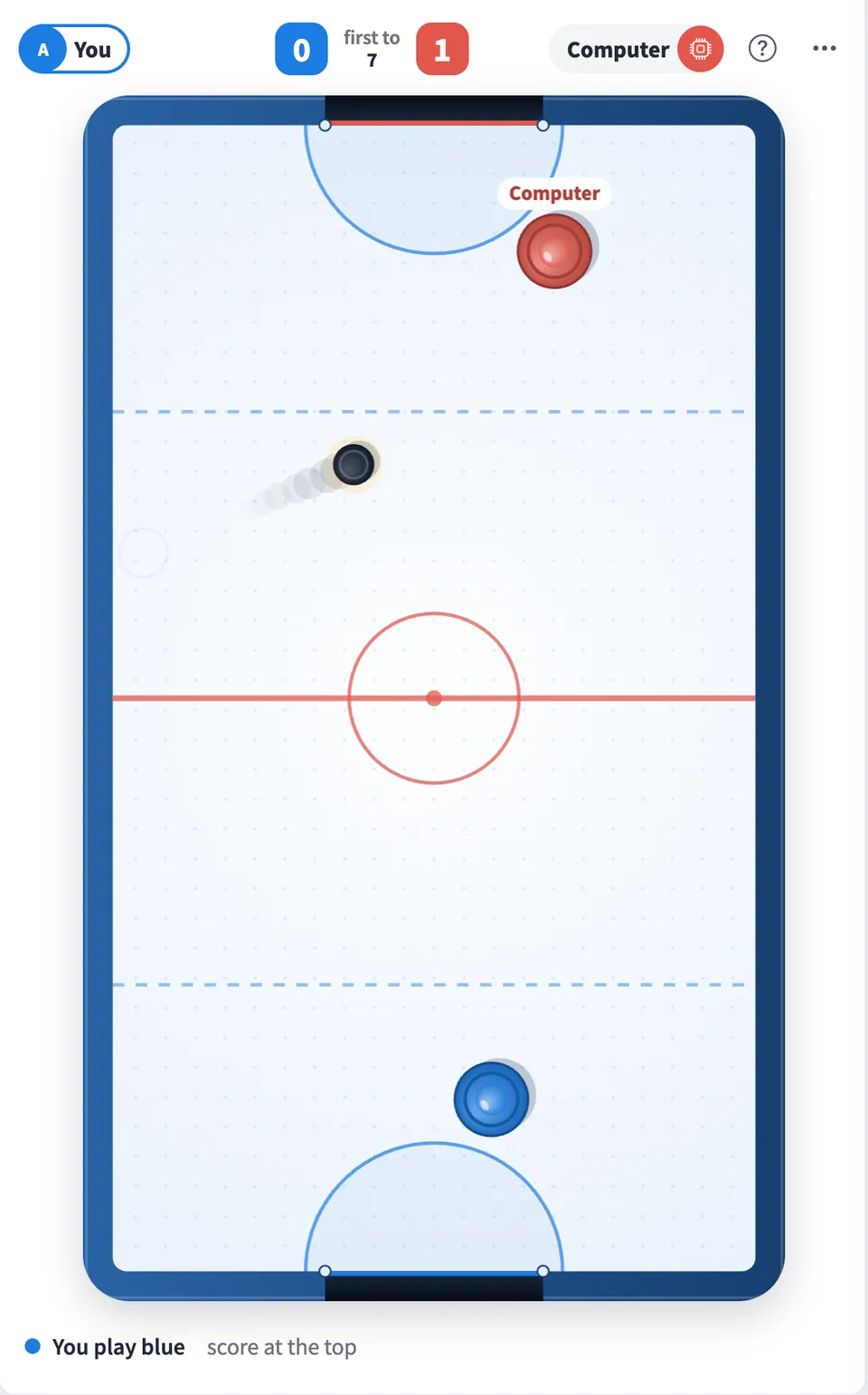
Play Air Hockey online together.
Each player sees the table turned so their own goal sits at the bottom of their screen. Everyone else on the board watches the match live, and a leaderboard keeps count of who wins.
It runs on a shared MockFlow board, so a quick match sits right next to the work. On your own, play the computer instead.
- Live two player play. Both players move at the same time and every hit shows up on the other screen within moments, while the rest of the board watches.
- Your goal at the bottom. The table turns for each player, so you always defend the goal nearest you and shoot upward.
- Real puck movement. The puck glides, slows a little, bounces off the rails and the goal posts, and flies harder off a faster swing.
- Computer opponent. Play the computer to warm up or to play on your own. It defends its goal and lines up its own shots.
- Leaderboard. Finished matches count toward a shared leaderboard of wins, losses and goals. Games against the computer are counted on their own.
- Mouse or touch. Steer with a mouse on a computer or drag with a finger on a phone or tablet.
How to play Air Hockey.
Pick a color
Press Play blue or Play red to take one end of the table. Anyone else on the board can take the other color.
Or play the computer
Alone at the table? Press Play the computer and it takes the other end.
Steer your mallet
Move the mouse over the table, or drag a finger on a phone. Your mallet follows and stays in your half.
Shoot
Swing through the puck. The faster your mallet moves, the harder the shot, and the side rails let you bank it around the other mallet.
Score at the top
Knock the puck into the goal at the top of your screen. After a goal the puck comes back on the side of the player who let it in.
Win the match
The first to 7 goals wins. Press Rematch to play again with the same two players.
Who uses Air Hockey.
Two teammates on a break
Play a quick match to 7 without leaving the board you are working on.
A remote team after a long meeting
Two people play while everyone else watches the match live on the same board.
An office running a weekly rivalry
Keep the leaderboard going over the week and see who ends on top.
Someone waiting for a meeting to start
Take a few shots against the computer while the others join.
Add Air Hockey to your board.
Use on a board opens a new board with Air Hockey already on it. To add it to a board you already have, follow these steps. Each copy keeps its own data, so a vote on one board never changes another.
Open your board
Open the MockFlow board you want to use it on.
Add it from the Artifact Library
Click Add anything (the plus button) in the toolbar at the bottom of the board, switch to Artifacts and pick Air Hockey under Games. Adding it does not use AI credits.
Use it together
Click Interact with Component (the hand button), or switch the board to Play mode. Everyone on the board uses the same app, and Reset shared data clears it for the next session.








 Brainstorm with MockFlow MCP


