



Online sticky notes that turn ideas into plans.
Add a note with one key, group the best ideas with your team, then let AI turn them into a kanban board, a mind map or a table.
 Olivia




MockFlow’s online sticky notes work like the paper ones, on a board the whole team shares. Press N, type one idea, pick a colour and drag the note into a section beside the others. Everyone adds and moves notes at the same time, from anywhere, and nothing falls off the wall. When the ideas are in, react to the best ones, then ask AI to group the notes into themes or turn them into a kanban board, a mind map or a table you keep working on, on the same online whiteboard.
What are online sticky notes?
Online sticky notes, also called virtual or digital sticky notes, are small coloured notes you place on a shared digital board. Each holds one idea, so a team can collect thoughts quickly, then move, group and rank them together.
One idea per note
A note is short by design. It keeps a brainstorm fast and makes every idea easy to move into a group later.
On a board everyone shares
The whole team writes on the same wall at once, in the room or across time zones, and sees each note appear live.
The start of the work
In MockFlow the notes sit beside kanban boards, mind maps, documents and charts, so ideas become plans on the same canvas.
Why sticky notes work better online.
Paper notes curl, fall off and end up in a photo nobody opens again. Online, every note stays readable, movable and part of the plan after the meeting ends.
Nothing falls off
Notes stay where you put them, in a clear typeface, however long the board lives.
Regroup in seconds
Drag notes between sections, wrap a cluster in a new section, or let AI sort them for you.
Join from anywhere
Remote teammates add notes at the same time as the people in the room, each with a named cursor.
Keep going after the session
The notes become tasks, a mind map or a document next to them, so the decisions don’t get lost.
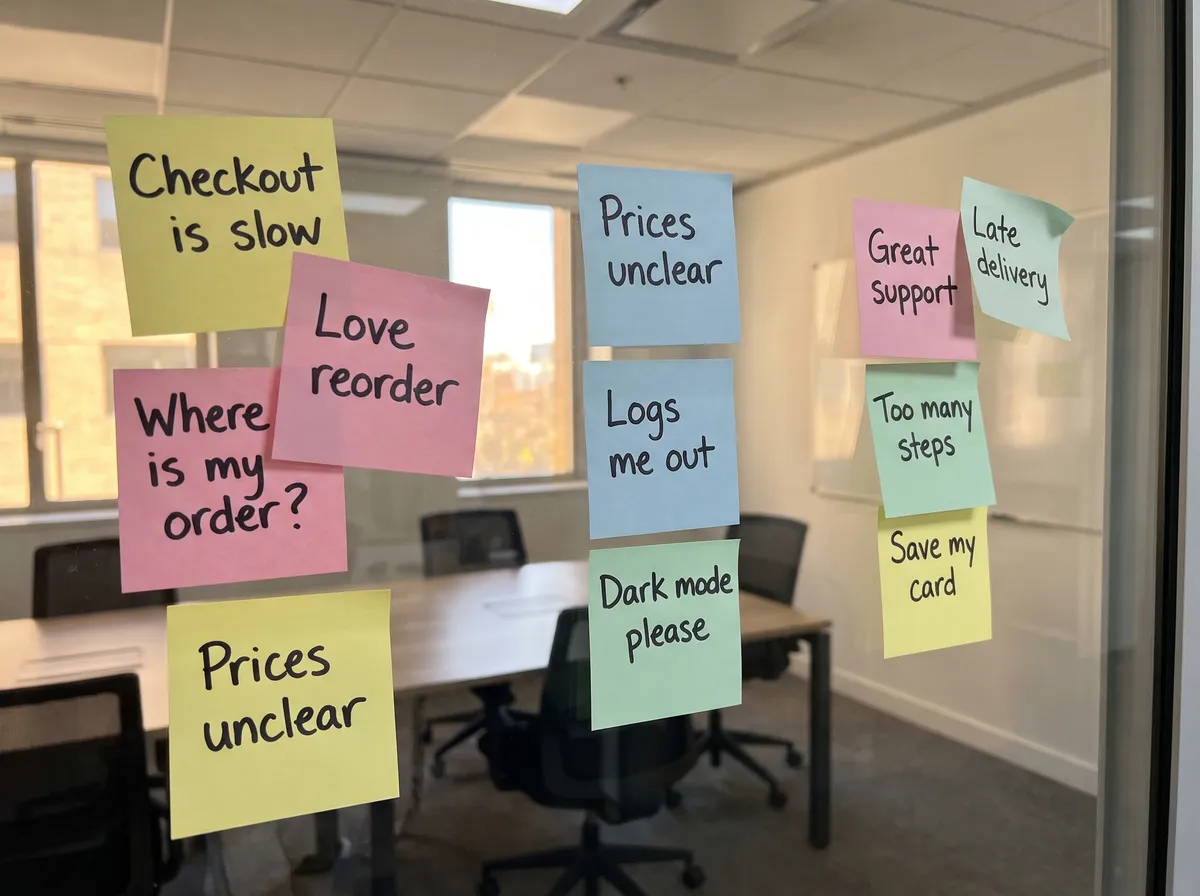
 Digitalize Whiteboards
Checkout is slow
Logs me out
Too many steps
Prices unclear
2 notesWhere is my order?
Late delivery
Love reorder
Great support
Dark mode please
Save my card
Turn a wall of paper notes into digital sticky notes.
Ran the workshop in a room? Take one photo of the wall. Mida, the AI on your board, reads the handwriting and rebuilds every note on the board, ready to sort, merge and share with people who weren’t there.
- One photo. Attach it in Mida with Digitalize Whiteboards or Brainstorm Images and ask for editable sticky notes.
- Clean it up. Ask Mida to merge duplicates and group the notes into themes.
- Bring everyone in. Remote teammates add their own notes to the same groups.
Photo to board is on Plus and Max. See Turn images and whiteboard photos into a board.
How to use online sticky notes.
Five steps from an empty board to a plan the team agrees on. Build your board covers every tool.
- Open a board.Open mockflow.com/new with no account, or sign up free and create a board in your workspace.
- Add sticky notes.Press N, or open Stationery with Ctrl+6 and click a colour. Type one idea per note.
- Group them.Press S for a section and drag notes in, or select notes and choose Wrap in Section.
- Pick the best ideas.Invite the team with Share. Reactions and comments show which notes everyone backs.
- Turn notes into a plan.Select the notes, click Ask AI about this selection and ask for a kanban, a mind map or a table.
Every sticky note tool in one menu.
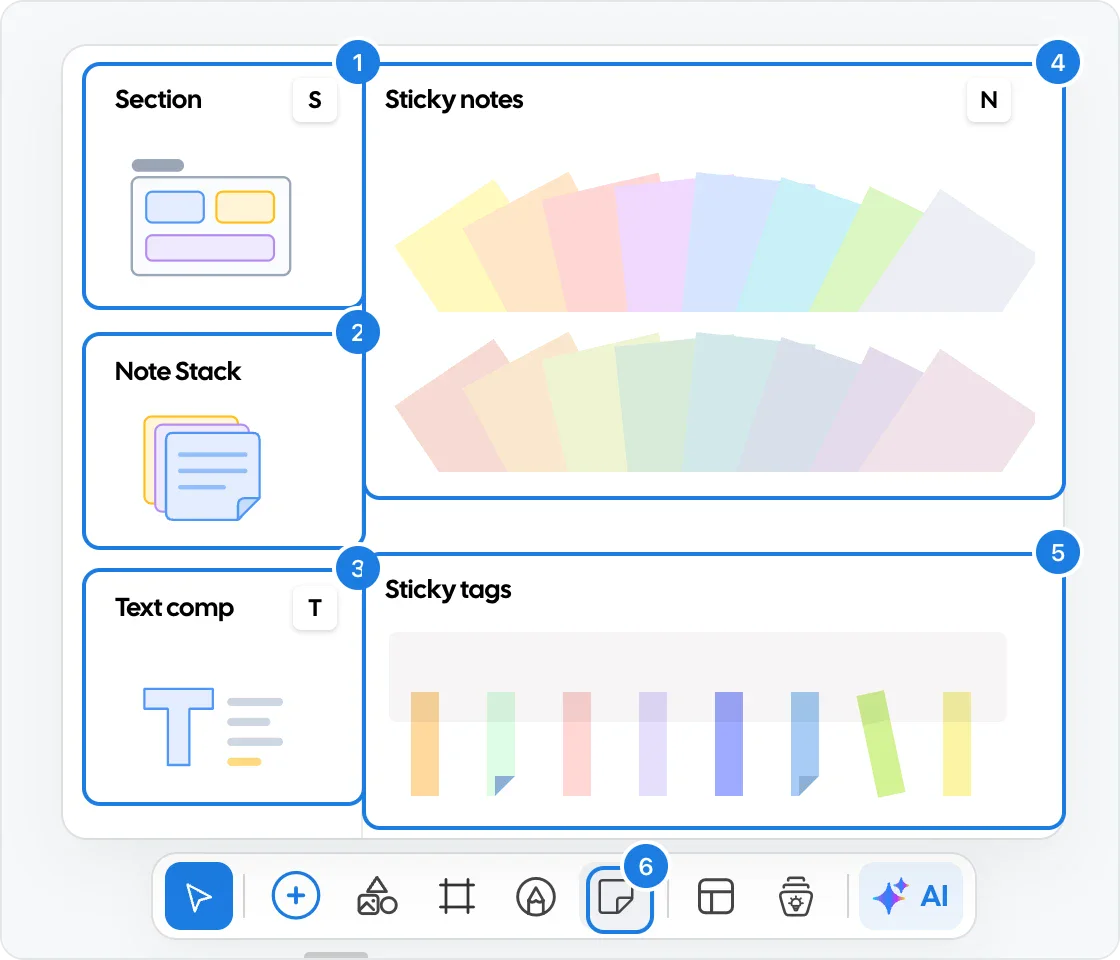
Stationery in the tool bar holds what you reach for most in a brainstorm. Open it with Ctrl+6, or skip the menu and press a key on the canvas.
- Sticky notes. Two rows of colours, bright and soft. Press N on the canvas to add one.
- Note stack. A pad on the board. Drag a fresh note off it whenever you need one.
- Sticky tags. Small coloured flags to mark a favourite, a decision or a question.
- Sections and text. Press S for a titled group and T for a heading or an instruction.
- Draw. Circle a cluster or sketch an arrow between notes with the pen, Ctrl+5.
All shortcuts are in Keyboard shortcuts.
Let people pause their weekly box
 Sofia
Make every note easy to read.
Select a note and its toolbar appears above it, with every setting one click away.
- Colour. Light yellow, peach, rose, lavender, blue, cyan, green and grey, softer shades, or More colors for any other.
- Text. Font, size, line height and colour, with AutoSize Text to fit long notes. Drag a corner to resize the note.
- Show the author. Each note can carry the writer’s picture and first name, handy in a retro.
- Fold, shadow and lock. A folded corner or a shadow for the paper look, and Lock from the right-click menu so a note stays put.
Build a sticky note board with sections.
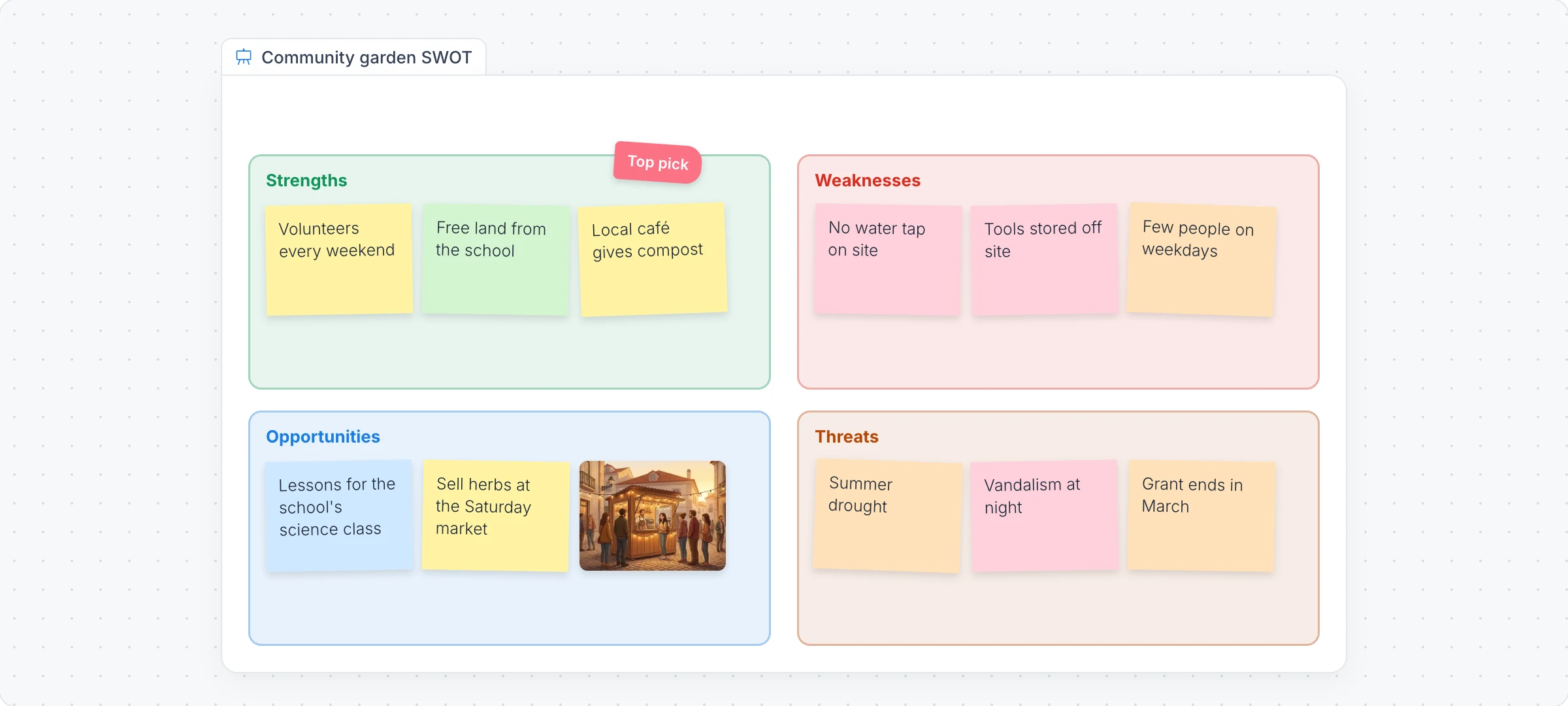
Sections give notes a home: one per theme, column or week. A Whiteboard frame holds a whole exercise, such as a SWOT or a retro, so it moves and exports as one. See Sections and Brainstorm on a whiteboard frame.
Wrap in Section
Select a cluster, right-click and choose Wrap in Section. The section is drawn around the notes, behind them.
Line them up
Turn on vertical or horizontal stacking and every note dropped in slides neatly into place.
Tell groups apart
Themes such as Mint, Sunny and Cherry, layout styles such as Minimal and Tab, and an icon beside each title.
Fill it with AI
Generate with AI on a section writes sticky notes from a prompt, such as icebreaker questions for a first lesson.
Vote on the best sticky notes.
A brainstorm ends with a decision. Let the team show what they back, time box the round, and see the favourites rise.
- Reactions. Drop a thumbs up or a heart on any note and the count shows how many agree, on every plan.
- Comments. Ask a question right on the note, and mention a teammate.
- Upvote ideas. A shared list that sorts itself by votes, on Plus and Max.
- Timer and polls. A countdown everyone sees, and a quick poll to settle a tie, on Plus and Max.
Want dot voting or planning poker? Voting apps run on the board too, on Plus and Max.


Deploys took too long
Flaky tests slowed us down
Release notes were late
Great pairing on search
| A | B | C | |
|---|---|---|---|
| 1 | Note | Theme | Votes |
| 2 | Deploys took too long | Process | 5 |
| 3 | Flaky tests | Quality | 4 |
| 4 | Release notes late | Process | 3 |
| 5 | Pairing on search | Keep | 6 |
Let AI sort your sticky notes.
Mida is the AI on every MockFlow board. Select a pile of notes, say what you need, and it reads every note before it builds, so the result keeps your team’s own words.
- Group and sort. “Group these ideas into themes” or “Sort these by priority”.
- Turn notes into work. A spreadsheet, a tree diagram, a mind map or a kanban board, placed beside the notes.
- Start from nothing. A section or a Whiteboard frame fills itself with notes from a prompt, and each note has its own prompt to write its text.
Try a prompt like “Group these interview notes into themes, then make a kanban of the top three problems.” Each request uses AI credits. More in Change selected items with Mida and on the AI whiteboard page.
Sticky notes for every kind of session.
The same notes run a ten minute check in or a week of research. Here is how teams use them.
Affinity mapping
Sofia’s research team pastes quotes from twelve customer interviews as notes, clusters them into themes and leaves with a ranked list of problems to fix.
Sprint retros
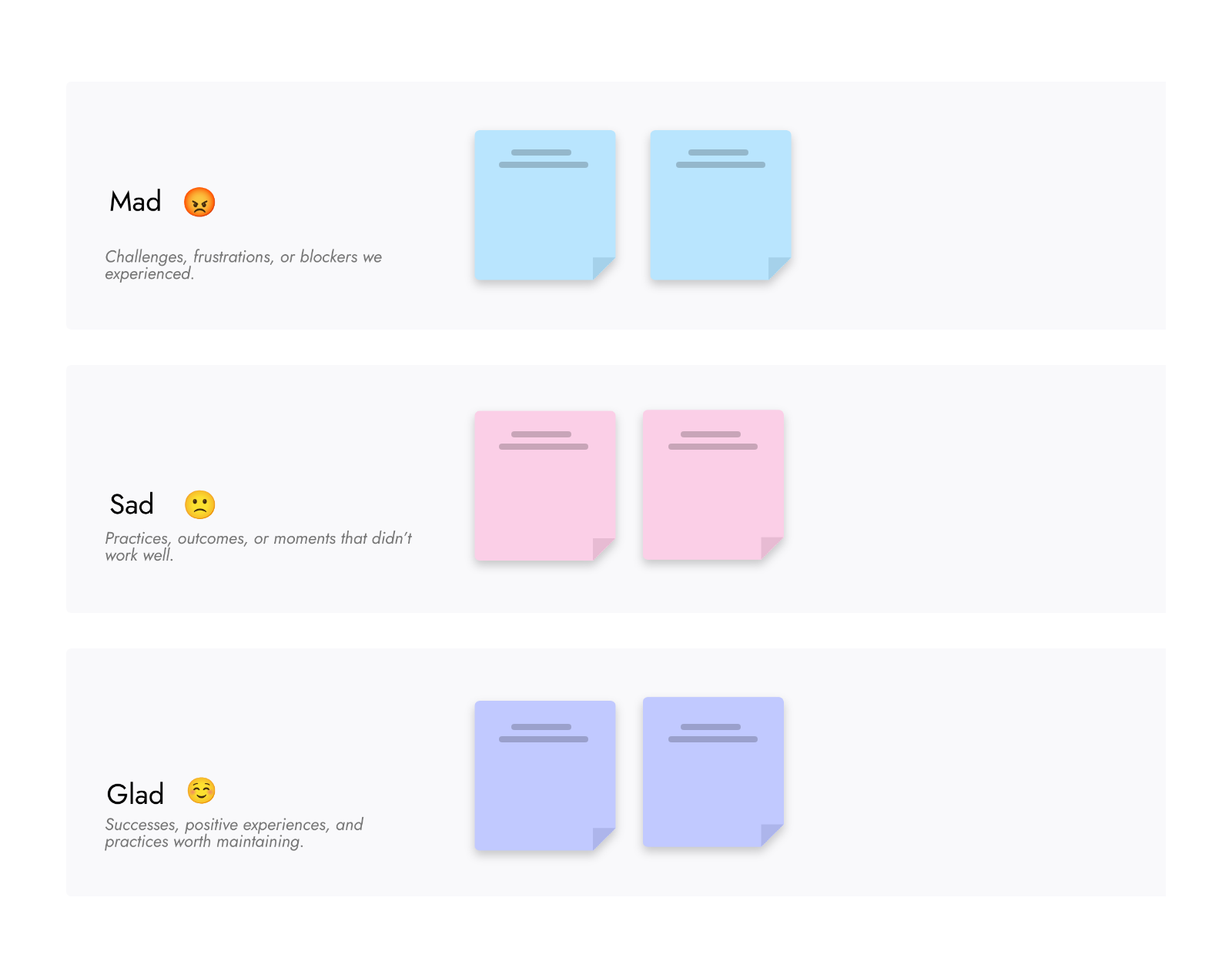
Olivia’s team writes what went well and what to change, reacts to the notes that matter and turns the top three into tasks before the call ends.
Campaign brainstorms
Lucas collects tagline ideas from the whole marketing team in fifteen minutes, then groups them by tone for the client review.
Classroom exit tickets
Marcus asks his class one question at the end of a lesson. Each student adds a note, and he sees who needs help next time. More on MockFlow for education.
Workshops in a call
Emma runs a planning workshop over video, with a timer for each round and notes from everyone on one board. See the whiteboard for meetings.
Personal planning
Elena keeps her week as notes in three sections: today, this week and waiting. She works on it on her laptop, even offline with the offline whiteboard.
Sticky notes, and the rest of the board.
Notes are where the work starts. The same board holds the AI, the meeting, the plan and the screens that come after.
AI whiteboard
AI that builds mind maps, diagrams, plans and apps on the board from a sentence.
Whiteboard for meetings
Talk, present and decide on the board itself, or inside Google Meet and Teams.
Jamboard alternative
A home for the sticky notes and sketches your class or team kept in Jamboard.
Whiteboarding guide
How to plan and run a whiteboard session that ends with real decisions.
Comparing tools? See the best online whiteboards. Ready for more than notes? Try the mind map maker, the flowchart maker and the storyboard maker. Running the session? See the whiteboard for workshops and the whiteboard for product managers.
Start from a sticky note template.
Free templates with the sections already set up. Open one, invite the team and start adding notes. Browse all templates




Free sticky notes, more for teams.
Sticky notes, sections and Whiteboard frames are on every plan. Plus and Max add editors, voting tools and more AI. Compare plans
| Feature | Basic | Plus | Max |
|---|---|---|---|
| Sticky notes, tags, sections and Whiteboard frames | |||
| Boards | 3 | Unlimited | Unlimited |
| Items on each board | 500 | No limit | No limit |
| People who can edit | 1 | As many as you add | As many as you add |
| Reactions and comments | |||
| Upvote ideas, polls and timer | |||
| Photo of paper notes to board | |||
| AI credits each month | 100 | 800 per editor | 2,000 per editor |
Online sticky notes questions.
Plans, sign up, colours, groups, AI and sharing.
Are MockFlow’s online sticky notes free?
Can I use online sticky notes without signing up?
Can my whole team add sticky notes at the same time?
Can I change the colour, size and text of a sticky note?
How do I group sticky notes?
Can AI organize my sticky notes?
Can I turn paper sticky notes into digital ones?
How do I share or export sticky notes?
A blank board in one click. Press N for your first note and share the link so anyone can add theirs. Boards last 24 hours, so sign up to keep one.


 Brainstorm with MockFlow MCP


