



A private whiteboard that works without the internet.
Keep boards as files on your Mac or PC, open them anywhere and let AI draw on them, with nothing uploaded.
Personal Whiteboard on the Mac App StoreFree download. Offline board files are on yearly Max plans. The Mac App Store app needs no account. All download options






 AI
What is an offline whiteboard?
An offline whiteboard is a board you can open and edit with no internet connection. In MockFlow it is a board file: the full canvas saved as a .board file in a folder you choose, like a document. It is never uploaded, so it suits private work, and it opens on a plane as easily as at your desk.
Saved where you choose
Press Ctrl+S, or ⌘S on a Mac, pick a folder and name the file. It sits beside your other project files and is backed up the way they are.
The same canvas
Mind maps, kanban boards, charts, tables, flowcharts, wireframes, text and shapes all work in a board file, just as on a cloud board.
Nothing leaves your computer
The file is not sent to MockFlow’s servers. Add a password and only people who know it can open the board.
When an offline whiteboard is the right choice.
Some work should stay on your own machine. A board file keeps it there and still gives you the whole MockFlow canvas.
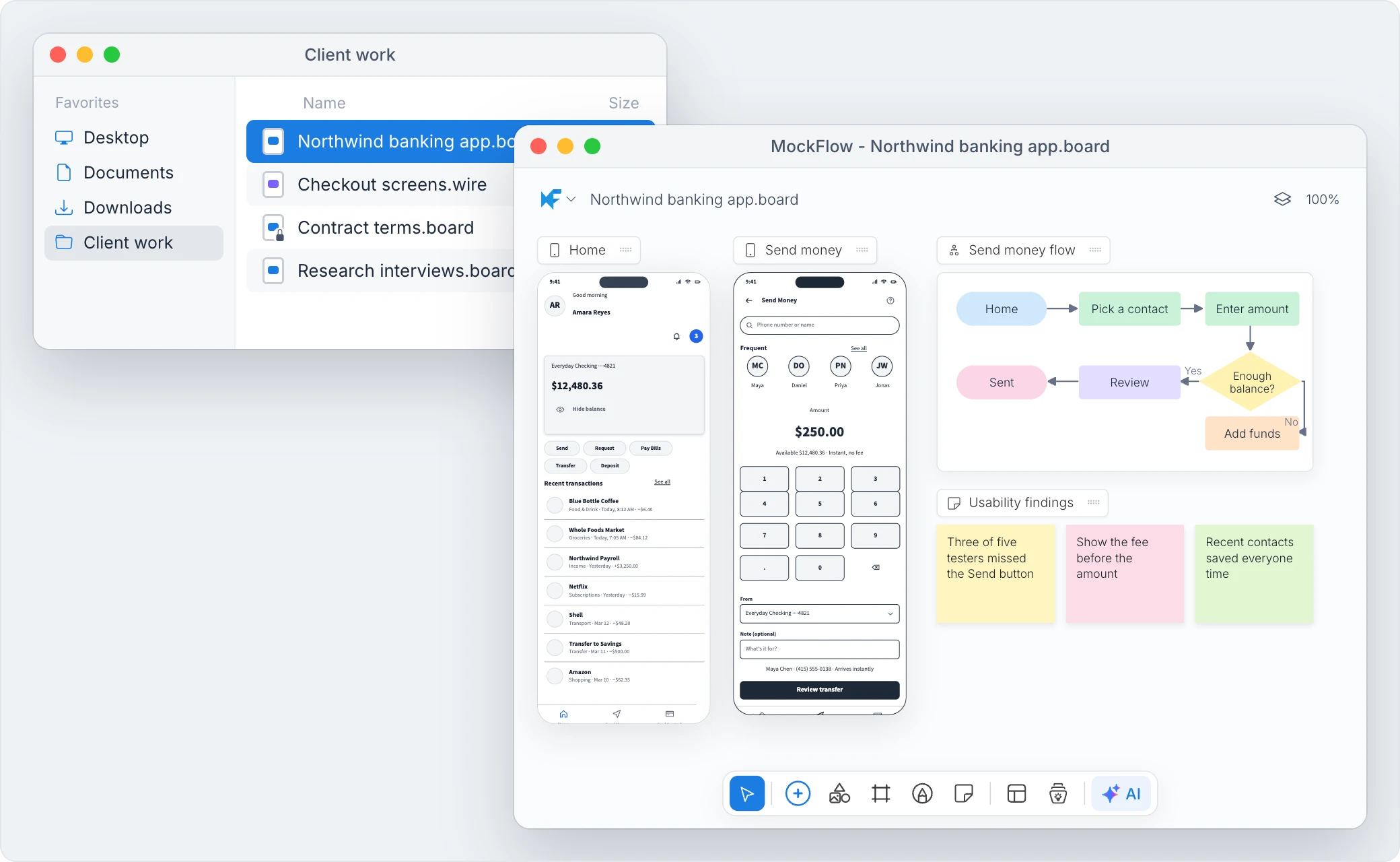
- Client work under an NDA. Keep the board in the client’s project folder, next to the contract and the research.
- Private planning. Budgets, hiring plans or a reorganization that should not leave your computer.
- Travel and weak signal. Work on a train, a plane or a site visit, then save when you are done.
- Archives. Copy a finished board to a USB drive or attach it to an email like any document.
Why MockFlow for an offline whiteboard?
Most online whiteboards stop working the moment the connection drops, and private plans end up on someone else’s server. MockFlow’s desktop app gives you the same rich board in a file you own, with a password, its own version history and AI that can still draw on it. When the work is ready to share, you move it into a space and the team picks it up there.
One file holds the whole board.
A .board file is complete on its own, so you can copy it to another computer and open it there. See File mode: a private whiteboard on your computer.
| A | B | C | D | |
|---|---|---|---|---|
| 1 | Section | Books | Per box | Boxes |
| 2 | Fiction | 1,240 | 40 | 31 |
| 3 | Children | 680 | 50 | 14 |
| 4 | Travel and maps | 310 | 35 | 9 |
| 5 | Art and design | 190 | 20 | 10 |
| 6 | Total | 2,420 | 64 |
Oak shelving, back and left walls
Six bays along the back wall and one tall run on the left, 2.4 m high with a rolling ladder rail. Solid oak, oiled, no visible fixings.
- Adjustable shelves, 30 cm deep
- Bottom shelf raised 10 cm for cleaning
- Ladder rail on the back wall only
Every page and item
All the board’s pages with their spreadsheets, documents, floor plans, charts, tables and wireframes.
Your images and media
Add JPG, PNG, GIF, SVG and WebP images, PDFs, MP4, MOV and WebM video, MP3 audio and GLB 3D models from the Uploads tab.
The fonts it uses
Fonts travel inside the file, so the board looks the same on the next computer.
Its revision history
Named and automatic revisions are stored in the file and go wherever it goes.
Wireframes have files too: design screens in Classic WireframePro and save them as .wire files. See Create wireframe files on your computer. Planning sites, routes and shifts? See the whiteboard for operations.
A private whiteboard with a password.
Encrypt a board file and MockFlow asks for the password every time it opens, on any computer. Use it for files you send by email or keep on a shared drive.
- AES 256 bit encryption. Choose Encrypt .board file in the board menu and set a password.
- Your key, not ours. The password is never stored by MockFlow, so keep it in a password manager. A lost password cannot be recovered.
- Revisions in the file. Save a named revision such as “Budget agreed”, preview it later and restore it in one click.
See Password protect a board file and Keep revisions in a board file.
Your AI agent draws on the file, not the cloud.
The desktop app runs an MCP server on your computer, the standard connection AI coding tools use to work with other apps. Your agent adds items to the board file you have open, and the board never leaves your machine.
- Claude Code. Add the server once:
claude mcp add --transport http -s user mockflow http://localhost:21193/mcp - Cursor and VS Code. Add
http://localhost:21193/mcpin Cursor’s MCP settings or in.vscode/mcp.json. - Ask in your own words. “Draw a flowchart of our support ticket process on my MockFlow board.” Review it, then save.
Wireframe files have their own server at port 21194. Setup in full: Use AI agents on board files. For cloud boards, see whiteboard for Claude Code and the AI whiteboard.
Cloud board or board file?
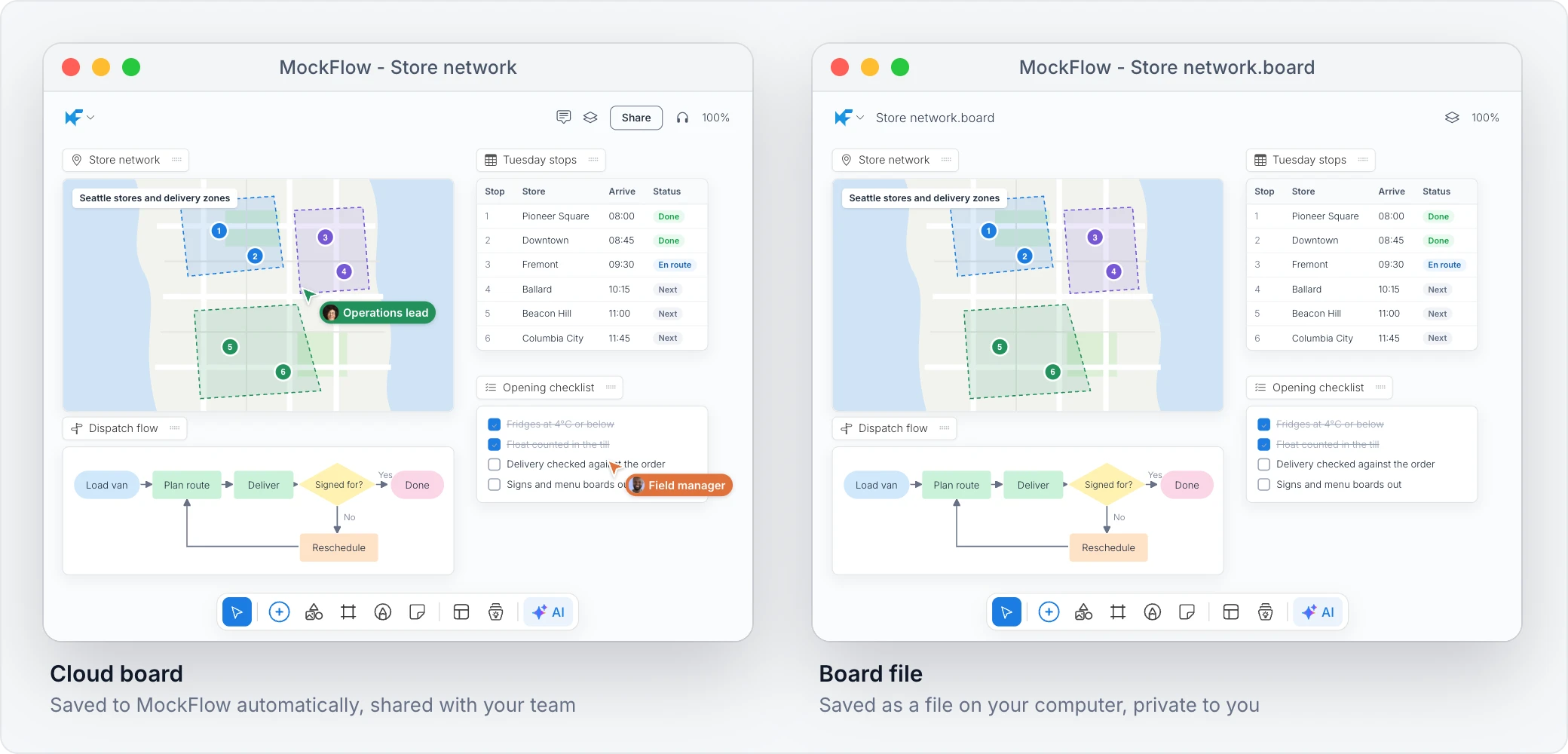
Use a cloud board when the team works on it together. Use a board file when the work should stay with you. The desktop app opens both, side by side.
| Feature | Cloud boards | Board files |
|---|---|---|
| Where it is saved | MockFlow’s cloud, automatically | A .board file in a folder you choose, when you save |
| Works offline | Needs a connection | Yes |
| Sharing, comments and real time editing | Yes | No |
| Version history | Revisions in the board | Revisions stored inside the file |
| Password on the file | Not needed, access is by invite | Optional, AES 256 bit |
| Plans | Every plan | Max |
Not in board files, because they work through the cloud: sharing, comments and activity, online libraries of UI packs, shapes and icons, PowerPoint, Word and Classic WireframePro exports, saved components and new custom fonts. See What is not available in file mode.
A whiteboard app for Mac and Windows.
The MockFlow desktop app is MockFlow in a native window, with your spaces, cloud boards, sharing and AI, plus file mode for boards kept on your computer.
Whiteboard app for Mac
Runs natively on Apple silicon and Intel Macs. Full screen with Ctrl+⌘F, and each board can open in a window of its own.
Whiteboard app for Windows
Installs on 64 bit and 32 bit Windows and launches from the taskbar. Full screen with F11.
Everything from the web
Sign in with the same account. A cloud board you change in the app changes on the web and for your teammates too.
No account? Personal Whiteboard for Mac.
MockFlow Personal Whiteboard is a separate app from the Mac App Store. It runs fully offline, needs no MockFlow account and saves boards as .board files you keep. Try it free, then unlock it once.
| Feature | Personal Whiteboard | Desktop app |
|---|---|---|
| Platform | Mac | Mac and Windows |
| Account | None | MockFlow account |
| Boards | .board files only | Cloud boards, and board files on Max |
| Teams and sharing | Not available | With your plan |
| Price | One time purchase | Your MockFlow plan |
Free to try, unlock once. Details in MockFlow Personal Whiteboard for Mac.
How to set up an offline whiteboard.
Five steps from download to a board that opens anywhere. Details in Install the MockFlow desktop app and Create and save a board file.
- Install the app.Download it for Mac or for Windows. Drag it into Applications on a Mac, or run the installer on Windows.
- Sign in.Use your MockFlow account with email, Google, Microsoft, Apple or SSO.
- Create a board file.In the File mode section of the sidebar, click New file and choose New board file.
- Save it.Press Ctrl+S, or ⌘S on a Mac, choose a folder and name it. Save Changes appears when there is more to save.
- Open it anywhere.Double click the file in Finder or File Explorer. No connection needed.
Who works on an offline whiteboard.
People whose boards hold things that should stay close.
Shop owners
Elena plans a refit of her bookshop. The budget, supplier quotes and mood board live in one encrypted file that only she and her accountant open.
Consultants and agencies
Lucas works under an NDA. Each client’s board and wireframes sit in that client’s folder, and the finished board moves into a shared space for the review.
Teachers on the move
Marcus prepares lesson boards on the train with no signal, then opens the same file on the classroom computer. More for schools on MockFlow for education.
Which plan includes the offline whiteboard.
The desktop app is free to download and works with every plan for cloud boards. File mode is part of Max. Compare plans.
| Feature | Basic | Plus | Max |
|---|---|---|---|
| Desktop app with cloud boards | |||
| Offline board files (file mode) | Yearly plans | ||
| Import a .board file into a space | |||
| Download a cloud board as an offline file | Yearly plans | Yearly plans | |
| AI credits each month for Mida | 100 | 800 per editor | 2,000 per editor |
MockFlow Personal Whiteboard for Mac is a separate one time purchase on the Mac App Store and needs no plan.
More ways to use the whiteboard.
The same board works online with your team, in your meetings and with AI.
Online whiteboard
Start a free board in the browser and invite your team.
AI whiteboard
Describe what you need and AI builds it on the board.
Whiteboard for meetings
Meet, present and decide on the board itself.
Online sticky notes
Collect ideas, group them and vote on the best.
New to whiteboards? Read the whiteboarding guide, or see how tools compare in best online whiteboards.
Offline whiteboard questions.
Files, privacy, Windows and Mac, sharing and AI.
Is there an offline whiteboard app?
Does MockFlow work without the internet?
Is there a whiteboard app for Windows?
Are my board files uploaded to MockFlow?
Can I password protect a whiteboard file?
How do I share an offline board with my team?
Can AI draw on an offline board?
What is not available in a board file?
Get the offline whiteboard.
The desktop app is a free download and opens your cloud boards on any plan. Board files that work offline are on yearly Max plans: compare plans. More on the desktop app.
Want to try the canvas first? Open a full whiteboard in your browser in one click. Boards last 24 hours, so sign up to keep one.


 Brainstorm with MockFlow MCP


