



 Tank Battle
Tank Battle is a top down multiplayer tank game where everyone who joins the board gets a tank of their own. Drive around the arena, aim with the mouse and fire at the other tanks.
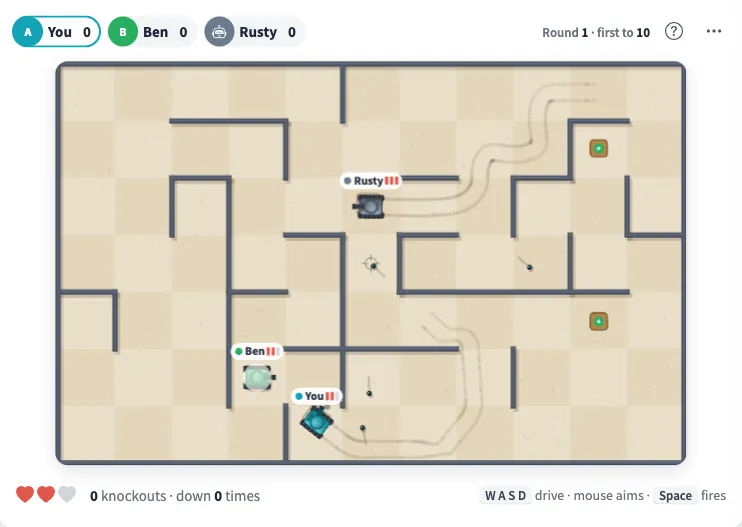
Play Tank Battle online together.
Shells bounce off the walls, so a well judged rebound can land a hit, and a careless one can hit you. Every hit you land counts on your tank, and a tank that is hit comes back right away.
It runs on a shared MockFlow board, so the whole team plays in the same arena at once, right next to the work.
- A tank for everyone. Every member of the board drives a tank in the same arena, so the whole team can play at once.
- Bouncing shells. Shells rebound off the walls, which makes bank shots possible and keeps everyone on their toes.
- Hit counts. Each tank shows the hits it has landed, so it is easy to see who is ahead.
- Instant respawn. A tank that is hit comes straight back, so nobody sits out.
- Who is playing. The members list shows every tank on the board and whether its driver is here now or parked.
- Watch the battle. When the board is view only, people can still watch the battle as it happens.
How to play Tank Battle.
Join the board
Anyone who joins the board gets a tank. Your own tank is marked as Your tank.
Click the arena
Click inside the arena so your keys drive your tank.
Drive and aim
Drive with WASD or the arrow keys and aim with the mouse.
Fire
Click or press Space to fire. Shells bounce off the walls, so use the angles and watch out for your own.
Land hits
Every hit you land counts on your tank. When you are hit, your tank respawns and you are back in the battle.
Start fresh
From More actions, use Respawn my tank for a new tank, or Reset scores to start the next round from zero.
Who uses Tank Battle.
A remote team on a Friday afternoon
Open the arena for a quick free for all before everyone logs off.
A team waiting for a meeting to start
Drive a few laps and trade shots while the last people join.
A team social or offsite
Reset the scores and run a few rounds to crown the best driver.
Colleagues taking a short break
A couple of minutes in the arena is an easy way to reset between tasks.
Add Tank Battle to your board.
Use on a board opens a new board with Tank Battle already on it. To add it to a board you already have, follow these steps. Each copy keeps its own data, so a vote on one board never changes another.
Open your board
Open the MockFlow board you want to use it on.
Add it from the Artifact Library
Click Add anything (the plus button) in the toolbar at the bottom of the board, switch to Artifacts and pick Tank Battle under Games. Adding it does not use AI credits.
Use it together
Click Interact with Component (the hand button), or switch the board to Play mode. Everyone on the board uses the same app, and Reset shared data clears it for the next session.






 Brainstorm with MockFlow MCP


