 Cricket
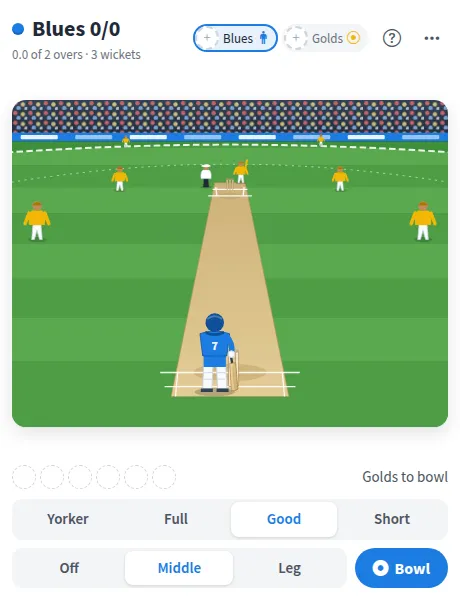
Cricket is a two player cricket game online, played on a drawn ground. One side bowls by choosing a length and a line, the other side faces the ball and times a shot just as it reaches the bat.
Play Cricket online together.
The Blues bat first and set a target, then the Golds chase it. Every ball goes on the scorecard, and every finished match goes on a leaderboard of wins, runs, wickets and sixes.
It runs on a shared MockFlow board, so a teammate can take the other side and you play live together. No one free? Play the computer instead.
- Real bowling choices. Four lengths and three lines, from a yorker at the stumps to a short ball outside leg.
- Timing based batting. Four shots, where matching the shot to the ball and hitting it at the right moment decides between a dot ball, a four, a six or a wicket.
- Bowled, LBW and caught. Wickets fall the way they do in cricket, and the over strip shows each ball as it happens.
- Short matches. Choose a match of 1, 2 or 5 overs a side, so a game fits into a break.
- Scorecard. See both innings with runs, wickets, overs, fours and sixes, ball by ball.
- Leaderboard. Finished matches build a leaderboard for each member: wins, runs, best score, wickets and sixes, with a trophy for the leader.
- Play the computer. The computer can take either side, bowling or batting, when you want to play alone.
How to play Cricket.
Pick your side
Tap the Blues or the Golds in the header to play that side, or turn on Play the computer in the more actions menu to play alone.
Bowl a delivery
Choose a length (Yorker, Full, Good or Short) and a line (Off, Middle or Leg), then press Bowl.
Face the ball
When the delivery is ready, the batter presses Face the ball and watches it come down the pitch.
Time your shot
Tap Defend, Drive, Pull or Loft as the ball reaches the bat. Drive the full ones, pull the short ones, and defend when in doubt. Play no shot and the ball is left alone.
Use the keys
Click the game once, then use the arrow keys for shots (up Loft, right Drive, left Pull, down Defend) and Space to face or bowl.
Chase the target
Each side bats one innings. The Golds win by reaching the target before their overs or wickets run out, otherwise the Blues win.
Start again
Open the more actions menu for a New match, a different match length or Undo last ball.
Who uses Cricket.
A remote team on a coffee break
Two teammates play a quick one over match while the rest of the board watches the score.
Cricket fans at work
Run a friendly rivalry across the week and let the leaderboard settle who is top.
A team social or offsite
Add it to the event board and let people take turns at batting and bowling.
Someone waiting for a meeting to start
Play the computer for a few overs without needing anyone else.
Add Cricket to your board.
Use on a board opens a new board with Cricket already on it. To add it to a board you already have, follow these steps. Each copy keeps its own data, so a vote on one board never changes another.
Open your board
Open the MockFlow board you want to use it on.
Add it from the Artifact Library
Click Add anything (the plus button) in the toolbar at the bottom of the board, switch to Artifacts and pick Cricket under Games. Adding it does not use AI credits.
Use it together
Click Interact with Component (the hand button), or switch the board to Play mode. Everyone on the board uses the same app, and Reset shared data clears it for the next session.






 Brainstorm with MockFlow MCP



