



 Multiplayer Bowling
 is a 3D ten-pin bowling game you play online with your team. Every bowler gets a lane of their own, and everyone bowls at the same time, so nobody waits for a turn.
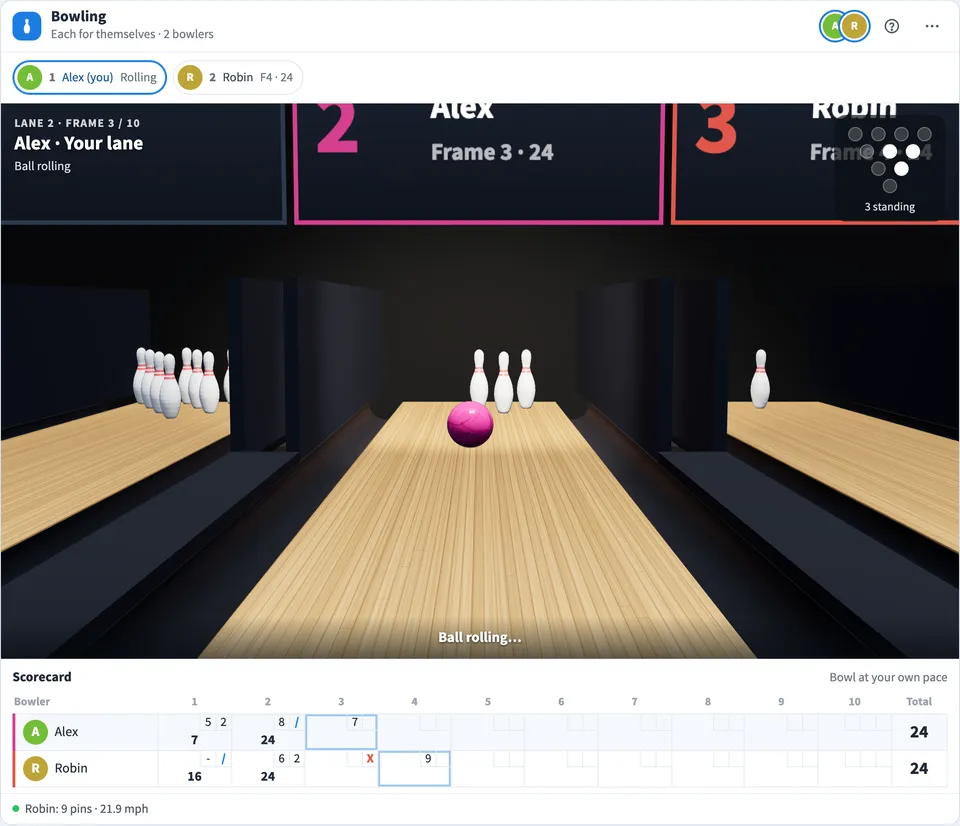
Play Multiplayer Bowling online together.
Line up with the mouse, drag down to throw, and bend the end of your drag to curve the ball. The ball skids on the oiled front of the lane and bends on the dry end, and the pins fly with real physics. A shared scorecard keeps ten frames of scores with strike and spare bonuses.
It runs on a shared MockFlow board, so a quick game sits right next to the work, ready for a team break or a social hour.
- A lane for every bowler. Every player has their own lane in the same 3D bowling alley, and everyone bowls at once. Lane tabs let you watch any other bowler's lane.
- Realistic ball and pin physics. The ball skids on the oil and hooks on the dry backend, and pins topple and scatter off each other. Every screen replays the same throw, so everyone sees the same result.
- Mouse controls. Line up, set speed, aim and curve with one drag of the mouse. Arrow keys line up and aim, and Space bowls.
- Solo or teams. Play each for themselves, or split into Blue and Orange teams whose scores add up.
- Practice lane. Practice opens your own lane with no score. Use Set pins to set up any spare, Full rack to reset, and Guide to show the ball's full path to the pins.
- Scorecard and standings. A live scorecard shows every bowler's ten frames with strike and spare bonuses, and Standings keeps each bowler's best game on the board.
- Follow the ball. The camera follows the ball down the lane and then shows the pins, or stays behind you if you prefer.
How to play Multiplayer Bowling.
Join the game
Choose Join game in the lobby. Each bowler who joins is given a lane. Up to 8 bowlers can play in one game.
Pick a mode
Choose Each for themselves, where the highest score wins, or Teams, Blue against Orange, where team totals add up. Teams need the same number of bowlers.
Start the game
Anyone who joined can choose Start game. Everyone bowls on their own lane at their own pace.
Line up
Move the pointer left or right over the lane, and the ball follows to your starting spot.
Throw the ball
Press on the lane and drag down. The farther you drag, the faster the ball. Drag sideways to aim, and a short line shows your path toward the arrows. Let go to roll.
Curve it
Bend the end of your drag to the left or right. The ball holds its line on the oil and hooks on the dry end of the lane, just like a real hook.
Finish ten frames
Knock down all ten pins with one ball for a strike or with two for a spare. After ten frames the game shows the winner, with Rematch or New game.
Who uses Multiplayer Bowling.
A remote team on a Friday break
Everyone joins from their own screen and bowls a quick ten frames together, with the scorecard on the board for all to see.
A team social or offsite
Split into Blue and Orange teams and bowl a team game, where every pin counts toward the team total.
A meeting warm up
Open the lanes a few minutes before a meeting so people can bowl a frame or two while others arrive.
Someone between tasks
Open a practice lane, set up a tricky spare, and work on your curve with the full path guide.
Add Multiplayer Bowling to your board.
Use on a board opens a new board with Multiplayer Bowling already on it. To add it to a board you already have, follow these steps. Each copy keeps its own data, so a vote on one board never changes another.
Open your board
Open the MockFlow board you want to use it on.
Add it from the Artifact Library
Click Add anything (the plus button) in the toolbar at the bottom of the board, switch to Artifacts and pick Multiplayer Bowling under Games. Adding it does not use AI credits.
Use it together
Click Interact with Component (the hand button), or switch the board to Play mode. Everyone on the board uses the same app, and Reset shared data clears it for the next session.




 Brainstorm with MockFlow MCP


