



 Map Vote
 lets a team vote on places together on a real map. Ask a question such as where to hold the offsite, put the options on the map as lettered pins, and let everyone spend a few votes on them.
Use Map Vote together on your board.
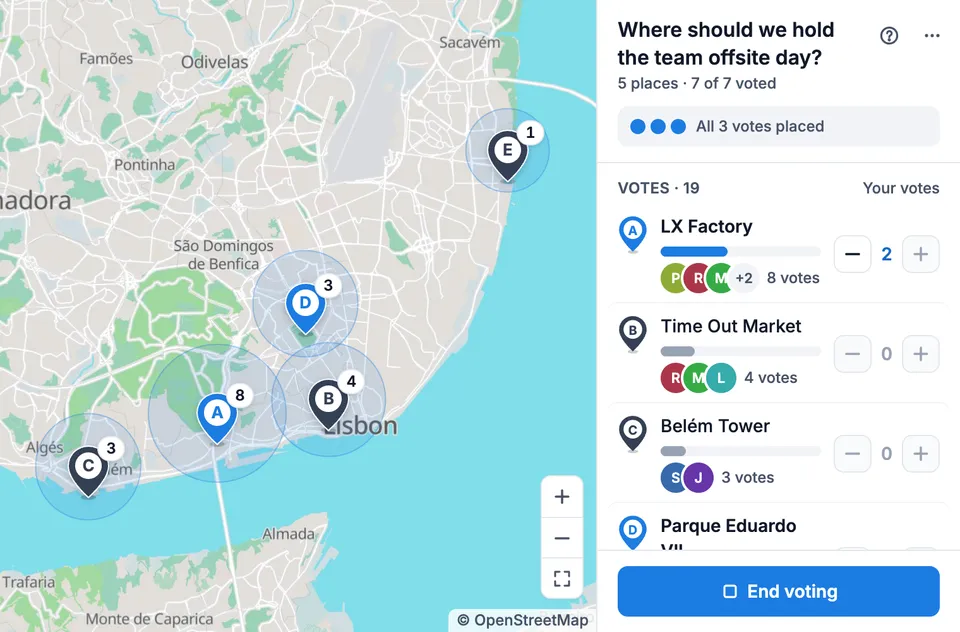
The list beside the map ranks every place with its votes and who cast them. When the host ends voting, the winning pin and row turn green.
It runs on a shared MockFlow board, so everyone on the board sees the same map, the same pins and the same votes as they happen.
- A real map. Streets, parks, rivers and place names, from a single neighbourhood to the whole world. Drag to move, zoom with the buttons, and fit every place in view with one click.
- Place search. Type a place, a landmark or an address and add the match to the vote, or tap anywhere on the map to drop your own pin.
- Dot votes. Each person gets 1, 3 or 5 votes to spend. Your votes show as blue dots on the pins and in the list.
- Results beside the map. The list ranks places with a bar, the vote count and the faces of the voters, and each pin grows a circle sized by its votes.
- Hidden or live results. Keep results hidden until voting ends so early votes do not steer the rest, or show them live while people vote.
- Everyone can add places. Let the whole team suggest places. Each pin then shows who added it.
How to use Map Vote.
Ask the question
Write what the team is choosing, pick who adds places (only you, or everyone) and how many votes each person gets: 1, 3 or 5.
Add places
Search for a place and press Enter, or tap the map to drop a pin and name it. Each place gets a letter, and you need at least two to open voting.
Open voting
Press Open voting. Everyone sees the places in the list and on the map, with their votes left shown at the top.
Spend your votes
Use + on a place in the list or on its pin card. Spread your votes across places or stack them on one, and use − to take one back while voting is open.
End voting
The host presses End voting. The place with the most votes is named as the winner and turns green on the map. A tie names every place that tied.
Who uses Map Vote.
A team planning an offsite
Shortlist a few venues on the map, see how far each one is from the office, and let the team vote on where to go.
Friday lunch
Drop the nearby options on the map and settle where the team eats in a minute.
A community picking a meetup city
Put candidate cities on the world map and let members spread their votes across them.
Choosing a new office area
Compare neighbourhoods side by side on the map and collect a quick read of where people would rather commute.
A workshop on site selection
Run a dot vote on store or event locations during a planning session, with the map and the ranking in one place.
Add Map Vote to your board.
Use on a board opens a new board with Map Vote already on it. To add it to a board you already have, follow these steps. Each copy keeps its own data, so a vote on one board never changes another.
Open your board
Open the MockFlow board you want to use it on.
Add it from the Artifact Library
Click Add anything (the plus button) in the toolbar at the bottom of the board, switch to Artifacts and pick Map Vote under Planning. Adding it does not use AI credits.
Use it together
Click Interact with Component (the hand button), or switch the board to Play mode. Everyone on the board uses the same app, and Reset shared data clears it for the next session.










 Brainstorm with MockFlow MCP


