



 Design Vote Duel
Design Vote Duel is a simple A/B design voting tool. Put two variants side by side, add your own images, and let everyone vote for the one they prefer.
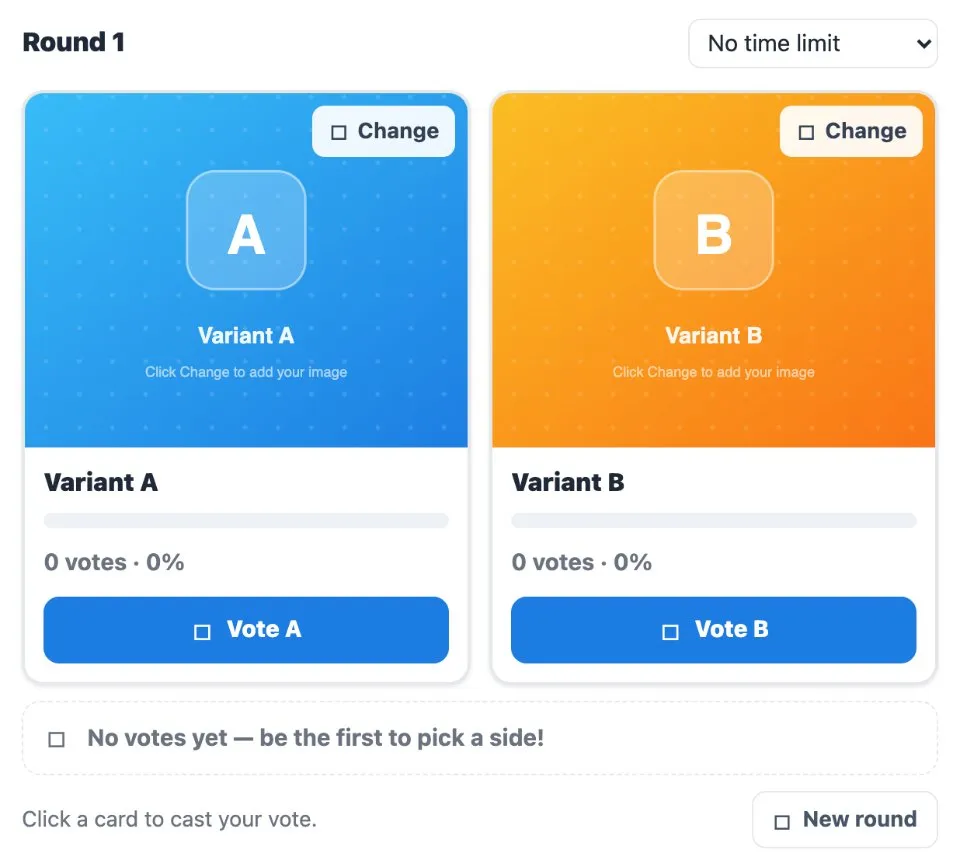
Use Design Vote Duel together on your board.
Each card shows its vote count and percentage as votes come in, and a new round starts the next comparison.
It runs on a shared MockFlow board, so the whole team votes on the same pair and sees the same tally.
- Side by side cards. Two variants shown at the same size, so the comparison is fair.
- Your own images. Replace either placeholder with a design of your own.
- Live vote counts. Votes and percentages update for everyone as people choose.
- Optional time limit. Run an open vote or give the round a time limit.
- Rounds. Start a new round to run several comparisons one after another.
How to use Design Vote Duel.
Add your two designs
Press Change on Variant A and Variant B to add your own images.
Set a time limit if you want one
Choose a time limit for the round, or keep No time limit.
Cast your vote
Press Vote A or Vote B to pick a side.
Watch the results
Each card shows its votes and percentage, with a bar that fills as votes arrive.
Start the next comparison
Press New round to compare the next pair.
Who uses Design Vote Duel.
A designer choosing between two mockups
Put both options up and let the team pick in seconds.
A product team reviewing a landing page
Compare two hero layouts before deciding which to build.
A marketing team picking an ad creative
Vote on two visuals to settle the direction.
A design critique session
Run a quick round per decision and move through the list.
Add Design Vote Duel to your board.
Use on a board opens a new board with Design Vote Duel already on it. To add it to a board you already have, follow these steps. Each copy keeps its own data, so a vote on one board never changes another.
Open your board
Open the MockFlow board you want to use it on.
Add it from the Artifact Library
Click Add anything (the plus button) in the toolbar at the bottom of the board, switch to Artifacts and pick Design Vote Duel under General. Adding it does not use AI credits.
Use it together
Click Interact with Component (the hand button), or switch the board to Play mode. Everyone on the board uses the same app, and Reset shared data clears it for the next session.





 Brainstorm with MockFlow MCP


