



 Word Cloud Studio
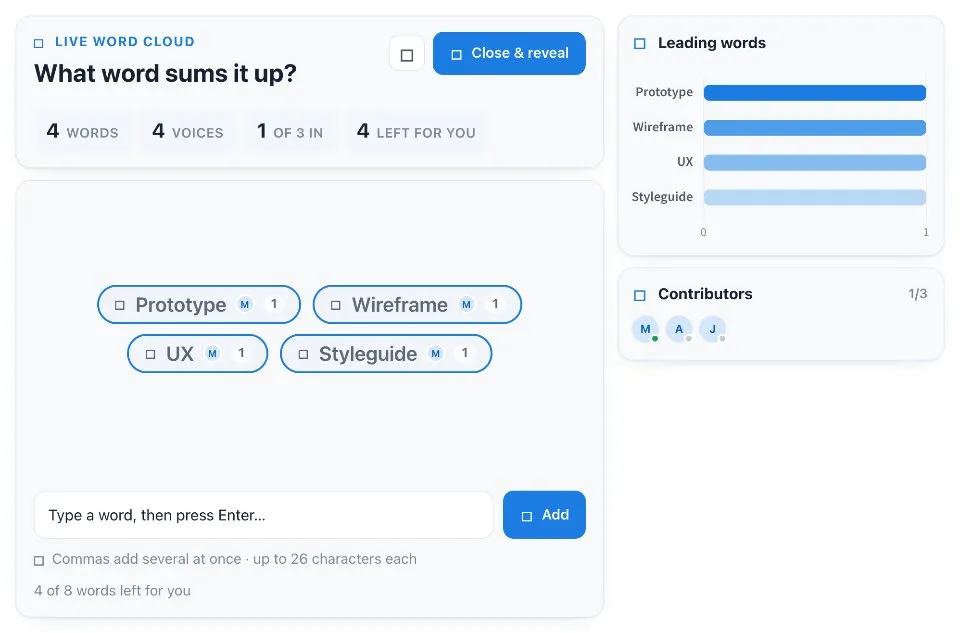
Word Cloud Studio is a live word cloud maker for groups. Ask a question, such as what one word describes how this sprint felt, and everyone adds their words to a shared cloud.
Use Word Cloud Studio together on your board.
Tap a word already on the cloud to back it. The more people who back a word, the bigger it grows, and a chart ranks the leading words as they come in.
It runs on a shared MockFlow board, so the whole group builds the same cloud at the same time.
- Words grow with support. Each word sizes by how many people back it.
- Leading words chart. A chart ranks the top words live as the board adds them.
- Your words marked. Words you back are outlined in blue with a check.
- Contributors. See who added words and spotlight one person's words.
- Suggestions. Starter words help people answer quickly.
- Close and reveal. Lock the cloud and crown the leading word when the round ends.
- Any question. Update content with AI changes the question and suggestions without changing how the app works.
How to use Word Cloud Studio.
Ask the question
The prompt sits at the top, for example What one word describes how this sprint felt.
Add your words
Type a word and press Enter. Separate several words with commas to add them at once, or pick from the suggestions.
Back other words
Tap a word already on the cloud to add your voice and grow it. Tap again to take your voice back.
Spotlight a person
Tap someone in Contributors to show only their words, and tap again to clear.
Close and reveal
When the group is done, press Close and reveal to lock the cloud and crown the leading word.
Who uses Word Cloud Studio.
A scrum master opening a retro
Ask for one word about the sprint and see the mood take shape.
A facilitator starting a workshop
Collect expectations in a word cloud before the first exercise.
A teacher checking understanding
Ask what students remember from the lesson and see which ideas stand out.
A leader closing an all hands
Ask for one word to sum up the meeting and reveal the top answer.
Add Word Cloud Studio to your board.
Use on a board opens a new board with Word Cloud Studio already on it. To add it to a board you already have, follow these steps. Each copy keeps its own data, so a vote on one board never changes another.
Open your board
Open the MockFlow board you want to use it on.
Add it from the Artifact Library
Click Add anything (the plus button) in the toolbar at the bottom of the board, switch to Artifacts and pick Word Cloud Studio under General. Adding it does not use AI credits.
Use it together
Click Interact with Component (the hand button), or switch the board to Play mode. Everyone on the board uses the same app, and Reset shared data clears it for the next session.
Update content with AI changes the content without changing how the app works, for example "Make it about a different word-cloud prompt with matching suggestions".










 Brainstorm with MockFlow MCP


