



 Venn Studio
Venn Studio is an online Venn diagram maker where your team builds, colours and labels set diagrams together. Start from a 2, 3 or 4 set layout, or add single circles and ovals and arrange them yourself.
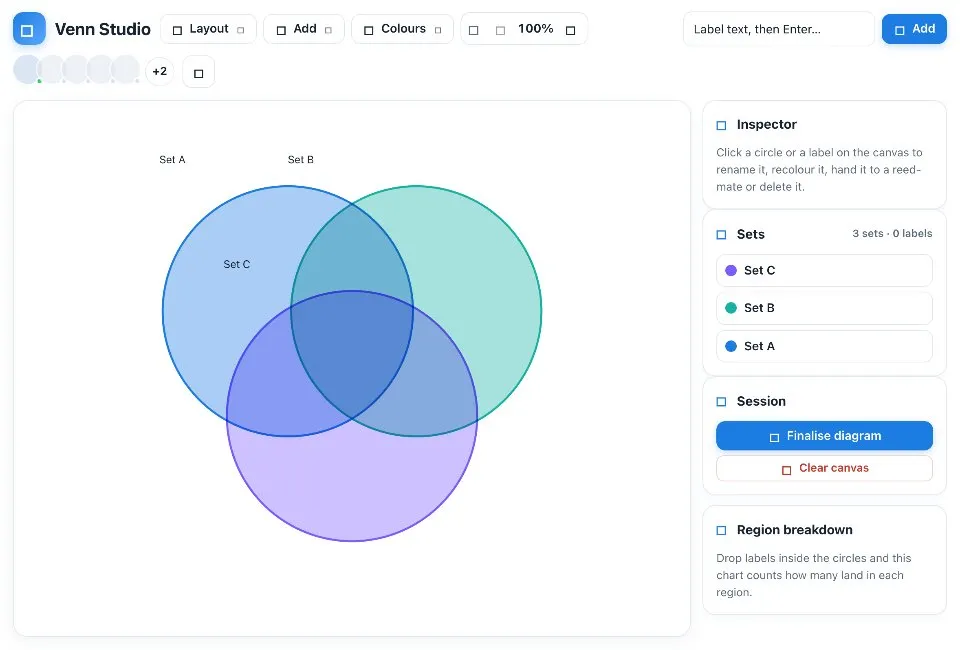
Use Venn Studio together on your board.
Type a label, drop it into the region it belongs to, and a region breakdown chart counts what sits in each overlap. Recolour the whole diagram with a theme or give one set its own colour.
It runs on a shared MockFlow board, right next to the work you are comparing. Every circle someone moves, colour they pick and label they drop appears instantly for everyone else.
- Ready layouts. Start from 2, 3 or 4 overlapping sets, or build your own from single circles and ovals.
- Circles that become ovals. Stretch, squash and rotate any shape with its handles to fit the overlaps you need.
- Labels you place by hand. Drop labels into a tray, then drag each one into the region where it belongs.
- Region breakdown chart. A chart counts the labels in each region, so you see where things cluster at a glance.
- Colour themes. Recolour the whole diagram with a theme such as Aurora, Citrus, Ocean or Sunset, or colour one set on its own as a tint or an outline.
- Set owners. Assign a set to a board member so everyone knows who looks after it.
- Built together. Everyone on the board edits the same diagram at the same time.
How to use Venn Studio.
Pick a layout
Hover Layout in the toolbar to start with 2, 3 or 4 sets, or hover Add for single circles and ovals.
Shape the circles
Drag a circle to move it. Select it for handles: the side handle stretches its width, the bottom handle its height and the top handle rotates it, so any circle can become any oval.
Add labels
Type into the label box and press Enter, or double click an empty spot on the canvas. The label lands in the tray at the bottom, ready to drag into its region.
Make room
If labels start to crowd, press plus on the size stepper. The whole diagram grows together, circles and label positions included. Press minus to bring it back down.
Colour it
Hover Colours to recolour the diagram with a theme, or give one selected set its own colour and switch it between tint and outline.
Assign and finalise
Assign a set to a board member when someone owns it, then finalise the diagram once the team agrees.
Who uses Venn Studio.
A product team in a strategy workshop
Compare what Product, Design and Engineering own, and drop shared work into the overlap.
A marketer comparing audiences
Lay out two or three customer segments and place the needs they share where the circles meet.
A teacher explaining sets
Show unions and intersections with labels the class drags into place.
A team weighing options
Put the features of competing ideas into each set to see what overlaps and what stands alone.
Add Venn Studio to your board.
Use on a board opens a new board with Venn Studio already on it. To add it to a board you already have, follow these steps. Each copy keeps its own data, so a vote on one board never changes another.
Open your board
Open the MockFlow board you want to use it on.
Add it from the Artifact Library
Click Add anything (the plus button) in the toolbar at the bottom of the board, switch to Artifacts and pick Venn Studio under General. Adding it does not use AI credits.
Use it together
Click Interact with Component (the hand button), or switch the board to Play mode. Everyone on the board uses the same app, and Reset shared data clears it for the next session.
Update content with AI changes the content without changing how the app works, for example "Rewrite the set names and the help text for a product strategy workshop".





 Brainstorm with MockFlow MCP


