



 World Clock Wall
World Clock Wall is a shared wall of live clocks for the places your team works in. Search any city, country or time zone, add it, and compare local times side by side.
Use World Clock Wall together on your board.
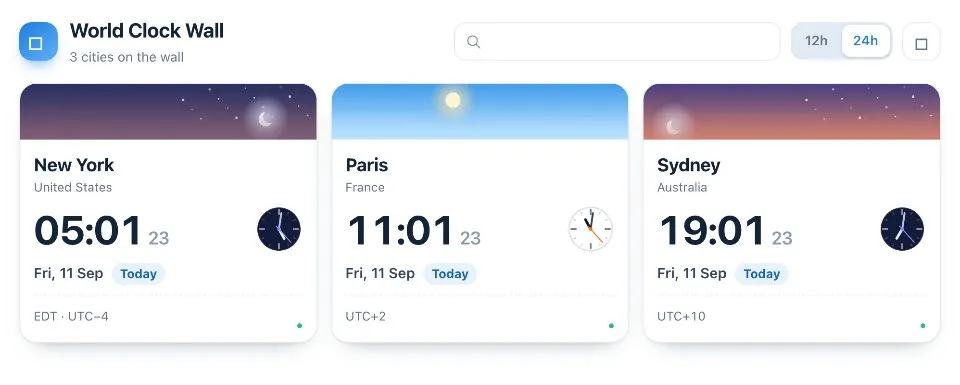
Each clock shows the local date and marks Today, Yesterday or Tomorrow when it differs from yours. A sky band and the dial follow the real local hour, from sunrise to stars, so you can tell day from night at a glance.
It runs on a shared MockFlow board. Everyone on the board sees the same cities, ticking in real time.
- Live clocks. Every clock ticks in real time for everyone on the board.
- Search any place. Find a clock by city, country or time zone name.
- Local date labels. Cards say Today, Yesterday or Tomorrow when the local date differs from yours, and the wall tells you when it becomes a new day in a city.
- Day and night sky. The sky band and dial follow the local hour through sunrise, daylight, dusk and stars.
- Your own time format. Choose 12h or 24h for yourself without changing anyone else's view.
- Who added it. A small avatar on each card shows the board member who added that city.
How to use World Clock Wall.
Add a city
Type a city, country or time zone in the search box, then click a result or press Enter to put it on the wall. Quick add offers cities in one click.
Pick 12h or 24h
Switch the time format with the toggle. The choice is yours alone and does not change what anyone else sees.
Arrange the wall
Hover a clock to move it earlier or later on the wall, or remove it. The cities and their order are shared with the whole board.
Read the day
Check the local date on each card, with Today, Yesterday or Tomorrow shown whenever it differs from yours.
Glance at day or night
Look at the sky band and the dial to see whether it is morning, daylight, dusk or night in each place.
Who uses World Clock Wall.
A distributed team planning a meeting
Put every office on the wall and see at a glance whose working day it is.
A support team covering several regions
Keep the local time of each customer region in view during a shift.
A project manager working with remote contractors
Add each contractor's city so deadlines and check ins land at a sensible hour.
A team planning a global launch
Compare launch markets side by side, including which ones are already on tomorrow.
Add World Clock Wall to your board.
Use on a board opens a new board with World Clock Wall already on it. To add it to a board you already have, follow these steps. Each copy keeps its own data, so a vote on one board never changes another.
Open your board
Open the MockFlow board you want to use it on.
Add it from the Artifact Library
Click Add anything (the plus button) in the toolbar at the bottom of the board, switch to Artifacts and pick World Clock Wall under General. Adding it does not use AI credits.
Use it together
Click Interact with Component (the hand button), or switch the board to Play mode. Everyone on the board uses the same app, and Reset shared data clears it for the next session.







 Brainstorm with MockFlow MCP


