



 Team Timezone Directory
Team Timezone Directory shows each teammate's local time side by side, so you know at a glance whether it is morning or late evening for someone before you reach out.
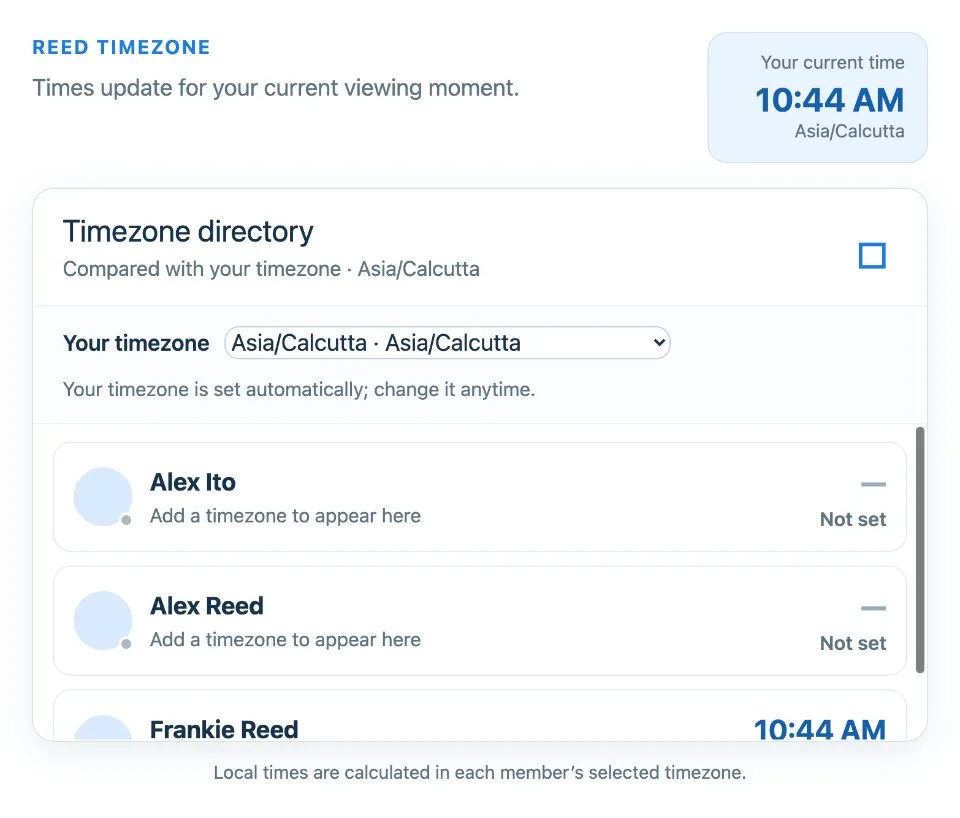
Use Team Timezone Directory together on your board.
Your own time zone is detected from your device, and you can choose from common zones such as Pacific Time, UK and Ireland, India, Singapore or Sydney.
It runs on a shared MockFlow board, so the whole team keeps one directory that everyone sees.
- Local time for each person. Every teammate's current time is shown side by side.
- Automatic detection. Your time zone is read from your device.
- Common zones. Choose from zones across the Americas, Europe, Africa, the Middle East, Asia and the Pacific.
- Shared directory. Everyone on the board sees the same list.
How to use Team Timezone Directory.
Add yourself
Your time zone is detected from your device, so joining the directory takes one step.
Check your zone
If the detected zone is wrong, pick the right one from the list.
Compare local times
See each teammate's current local time next to everyone else's.
Plan the call
Use the directory to pick a time that suits people in different zones.
Who uses Team Timezone Directory.
A distributed team planning a meeting
Check who is in working hours before sending an invite.
A manager with reports in several countries
Know when it is a good moment to message each person.
A new hire joining a remote team
Learn where teammates are and what time it is for them.
A support team handing over shifts
See which teammates are starting or ending their day.
Add Team Timezone Directory to your board.
Use on a board opens a new board with Team Timezone Directory already on it. To add it to a board you already have, follow these steps. Each copy keeps its own data, so a vote on one board never changes another.
Open your board
Open the MockFlow board you want to use it on.
Add it from the Artifact Library
Click Add anything (the plus button) in the toolbar at the bottom of the board, switch to Artifacts and pick Team Timezone Directory under General. Adding it does not use AI credits.
Use it together
Click Interact with Component (the hand button), or switch the board to Play mode. Everyone on the board uses the same app, and Reset shared data clears it for the next session.





 Brainstorm with MockFlow MCP


