



 Countdown Board
Countdown Board is a team birthday and anniversary tracker that counts down to the dates that matter to your people. Add a birthday, an anniversary, a work anniversary or a milestone for a board member and see which celebration is coming up next.
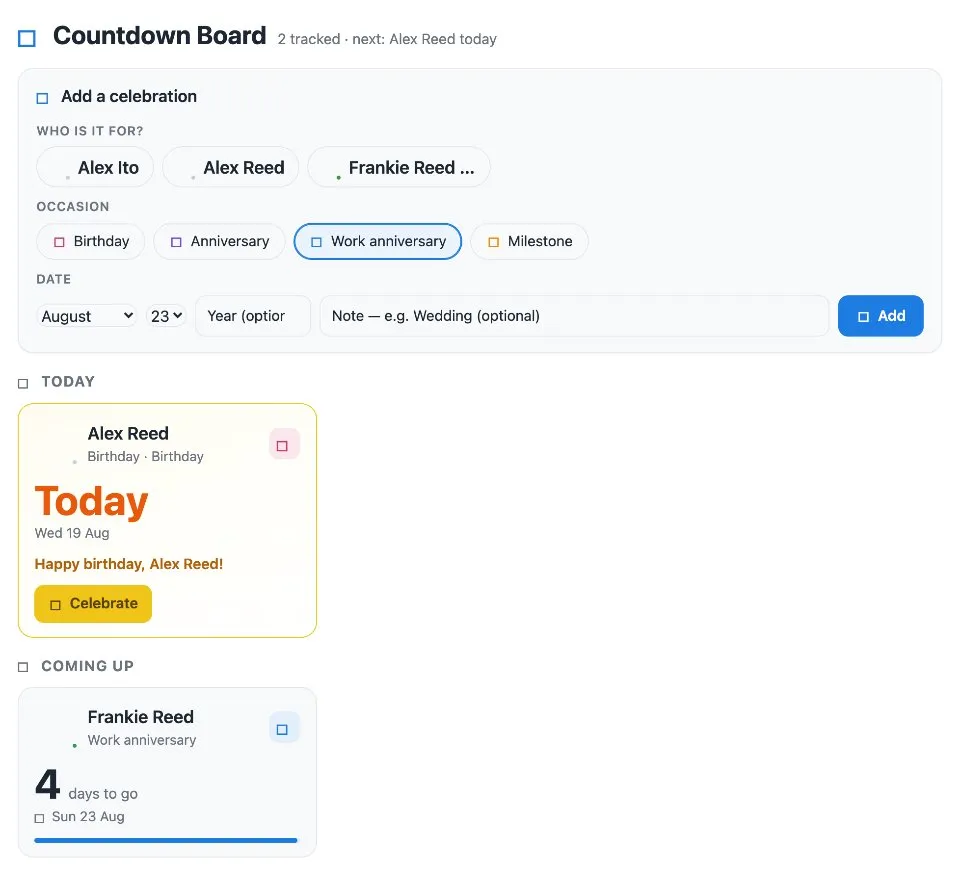
Use Countdown Board together on your board.
When the day arrives, the board greets the person by name, for example Happy birthday or Congrats on another great year, with a burst of confetti.
It runs on a shared MockFlow board, so the whole team sees the same upcoming dates and never misses a celebration.
- Four occasion types. Birthday, Anniversary, Work anniversary and Milestone, each with its own color and icon.
- Linked to people. Each date belongs to a board member, so greetings name the right person.
- Personal greetings. Each occasion has its own greeting, such as Happy birthday or Congrats on another great year.
- Confetti on the day. A celebration plays when a date arrives.
- Your own occasions. Update content with AI can change the occasion types and greetings without changing how the app works.
How to use Countdown Board.
Pick a person
Choose the board member the date belongs to.
Choose the occasion
Pick Birthday, Anniversary, Work anniversary or Milestone.
Set the date
Choose the month and day, and add the year and a label if you want them.
Watch the countdown
The board lists the coming dates so everyone can see who is next.
Celebrate on the day
On the day, the board shows a greeting with the person's name and a confetti celebration.
Who uses Countdown Board.
A team lead keeping track of birthdays
Put every teammate's birthday on one board so nobody is forgotten.
An HR or people team
Track work anniversaries and celebrate them where the team already works.
A project team marking milestones
Add launch dates and milestones and count down to them together.
A remote team across offices
Share one list of celebrations that everyone sees, wherever they work.
Add Countdown Board to your board.
Use on a board opens a new board with Countdown Board already on it. To add it to a board you already have, follow these steps. Each copy keeps its own data, so a vote on one board never changes another.
Open your board
Open the MockFlow board you want to use it on.
Add it from the Artifact Library
Click Add anything (the plus button) in the toolbar at the bottom of the board, switch to Artifacts and pick Countdown Board under Timers. Adding it does not use AI credits.
Use it together
Click Interact with Component (the hand button), or switch the board to Play mode. Everyone on the board uses the same app, and Reset shared data clears it for the next session.
Update content with AI changes the content without changing how the app works.





 Brainstorm with MockFlow MCP


