



 Speaker Turn
Speaker Turn is an online talking stick for meetings. Only the person holding the stick speaks, and everyone else listens, so standups, retros and check ins move through the whole team in order.
Use Speaker Turn together on your board.
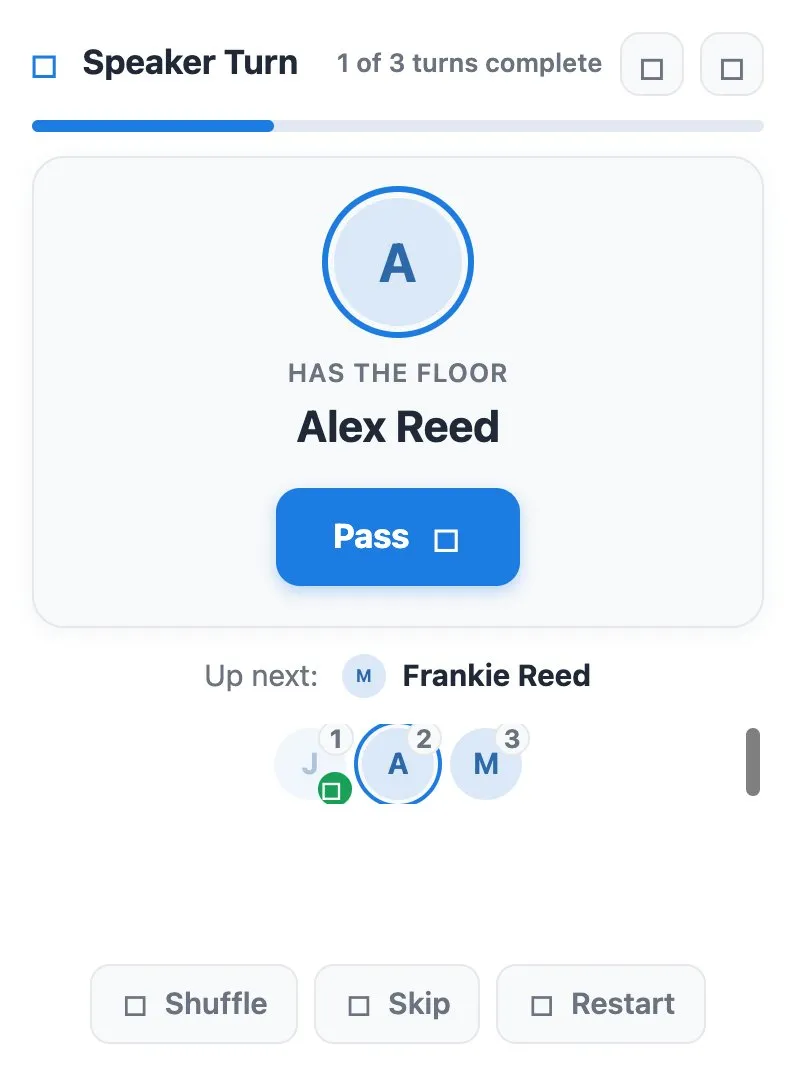
The person with the floor is shown large in the middle, with who is up next underneath and a progress bar that counts the turns completed in the round.
It runs on a shared MockFlow board, so everyone on the board sees the same speaker and the same order.
- Round robin order. Every board member gets a turn, in a numbered order everyone can see.
- Who has the floor. The current speaker is shown front and center, with who is up next.
- Round progress. A progress bar and a turn count show how much of the round is done.
- Skip without losing anyone. Skipped people stay in the round and get the stick back at the end.
- Shuffle and restart. Mix up the order or start a new round with one tap.
- Optional speaker timer. Turn on a countdown per speaker from Settings to keep turns short.
How to use Speaker Turn.
Everyone is in the circle
Everyone on the board joins the circle automatically, in round robin order.
Speak when you have the floor
The current speaker is shown under Has the floor, with who is up next below.
Pass the stick
When the speaker finishes, anyone taps Pass to hand the stick to the next person.
Skip someone for now
Skip moves on but keeps that person in the round, and the stick comes back to them at the end.
Shuffle or restart
Shuffle mixes the order, and Restart begins a fresh round.
Add a timer if you need one
In Settings, turn on the per speaker timer and choose the time per speaker to show a countdown near the current speaker.
Who uses Speaker Turn.
A team running a daily standup
Pass the stick so each person gives their update without talking over each other.
A facilitator leading a retro
Go round the team so everyone shares one highlight before the discussion opens.
A manager opening a check in
Give every person the floor in turn, and turn on the timer to keep it brief.
A remote meeting where some people stay quiet
A visible order gives everyone a clear moment to speak.
Add Speaker Turn to your board.
Use on a board opens a new board with Speaker Turn already on it. To add it to a board you already have, follow these steps. Each copy keeps its own data, so a vote on one board never changes another.
Open your board
Open the MockFlow board you want to use it on.
Add it from the Artifact Library
Click Add anything (the plus button) in the toolbar at the bottom of the board, switch to Artifacts and pick Speaker Turn under General. Adding it does not use AI credits.
Use it together
Click Interact with Component (the hand button), or switch the board to Play mode. Everyone on the board uses the same app, and Reset shared data clears it for the next session.






 Brainstorm with MockFlow MCP


