



 Risk-Style World Map
This is a Risk style world conquest strategy game for 2 to 4 players. Each turn you deploy new armies, attack neighbouring enemy territories with dice, then fortify your borders.
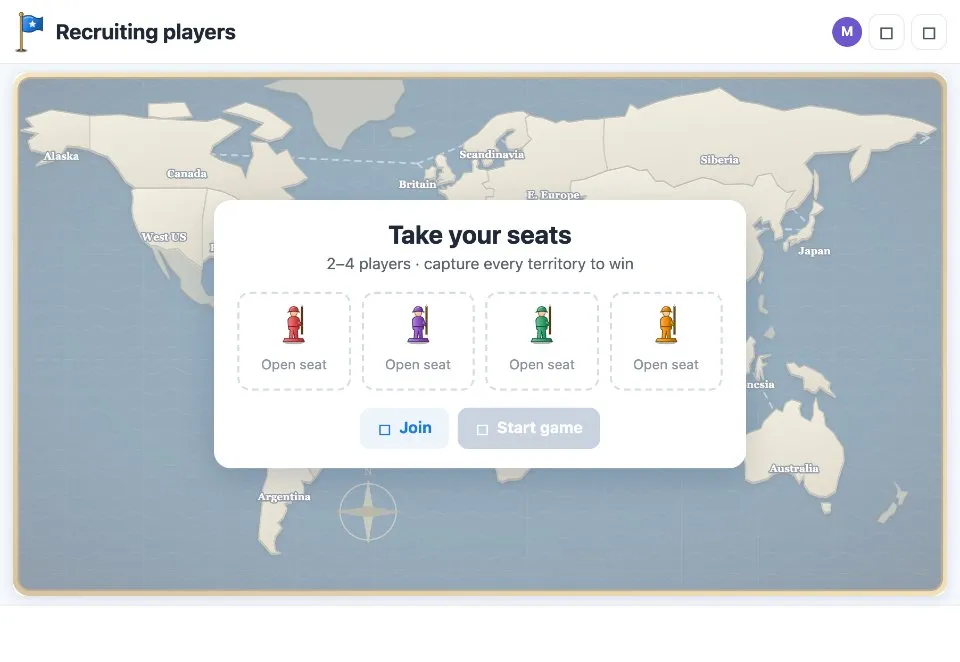
Play Risk-Style World Map online together.
Hold a whole continent to earn bonus armies. Lose all your territories and you are eliminated. The last player standing conquers the world.
It runs on a shared MockFlow board, so everyone on the board sees the same map, the same dice and the same turn as it happens.
- Deploy, attack, fortify. Every turn follows the classic three steps, with a hint at each step telling you what to tap.
- Dice battles. Attack and defence dice are rolled on screen for everyone, with ties going to the defender.
- Continent bonuses. Holding a whole continent earns extra armies each turn.
- Turns and rounds. The top bar shows whose turn and step it is and which round you are in.
- Game log. Every deployment, attack, capture and elimination is called out so everyone can follow the game.
- Rankings. Tap the player chips to see where every player stands.
- Keep the game moving. Skip current turn moves past a player who has stepped away, and New game starts over.
How to play Risk-Style World Map.
Take your seats
Join an open seat in the lobby. When 2 to 4 players have joined, press Start game and the first player is announced.
Deploy
At the start of your turn, tap your territories to place your new armies until none are left to place.
Attack
Pick one of your territories, then an enemy neighbour. Roll the dice, or retreat to pick another target. Press End attack when you are done.
Roll the battle
Red attack dice go against white defence dice, and the defender rolls to defend. Ties go to the defender. Win and the territory is captured.
Fortify
Pick a territory, then tap a connected one to move armies between them. Press End turn to pass to the next player.
Win the world
Players with no territories left are eliminated. The last player standing wins, and Play again starts a new game.
Who uses Risk-Style World Map.
A remote team on a Friday afternoon
Gather 2 to 4 players for a game of world conquest while others watch the map.
Strategy fans at work
Play a longer game over lunch breaks, picking up where you left off on the same board.
A team social or offsite
Run a quick tournament and play again with new seats.
A geography or history class
Talk through continents and borders while students compete for territory.
Add Risk-Style World Map to your board.
Use on a board opens a new board with Risk-Style World Map already on it. To add it to a board you already have, follow these steps. Each copy keeps its own data, so a vote on one board never changes another.
Open your board
Open the MockFlow board you want to use it on.
Add it from the Artifact Library
Click Add anything (the plus button) in the toolbar at the bottom of the board, switch to Artifacts and pick Risk-Style World Map under Games. Adding it does not use AI credits.
Use it together
Click Interact with Component (the hand button), or switch the board to Play mode. Everyone on the board uses the same app, and Reset shared data clears it for the next session.




 Brainstorm with MockFlow MCP


