



 Startup Simulator
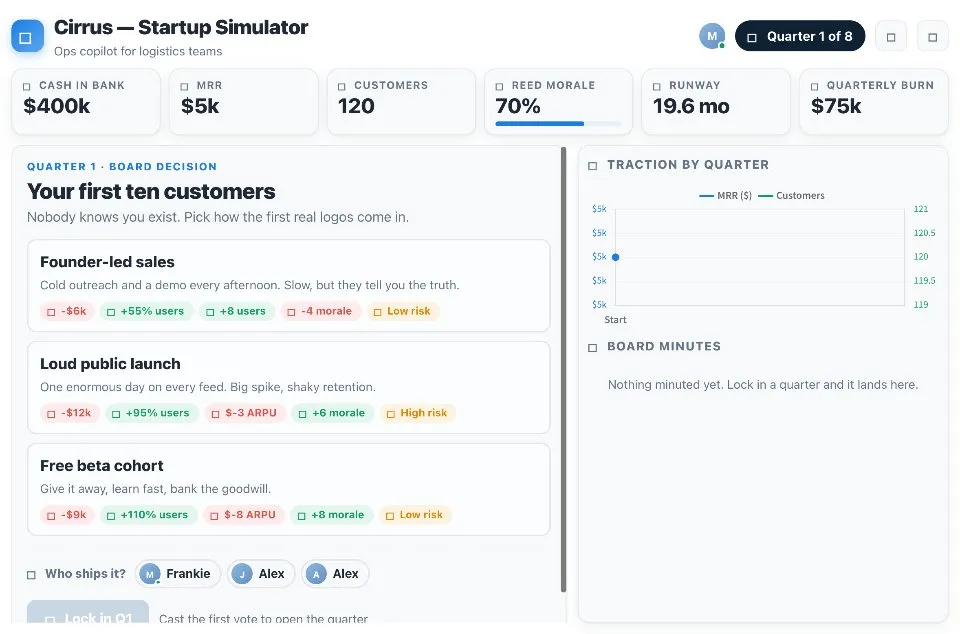
Startup Simulator is a business strategy game where your team runs a young company together. Each quarter brings a decision on things like your first customers, pricing, your first hire and fundraising, and every choice moves your cash, growth, ARPU, morale and burn.
Play Startup Simulator online together.
Everyone takes a seat as a co-founder with a role at the cap table. The founders vote on the quarter's decision, one of you ships it, and the market does the rest. A risky bet can set off a market event.
It runs on a shared MockFlow board, so the whole team plays the same company at once and sees every quarter play out together.
- Real startup decisions. Quarters cover choices founders actually face, from founder led sales or a public launch to raising a seed round or staying bootstrapped.
- Clear trade offs. Every option shows its effect on cash, growth, ARPU, morale and burn, plus its risk, before anyone votes.
- Team voting. Each co-founder votes, and one founder ships the winning choice.
- Market events. Risky options can set off an event that changes the quarter's outcome.
- Traction by quarter. A chart tracks how the company grows from one quarter to the next.
- Board minutes. A running log records what the team decided and what happened.
How to play Startup Simulator.
Take a seat
Anyone on the board joins as a co-founder and picks a role at the cap table, such as CEO, CTO, CFO or Head of Growth.
Read the quarter
Each quarter sets out a situation and a few options. The tags on each option show what it does to cash, growth, ARPU, morale and burn, and how risky it is.
Vote
Every founder votes for one option.
Pick who ships it
Choose the founder who ships the decision, then lock the quarter in.
See what happens
The winning option applies, churn and revenue run, and a risky bet can trigger a market event.
Keep the company alive
Play through the quarters and watch traction grow, or see the company run out of cash.
Who uses Startup Simulator.
A founding team before a planning session
Warm up by debating trade offs on a company that is not your own.
A teacher running a business class
Let students see how pricing, hiring and fundraising choices change runway and growth.
A remote team at a social
Play co-founders for an hour and argue over every quarter's call.
A manager training new leads
Show how one decision ripples through cash, morale and growth.
Add Startup Simulator to your board.
Use on a board opens a new board with Startup Simulator already on it. To add it to a board you already have, follow these steps. Each copy keeps its own data, so a vote on one board never changes another.
Open your board
Open the MockFlow board you want to use it on.
Add it from the Artifact Library
Click Add anything (the plus button) in the toolbar at the bottom of the board, switch to Artifacts and pick Startup Simulator under Games. Adding it does not use AI credits.
Use it together
Click Interact with Component (the hand button), or switch the board to Play mode. Everyone on the board uses the same app, and Reset shared data clears it for the next session.
Update content with AI changes the content without changing how the app works.












 Brainstorm with MockFlow MCP


