 Chess
Chess
Chess Online is a full rules chess game on a classic wooden board. Two people take the White and Black seats, and everyone else watches the same board live.
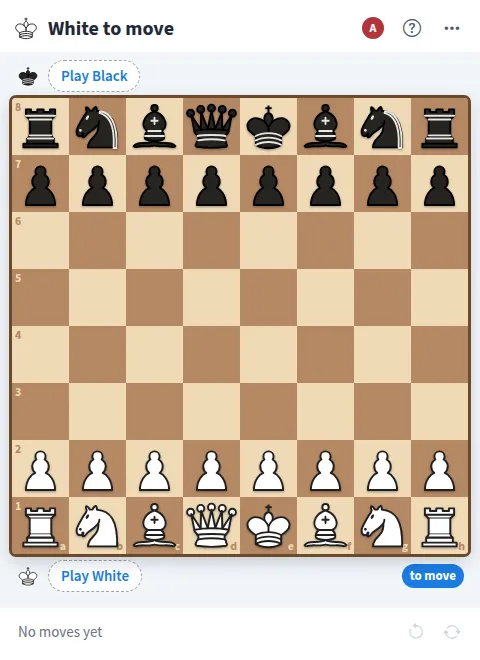
Play Chess online together.
Tap a piece to see its legal moves, then tap a square to move. Castling, en passant and promotion all work, check and checkmate are called out, and you can add a chess clock for timed games.
It runs on a shared MockFlow board, right next to your work. Everyone on the board sees every move as it happens.
- Full chess rules. Legal moves only, with castling, en passant, promotion, check, checkmate and stalemate.
- Legal moves marked. Tap a piece and its legal squares light up, so new players learn as they go.
- Chess clock. Optional timed games from blitz to 30 minutes, some with an increment, and the same times on every screen.
- Move history. Every move is listed in standard notation as the game goes on.
- Watch live. Anyone on the board who is not playing watches the game move by move, and the people list shows who plays and who watches.
- Flip board. Black sees the board from their side automatically, and anyone can flip the view from the menu.
- Seats you control. Leave my seat or Free both seats hands the game to the next pair of players.
How to play Chess.
Take a seat
Press Play White or Play Black. The other seat stays open until another member takes it, and everyone else watches.
Pick a clock if you want one
Before the first move, open the more actions menu and choose a chess clock: 3 min + 2 s, 5 min, 10 min, 15 min + 10 s or 30 min. White's first move starts it.
Make your move
White moves first. Tap one of your pieces to mark its legal squares, then tap where it should go.
Use the special moves
Move the king two squares to castle, take en passant when it is allowed, and pick a piece when a pawn reaches the last rank.
Win the game
Checkmate the other king, or win on time when the other player's clock runs out. A stalemate ends in a draw.
Undo or restart
Undo move takes back the last move. Restart game sets up a new game with the same seats and the same clock.
Who uses Chess.
Two teammates on a coffee break
Start a quick timed game on the board between meetings.
A remote team running a chess ladder
Pair people up for games while the rest of the team watches live.
A teacher showing chess to a class
Play out openings and tactics while students follow every move and see the legal squares.
Friends who want to play online
Open a board, take White and Black, and play a full game together.
Add Chess to your board.
Use on a board opens a new board with Chess already on it. To add it to a board you already have, follow these steps. Each copy keeps its own data, so a vote on one board never changes another.
Open your board
Open the MockFlow board you want to use it on.
Add it from the Artifact Library
Click Add anything (the plus button) in the toolbar at the bottom of the board, switch to Artifacts and pick Chess under Games. Adding it does not use AI credits.
Use it together
Click Interact with Component (the hand button), or switch the board to Play mode. Everyone on the board uses the same app, and Reset shared data clears it for the next session.











 Brainstorm with MockFlow MCP



