 Othello
Othello online brings the classic two player strategy game to a shared 8x8 board. Place a disc to bracket your opponent's discs in a straight line, flip them to your color, and finish with the most discs showing.
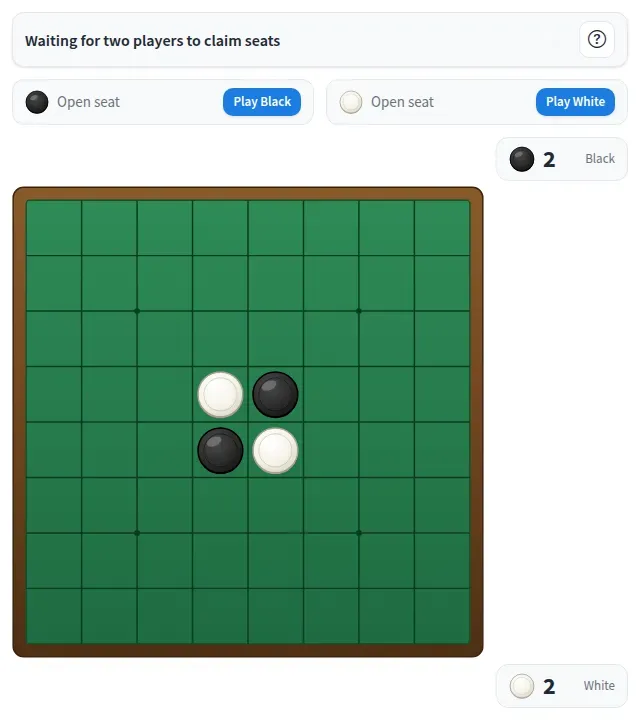
Play Othello online together.
Two people claim the Black and White seats while everyone else on the board watches the game live. The app enforces the rules for you: legal moves, turns, passes, scores and the winner.
It runs on a shared MockFlow board, so a quick game can sit right next to the work, and every move appears on every screen at once.
- Rules built in. Legal moves, flips, turn order, passes and the final result are all handled for you, so nobody needs to know the rules by heart.
- Legal moves marked. Dots show where you can play, and the status bar counts your legal moves.
- Live score. Black and White disc counts update after every move.
- Spectators welcome. Everyone on the board sees the game as it happens and can take a seat after a reset.
- Assign players. Seat a board member as Black or White straight from the board members list.
- Help on hand. The help button explains how to play with a short example, ideal for first timers.
How to play Othello.
Take a seat
Press Take Black or Take White. The game starts once both seats are filled, and Black moves first.
Place a disc
On your turn, tap a square marked with a dot. A legal move brackets one or more opposing discs between your new disc and one of yours.
Flip the line
Every bracketed disc in a horizontal, vertical or diagonal line flips to your color. The last move stays highlighted for everyone.
Pass when stuck
If you have no legal move, press Pass and your opponent plays on.
Win the board
The game ends when neither player can move. The color with more discs wins, or it is a draw when the count is even.
Play again
Press Play again for a rematch, or Reset game to clear the board and both seats for new players.
Who uses Othello.
A remote team on a coffee break
Two teammates play a quick game while the others watch and cheer.
A team building session
Run a friendly Othello ladder, resetting the board for each new pair.
A teacher in a strategy lesson
Show students how corners and edges change the game on a board everyone can see.
Friends catching up online
Open a board, claim your colors and play a classic game together from anywhere.
Add Othello to your board.
Use on a board opens a new board with Othello already on it. To add it to a board you already have, follow these steps. Each copy keeps its own data, so a vote on one board never changes another.
Open your board
Open the MockFlow board you want to use it on.
Add it from the Artifact Library
Click Add anything (the plus button) in the toolbar at the bottom of the board, switch to Artifacts and pick Othello under Games. Adding it does not use AI credits.
Use it together
Click Interact with Component (the hand button), or switch the board to Play mode. Everyone on the board uses the same app, and Reset shared data clears it for the next session.










 Brainstorm with MockFlow MCP



