



 Timezone Overlap Finder
Timezone Overlap Finder is a time zone overlap tool that lays your team's locations side by side on one hourly grid. Each row shows when that place is inside a 9 to 17 local working day.
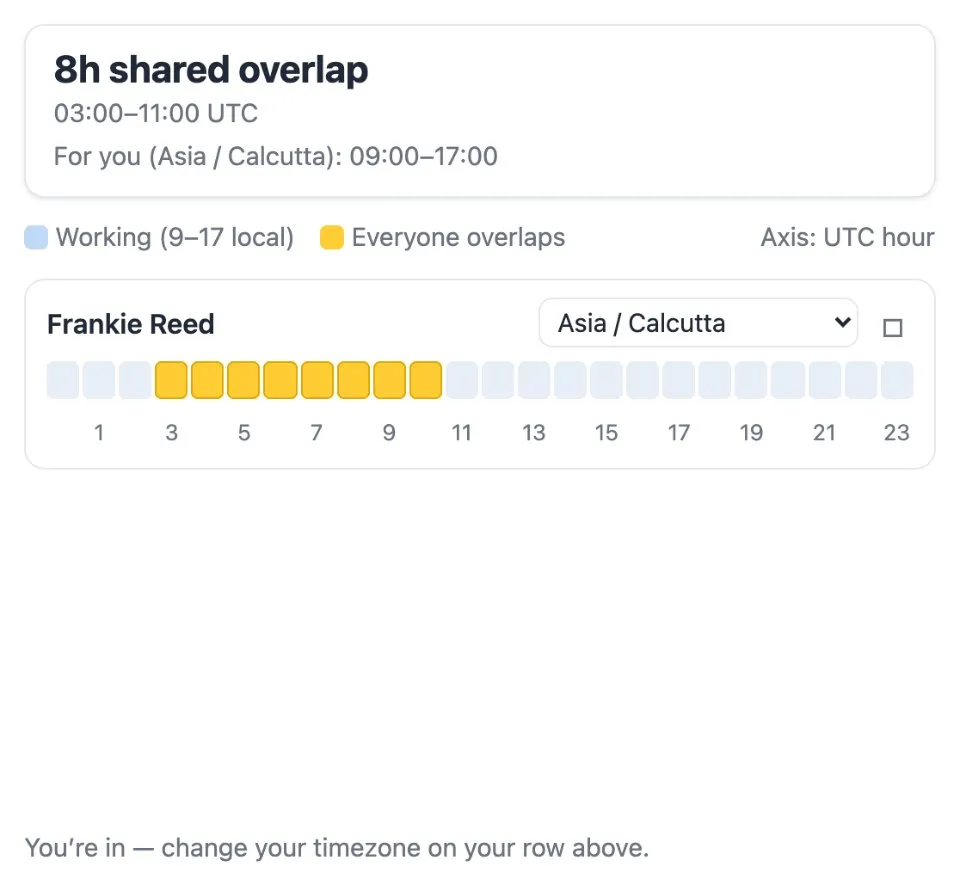
Use Timezone Overlap Finder together on your board.
Hours where every location is working at once are highlighted, so the best window for a meeting stands out without any mental math.
It runs on a shared MockFlow board, next to the plans you are scheduling. Everyone on the board sees the same grid at the same time.
- Hourly grid. One row per location and one column per hour, so the whole day fits in a single view.
- Working hours shaded. Each row marks when that location is inside a 9 to 17 local work day.
- Overlap highlighted. Hours when everyone is working at once stand out in their own color.
- Major time zones built in. Pick from time zones across Asia Pacific, Europe and the Americas, including Sydney, Kolkata, Dubai, Berlin, Sao Paulo, Chicago and Los Angeles.
- Shared with the team. Everyone on the board looks at the same grid, so the whole team agrees on the window.
How to use Timezone Overlap Finder.
Add your locations
Use the bar at the bottom to pick the time zones your team works in, from Auckland and Tokyo to London, New York and Honolulu.
Read the rows
Each location gets a row of hourly cells. Shaded cells are that place's working hours, 9 to 17 local time.
Find the overlap
Columns where everyone is working are highlighted, and the summary at the top sums up the shared window.
Compare on one axis
The columns follow UTC hours, so every row lines up against the same moment in time.
Who uses Timezone Overlap Finder.
A distributed team booking a weekly sync
Add each teammate's city and pick a slot inside the highlighted overlap.
A manager working with remote contractors
Check which hours both sides are online before promising a call.
A support team planning handovers
See where one region's day ends and the next one starts.
A project lead planning a global kickoff
Find the one window when every office is at work.
Add Timezone Overlap Finder to your board.
Use on a board opens a new board with Timezone Overlap Finder already on it. To add it to a board you already have, follow these steps. Each copy keeps its own data, so a vote on one board never changes another.
Open your board
Open the MockFlow board you want to use it on.
Add it from the Artifact Library
Click Add anything (the plus button) in the toolbar at the bottom of the board, switch to Artifacts and pick Timezone Overlap Finder under Timers. Adding it does not use AI credits.
Use it together
Click Interact with Component (the hand button), or switch the board to Play mode. Everyone on the board uses the same app, and Reset shared data clears it for the next session.






 Brainstorm with MockFlow MCP


