 Sudoku
Sudoku is the classic number puzzle: fill every row, column and 3×3 box with the digits 1 to 9, each one once. This online Sudoku puts one board in front of the whole team, and everyone solves the same puzzle together.
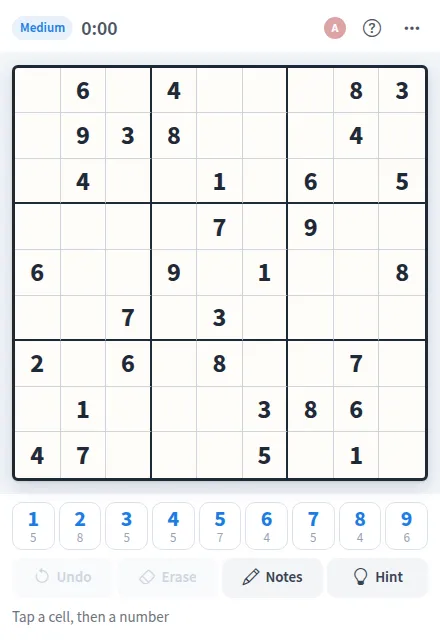
Play Sudoku online together.
Every puzzle is freshly made in easy, medium or hard, with exactly one solution. Pencil in notes, see clashing digits turn red, take a hint when you are stuck, and watch the shared clock until the grid is solved.
It runs on a shared MockFlow board, right next to the work. Each placed digit and note shows up for everyone at once, along with where your teammates are looking.
- Fresh puzzles in three levels. Easy prints about 40 givens, medium 32 and hard 25, and each puzzle has a single solution.
- Solve together. The board is shared, so every digit and note anyone places appears for the whole team, and teammates' selected cells show in their own colour.
- Notes. Pencil in candidates while you work out a cell, then write the digit over them.
- Clash highlighting. Repeated digits turn red right away, so mistakes are easy to spot.
- Hints and reveal. Fill one cell when you are stuck, or reveal the full solution to end the puzzle.
- Shared clock. One timer runs for the whole team and shows the finishing time when the grid is solved.
- Who is solving. The member list shows everyone on the board and how many cells each person has filled.
- Undo. Take back the last change, whoever made it.
How to play Sudoku.
Pick a cell
Tap an empty cell. The printed digits are part of the puzzle and cannot be changed.
Place a number
Tap a number on the pad to write it in. The keyboard works too: 1 to 9, the arrow keys and Backspace.
Pencil in candidates
Turn on Notes, or press N, to mark the digits a cell could hold. Writing a digit clears the notes in that cell.
Fix clashes
When a digit repeats in a row, column or box, both cells turn red and the footer says Some digits clash. Erase or Undo to fix it.
Get unstuck
Hint fills one cell with the right digit. Reveal solution in the more actions menu shows the whole answer and ends the puzzle.
Finish the grid
When every cell is right, the board shows the time it took and who solved it.
Play again
Choose New puzzle, or pick New easy, New medium or New hard puzzle from the more actions menu.
Who uses Sudoku.
A remote team on a coffee break
Open a medium puzzle and solve it together while you chat.
A team warming up before a meeting
Solve an easy grid in a few minutes to get everyone talking.
Puzzle fans at work
Race the shared clock on a hard puzzle and see who filled the most cells.
A teacher building logic skills
Work through a puzzle with the class, using notes to show how to rule out digits.
Add Sudoku to your board.
Use on a board opens a new board with Sudoku already on it. To add it to a board you already have, follow these steps. Each copy keeps its own data, so a vote on one board never changes another.
Open your board
Open the MockFlow board you want to use it on.
Add it from the Artifact Library
Click Add anything (the plus button) in the toolbar at the bottom of the board, switch to Artifacts and pick Sudoku under Games. Adding it does not use AI credits.
Use it together
Click Interact with Component (the hand button), or switch the board to Play mode. Everyone on the board uses the same app, and Reset shared data clears it for the next session.









 Brainstorm with MockFlow MCP



